This function can take a snapshot of the data generated during the mapping until then. Snapshots can only be taken in a mapping test. Calling the function during an actual job has no effect.
Parameter b is for an optional description that is shown in the test. For details, see the example below.
The return value after successful execution is true.
Important note: Snapshots are only available in the main memory. A thoughtless use could therefore lead to memory problems!
Parameters
Parameter | Description |
|---|---|
a | (optional) If true, a snapshot will be created. Default: false. |
b | (optional) Description text that is displayed for the snapshot. See example below. |
Example
Let's assume the following simplified target structure.
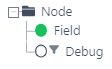
We go through node Node three times in our example. And on field Debug, we execute the following simple function chain.
iteration-level

concat( a, b, [CR-support c] )
a 	Value: 	This is pallet
b 	Result: 	1
c   Value:

create snapshot(a,b)
a 	Value: 	true
b   Result: 	2
If we carry out a mapping test, we get the usual result, as with a 'normal' mapping test.
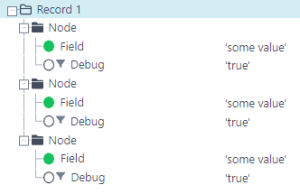
Now switch to tab (1) Snapshot.
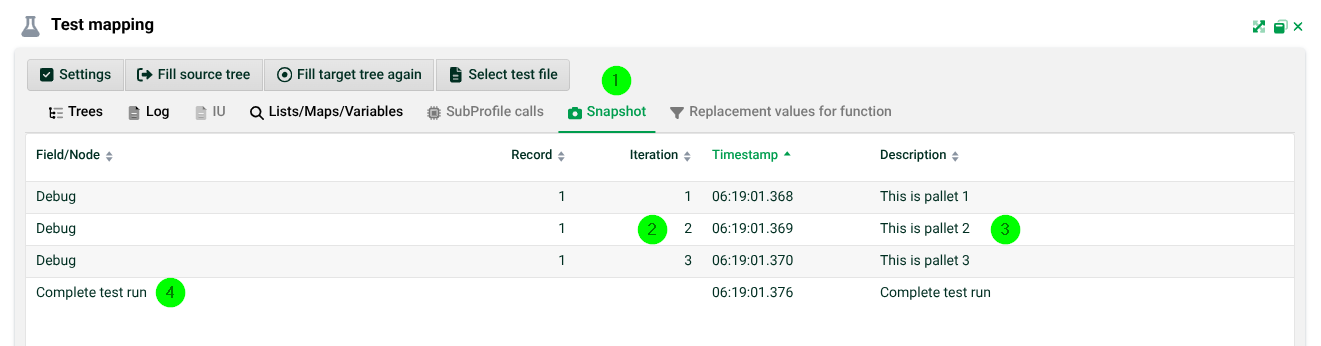
(2) Iteration: For each time the function has been called, you will get an entry here. By double-clicking or via the context menu, you can display the data status of the respective snapshot. See the following screenshots. Note: The state of the data in tabs Lists/Maps/Variables and SubProfile calls corresponds to the respective iteration. But the tab Log always contains the final result of the run.
(3) Description: The description from parameter b.
(4) Complete test run: This is the complete result again, after the entire test run.
The data status after iteration 1 (of 3):

The data status after iteration 2 (of 3):
