The function $intToHex converts a 32-bit integer into hexadecimal format.
Tooltip
Syntax: $intToHex(number,digits)
Parameter
Description
numberA 32-bit integer passed as numeric type or text
e.g. 1234 or "12345".
digitsThe minimum number of hexadecimal digits (min 1, max 8).
Returns the passed 32-bit integer in hexadecimal notation with the specified number of hexadecimal digits.
Example: $intToHex(255,2) – returns ff
Syntax
$intToHex(number,digits)
Parameters
Name | Description |
|---|---|
number | A 32 bit integer given as either numeric type or text e.g. 1234 or "12345". |
digits | The minimum number of hexadecimal digits (min 1, max 8). |
Return value
The given 32 bit integer value in hexadecimal format with the given number of digits.
Examples
Input | Output |
|---|---|
number = 255 digits = 2 | "ff" |
number = 255 digits = 6 | "0000ff" |
NOTE In Lobster Data Platform/Orchestration, colors are often stored as 16 bit integers. However, sometimes the color should be used directly in a HTML formatted text or cell content. To achieve this, simply prefix the returned value with a "#" character, so that it can be interpreted as a CSS (cascading style sheet) color value.
Practical example
The color of arbitrary source needs to be rendered in a form. To simulate the color source, it will simply be red from a text field. The following image shows the configuration of the form (as portal).
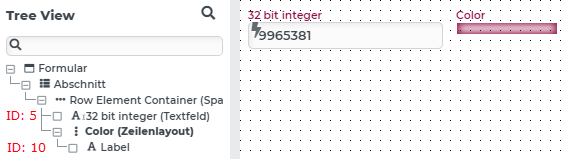
The 32-bit integer text field with element id "5" simulates the source of the color, which is to be visualized, as integer.
A configured behavior named "renderColor" which is triggered on "Changed" is to write HTML code into the color label (element id "10"), which will therefore render the color.
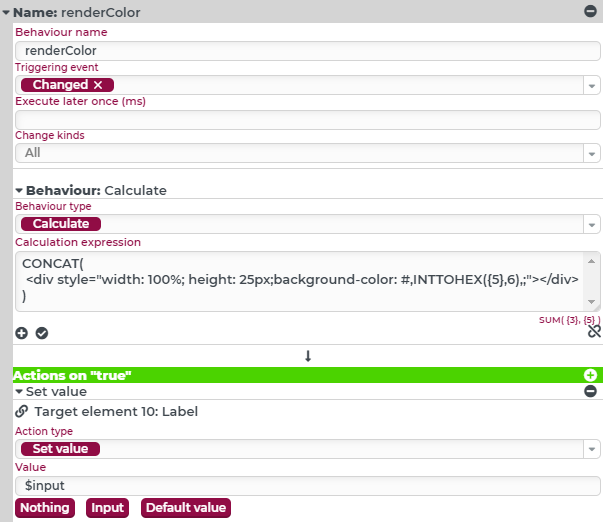
If the form is now loaded and displayed, the label will render the color which is coded into the text field.

NOTE An appropriate contrast color can be calculated as well, which makes writing into such a label field possible, using the calculation function contrastColor (Calculate contrast color).