Running workflow jobs are displayed here.
Settings
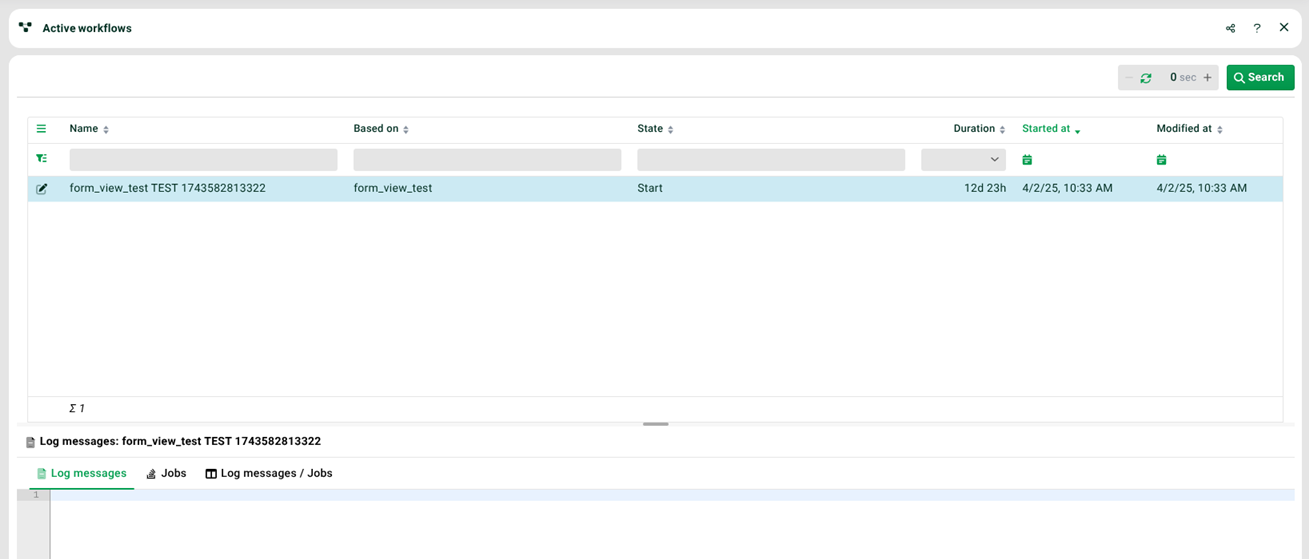
(1) Log messages: This tab shows the log messages (so far) for the selected workflow job. The tab to the right shows the jobs started by this workflow.
(2) Selected workflow job: The following options are available via the context menu of a selected workflow job.
Entry | Description |
|---|---|
Fill form | Opens the form of the current state of the workflow job. |
Find and execute next transition automatically | This option is available if the state has no form. |
Cancel & delete | Cancels the selected workflow job. A log is still available afterwards. |
Cancel & delete all workflows based on same definition | Cancels all workflow jobs that have the same workflow definition as the selected workflow job. A log is still available afterwards. |
Cancel & delete all workflows | Cancels all workflow jobs displayed here. A log is still available afterwards. |
Edit entry | Allows editing the workflow definition of the selected workflow job. |
View entry | Allows viewing the workflow definition of the selected workflow job. |
Current information | Displays the current values of all existing workflow variables, the files assigned to the workflow job and the diagram of the workflow definition. |
(3) Name: The name of the workflow job (also called "display name") is shown in this column.