Projection – Abstract
Purpose: Enables simple calculations for individual property values and aggregations for lists of property values, which can optionally be formed by grouping as subsets from a basic set defined by the search.
Tooltip
Usage: The selection for the Type of Aggregate determines whether a single value or a list of values determined by grouping is expected. The Projection defines the origin of the individual value or the values to be aggregated.
Parameter:
The Name optionally defines the title of an output column (if relevant). By default, the internal name for the Type is linked to the applicable name for the Projection via the static text "of".
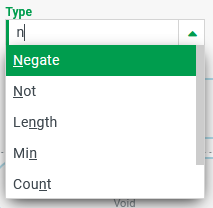
A selection must be made from the following options for the Type:
Aggregation functions for any data types: Count, Count (distinct), Min, Max, Least
Aggregation functions for numerical data types: Sum, Average
Calculation functions for numerical values: Absolute, Negate, Square root
Calculation functions for Boolean values: Not
Calculation functions for text: Length, Lower case (letters), Upper case (letters), Trim
The Projection determines the source from which the individual value or the values to be aggregated are obtained
Note: Aggregation functions ignore
$nullvalues from the Projection. Calculation functions return$nullas the result, for$nullas the value of the Projection.
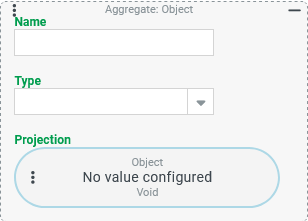
The Aggregate projection type enables various simple calculations (for individual property values) and aggregations for lists of property values, which can optionally be formed by grouping as subsets from a basic set defined by the search.
The following table divides the options for the Type of calculation/aggregation into categories and specifies for each Type which data type is supported per Projection.
Only the types summarized here as aggregation functions can process several return values from the Projection and, if necessary, take into account subsets from a grouping in the context of the search.
The other calculation functions enable simple calculations or "conversions" of individual values of a specific data type from the Projection.
Type | Function name | Data type for the projection | Description |
|---|---|---|---|
Aggregation functions | |||
Count |
| any | Number of individual values to be aggregated that are not "no value" ( |
Count (distinct) |
| Number of different individual values that are not "no value" ( | |
Min |
| Minimum value (according to the sorting logic of the database used for the data type). | |
Max |
| Maximum value (according to the sorting logic of the database used for the data type). | |
Least |
| Minimum value (according to the sorting logic of the database used for the data type). | |
Sum |
| numerical | Sum of the individual values to be aggregated. |
Average |
| Arithmetic mean of the individual values to be aggregated that are not "no value" ( | |
Arithmetic (for single numerical value) | |||
Absolute |
| numerical | Returns the absolute value of a numerical value ("removes" a negative sign, if present). |
Negate |
| Changes the sign of a numerical value ( | |
Square root |
| Square root of a numerical value. | |
Logic (for single Boolean value) | |||
Not |
|
| Reverses a truth value ( |
Text processing (for single text value) | |||
Length |
|
| Length of a character string ( |
Lower |
| Returns a character string in lower case letters. | |
Upper |
| Returns a character string in capital letters. | |
Trim |
| "Trims" (=removes) marginal space characters from a character string. | |
Configuration
Parameter | Type | Description |
|---|---|---|
Name |
| The optional Name parameter can be used to assign an (alias) name to the projection.
|
Type |
| The Type determines the type of aggregation, calculation and conversion to be performed on the basis of the Projection.
NOTE The breakdown of the above table by category ("Aggregation functions", "Arithmetic", ...) is not reflected in the dropdown. |
Projection |
| In principle, any Projections can be configured for the Projection parameter as long as they return a data type permitted for the Type and the database system used supports their use in the given context.
|
Examples of the conversion of individual values
Arithmetic – Absolute (ABS): Absolute value of a numerical field as a restriction projection
The default property "Last modifier ID" (lastModifierId) for entities usually contains a positive Long value that corresponds to the "ID" (id) of a user account (see Users).
However, if the last change to an entity was made in the context of a guest user account (see Guest users), its "ID" (id) is entered as a negative value in the lastModifierId property to ensure differentiation from users with the same ID.
In the data grid of an overview, the "Last modifier ID" column appears empty by default if this property references a guest user account, because looking up the user name (see Subsearch projection), which is implemented as a column projection by default, is "unproductive" for negative references.
Regardless of the display, the filter function for this column should be adapted so that the filter criteria for the positive Long value of an account ID can be entered, regardless of whether it is a Users or Guest users.
Configuration:
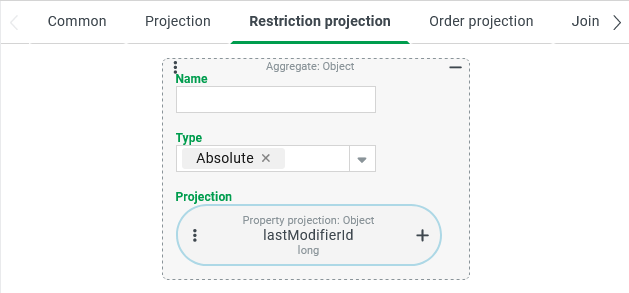
The settings for the "Last modifier ID" column (lastModifierId) must be displayed in the data grid settings for the relevant overview.
For this column, there is no configuration for a projection in the tab for defining the Restriction projection by default. This means that by default the Projection is also a Restriction projection.
If you configure a Restriction projection as shown on the right, it overrides the default behavior as follows:
Instead of the text value tailored to Users (scheme: {id} - {username}), an Aggregate with the Type "Absolute" (
ABS) is used as a compare value for the filter, which is used here to remove any minus sign (for Guest users) from theLongvalue read from the Property projection for thelastModifierIdproperty.The positive ID values for Users return the Aggregate with the Type "Absolute" (
ABS) unchanged.The characteristic of the filter adapts to the numerical data type.
NOTE Of course, it is not ideal that this Restriction projection cannot distinguish between a user account and a guest user account with the same ID. However, if overlaps between the IDs used are relevant in practice, it is still possible to adapt the Projection so that Users and Guest users can still be clearly distinguished from each other.
Runtime example:
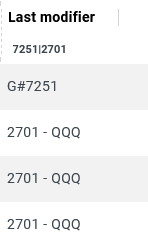
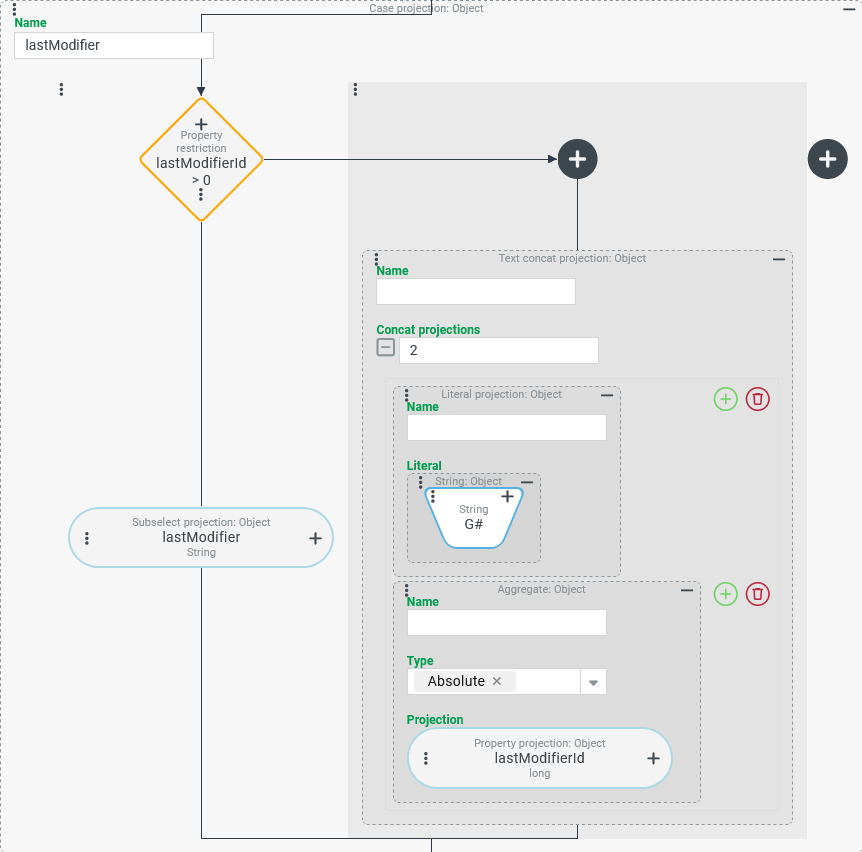
| The screenshot on the left shows an excerpt from the "Last modifier" column, for which not only the Restriction projection (as above) has been adjusted, but also the Projection, so that for Guest users the (positive) ID of the account appears with the prefix "G#". As the filter expression ( NOTE The Projection uses a Case projection (see screenshot below), which compiles the display text for references to the Guest users in the right branch of the case differentiation using a simple Concatenated projection. Again, an Aggregate with the Type "Absolute" ( |
| |
Arithmetic – Negation (NEG): Negating numerical values (sign reversal)
The line items of a user-defined entity type "Account" (see Custom type definitions) are used to record incoming and outgoing payments, which are always maintained as positive numerical values in a "payment value" property (payment.value), regardless of their type. An associated text property "payment type" (paymentType) is used to further classify the transaction.
By convention, payouts should be identified by key values for the "payment type" (paymentType) that begin with the letter "R".
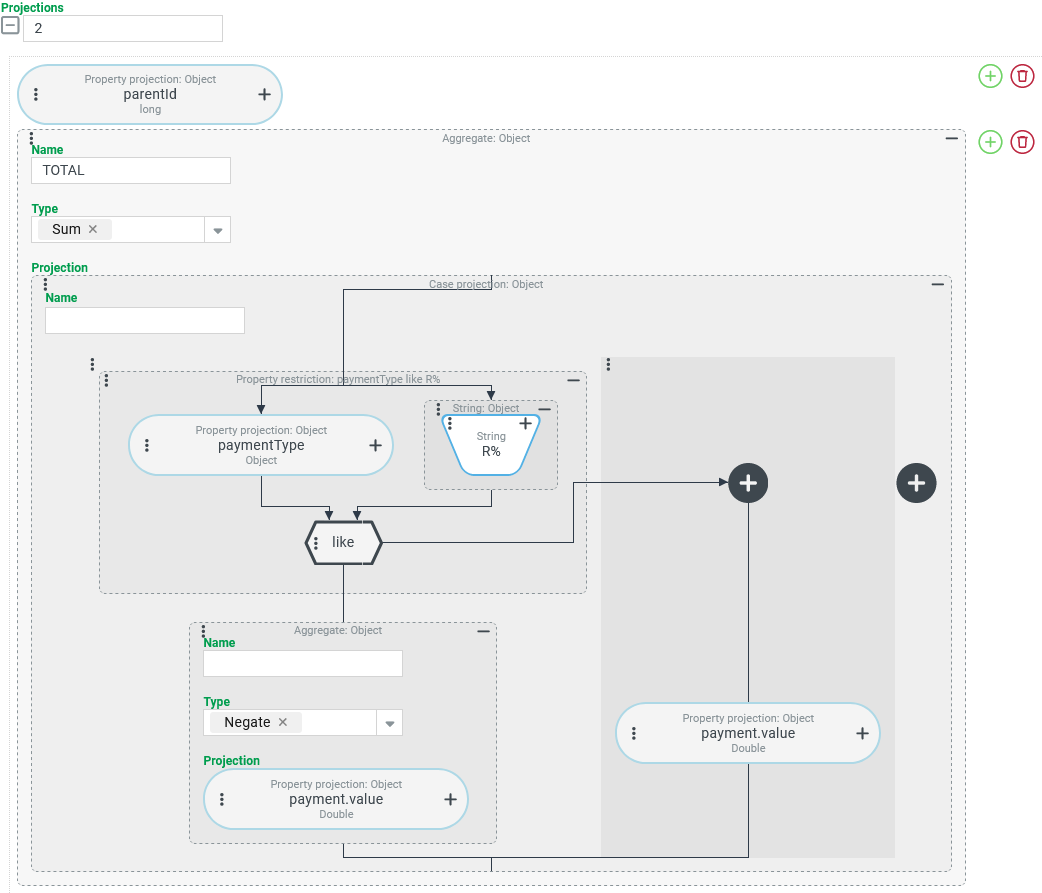
Using a tuple search that directly addresses the item level (AccountLineItem), the balances for each "account" instance are to be calculated in such a way that the total of all payments out is deducted from the total of all payments in.
Configuration:
The tuple search uses the two Projections shown on the right:
NOTE The example uses the |
|
Arithmetic – Square root (SQRT): Square root
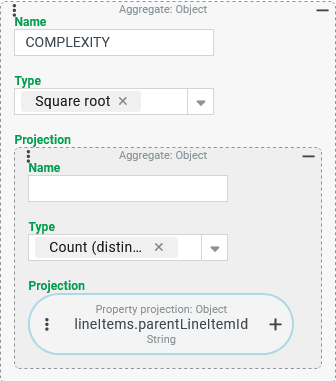
A tuple search for Shipments should provide an indication of the complexity of a shipment in a COMPLEXITY column, the square root of the number of different values for the "parent line item", in addition to other key figures.
Configuration:
The Projection shown on the right, in conjunction with a Group by of the search by the "ID" (
|
|
Runtime example: | The example data on the left shows the calculated The square root is used here because doubling the number of "parent line items" in the hierarchy should not mean twice the complexity. However, quadrupling does. |
Logic – Not (NOT): Logical negation
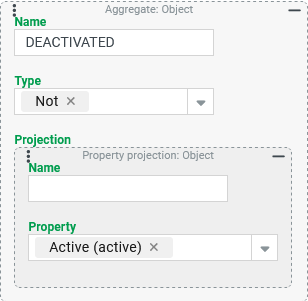
In a tuple search for Users, the Boolean property "Active" should be logically reversed so that with the column labeling such as DEACTIVATED, the value $true appears for the Users for which the "Active" property contains the value $false and vice versa.
Configuration:
The Aggregate shown on the right defines the output column
|
|
NOTE
The "Active" property for users is "not nullable" by definition, so the return value of the Aggregate will be
$trueor$falsein all cases.If the return value of the Projection can also be
$nullin addition to$trueand$false, the Aggregate with the Type "Not" (NOT) returns the return value$nullif the original value is$null.
String processing – Length (LENGTH): Text length as filter condition
In the address property "Account number" (address.accNumber) for Companies/Clients, a nine-digit character string is expected by convention.
A search should return a list of all Companies/Clients for which this convention for the address property "Account number" is not fulfilled.
Configuration:
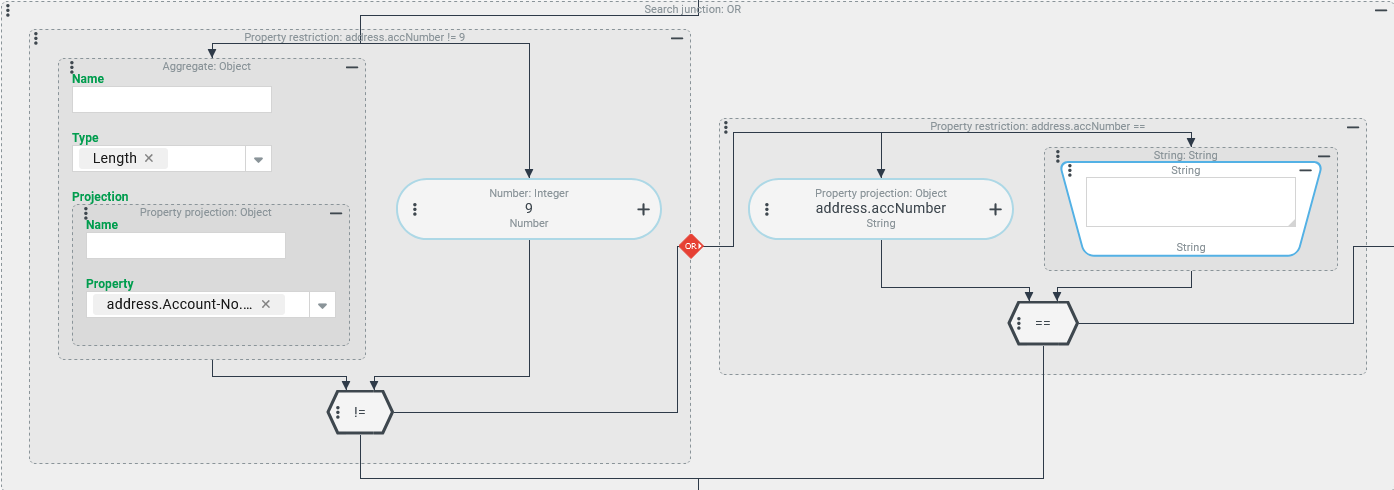
Within an OR conjunction, two instances of the Field restriction must be used to identify Companies/Clients for which the address property "Account number" (address.accNumber) is either unassigned or not filled in at all:
The left Field restriction evaluates the text property "Account number" as a check value using Aggregate with the Type "Length" to check whether the length of an existing character string deviates from the default value
9(!=).The right Field restriction is required to cover the case that there is no information at all for the "Account number".
IMPORTANT The right Field restriction formally checks whether the "Account number" contains an empty string (""). This condition is actually implemented in the database in such a way that it checks whether there is an empty string or "no value" ($null).
The Aggregate with the Type "Length" only returns the value 0 in the special case that the address property "Account number" actually contains an empty string ("") and not "no value" (
$null).
String processing – Upper (UPPER): Grouping users according to the first letter in the username
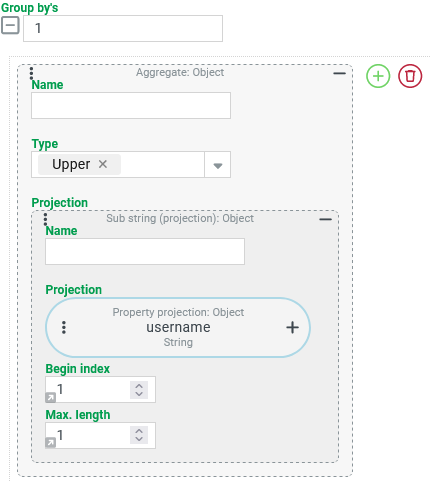
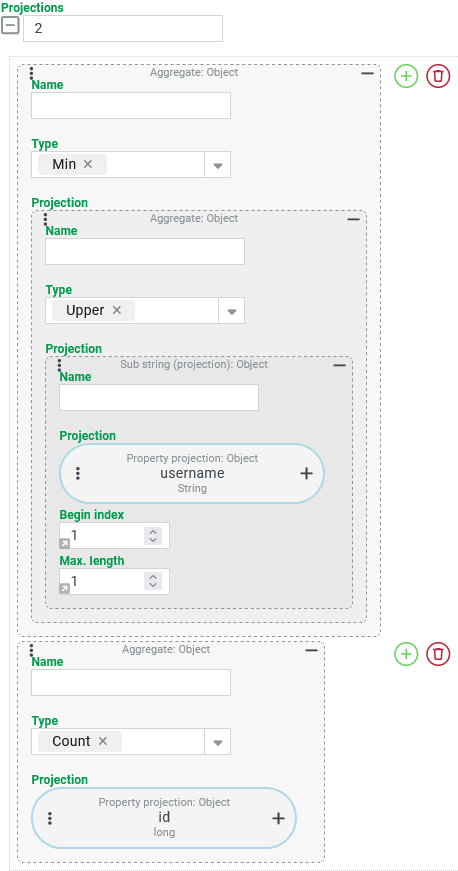
A CSV search should return the number of Users who share the same initial letter for the "username" (username).
No distinction should be made between upper and lower case letters (e.g. { admin,AEINSTEIN}→ A).
Configuration:
Group by’s are required as the basis for the use of an Aggregate with the Type "Count" (see below) for the actual aggregation of user accounts, which can be configured as shown on the right:
|
|
The following two columns are to be output as Projections for the CSV search:
|
|
String processing – Lower (LOWER): Upper/lower case non-specific comparison
A search should list all Users for which there is a match between the address property "Country" (address.countryCode) and the first two characters of the internal identifier for the "Locale" (locale).
Configuration:
The Field restriction shown on the right produces the desired adjustment:
|
|
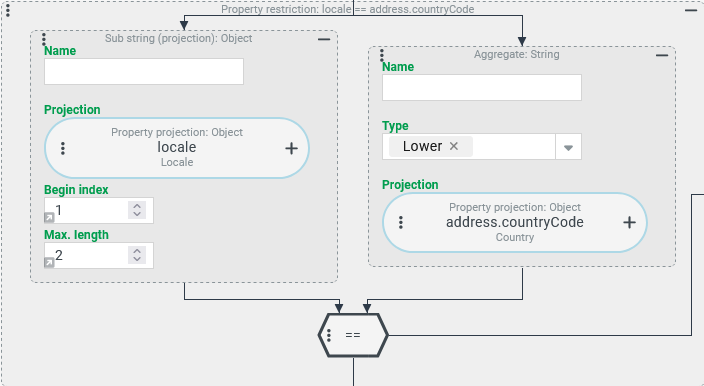
IMPORTANT An Aggregate with the Type "Lower" cannot generally be used to process the internal name of enumeration values (here: Country, Locale). This only works here in exceptional cases, as the relevant properties for the user account (locale) or the address (countryCode) are treated as text properties in the database, in contrast to the general standard. In general, properties that refer to Enumerations contain the "ordinal" value of the Long type in the database. A Projection on such a property – e.g. the address property "Salutation" (address.salutation) for a user that refers to the dynamic enumeration Salutation – is then not suitable as an input value for a calculation function for text processing in an Aggregate. When executing the query, an error message usually appears, which refers to the conflict of types.
String processing – Trim (TRIM): Search for "untrimmed" texts
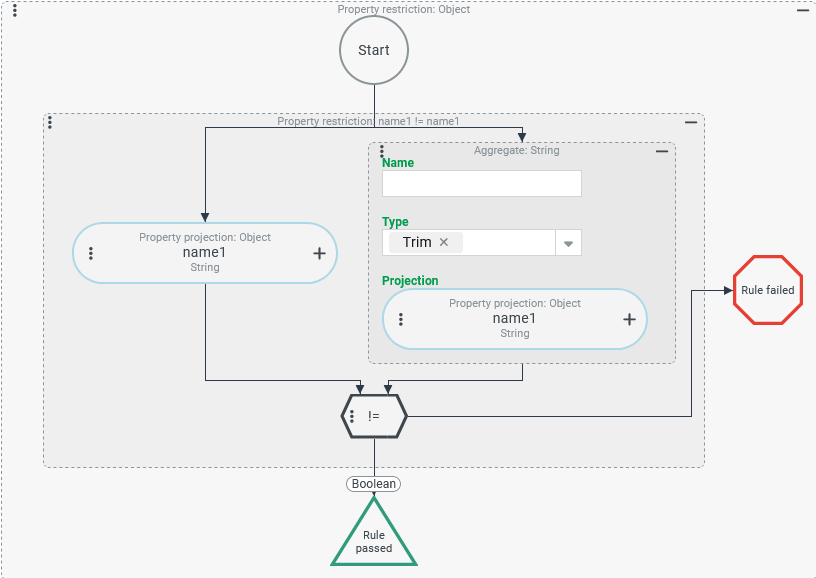
A search is to determine Addresses for which "untrimmed" text – i.e. a character string with at least one bordered space – was entered as the "Name" (name1).
Configuration:
The Where condition shown on the right uses a Field restriction to check whether the text specified as "Name" (
NOTE A search with this Where condition returns all Addresses that can be accessed in the execution context because Address book entries refer to them. Addresses that were created in the context of other entities (e.g. Companies/Clients or Users) are not included in the search result, as long as they are not accessed via Joins, a Sub search or similar. |
|
Examples of aggregation functions
Typical example: Aggregation of key figures in a search with grouping
A tuple search determines three "static key figures" for the use of Guest users accounts by different Companies/Clients (column: COMPANY):
Number of Guest users per company (column:
GUEST_ACCOUNTS).Sum of logins executed by Guest users per company (column:
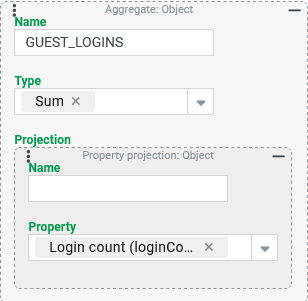
GUEST_LOGINS).Average login count executed per account per company (column:
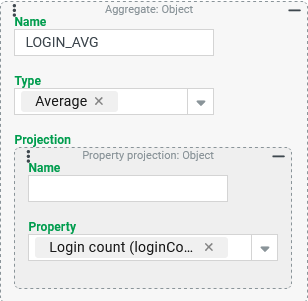
LOGIN_AVG).
Runtime example:
The example on the right shows the result of a tuple search with the following characteristics:
| |
Configuration:
The data structure for Guest users provides the following characteristics for our statistics:
The "Company" (
companyId) property is a required field for the guest user account, which must be filled with a reference to the "ID" (id) of exactly one company account (see Companies/Clients).The "Number of logins" (
loginCount) property provides the number of logins carried out with a guest user account as an integer.
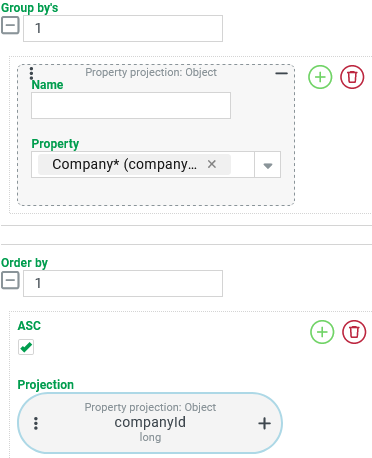
As our search is intended to aggregate key figures for Guest users per company, Group by's must be defined for the search:
|
|
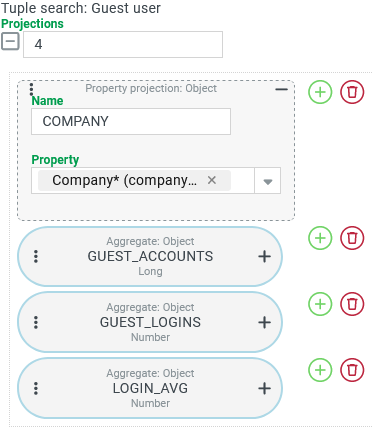
The screenshot on the right shows an overview of the Projections set up for the tuple search, which define the output columns:
|
|
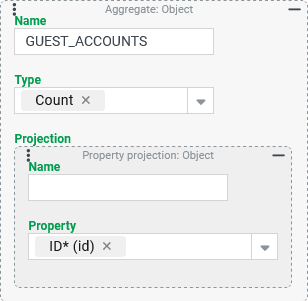
The For the "Count" aggregation type, the property selection is irrelevant as long as it is ensured that it cannot contain "no value" ( Without an entry for the Name parameter, the title of the output column would be |
|
The The "Sum" aggregation type adds up all the numerical values found. Whether the property in the Projection is filled for all aggregated Guest users is irrelevant for the value returned as "Sum". Without an input for the Name parameter, the title of the output column would be |
|
The The "Average" aggregation type relates the sum of all values from the Projection to the number of aggregated individual values that are not "no value" ( Without an entry for the Name parameter, the title of the output column would be |
|
Unusual example: Determining key figures for company accounts
A tuple search should determine three "statistical key figures" for the addresses of Companies/Clients maintained in the system:
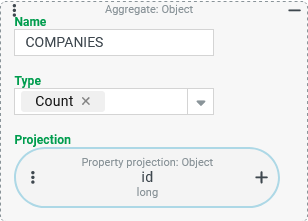
Count of all Companies/Clients (column:
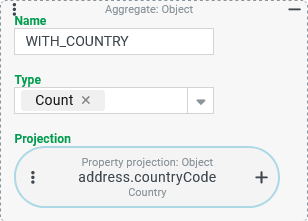
COMPANIES).Count of all Companies/Clients in whose address (
address) a Country is selected in the "Country" (countryCode) property (column:WITH_COUNTRY).Number of different Country values in the "Country" (
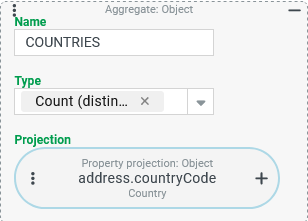
countryCode) property in the addresses of companies (column:COUNTRIES).
Runtime example:
The key figures for the evaluation should "aggregate" all companies for which read access exists in the execution context. This means:
| |
Configuration:
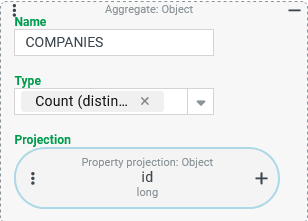
Three Projections of the Aggregate type are required for the output columns of the tuple search:
The The Type "Count" enables this in conjunction with a Property projection that refers to the "ID" (
|
|
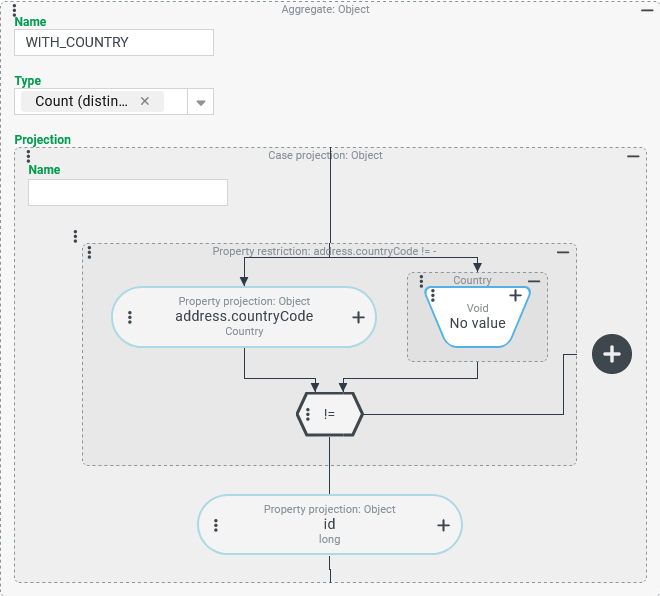
The Since the Type "Count" only takes into account the values from the Projection that are not |
|
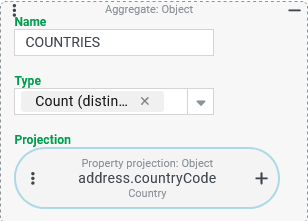
The The Type "Count (distinct )" ( IMPORTANT The condition that no country is specified in the address is not counted. If the "Count (distinct)" results in the value In contrast to the Type "Count", the Type "Count (distinct)" is fundamentally resistant to the scenario that a multi-value projection generates several result rows per company (see following variant). The variety of values in the Projection does not increase if the same values are mentioned repeatedly. |
|
Variant:
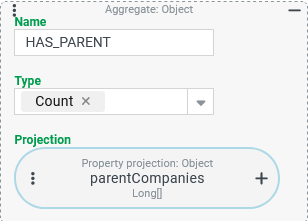
Based on the existing configuration, an additional output column (HAS_PARENT) is added which specifies the number of Companies/Clients whose list field "parent companies" (parentCompanies) contains at least one entry.
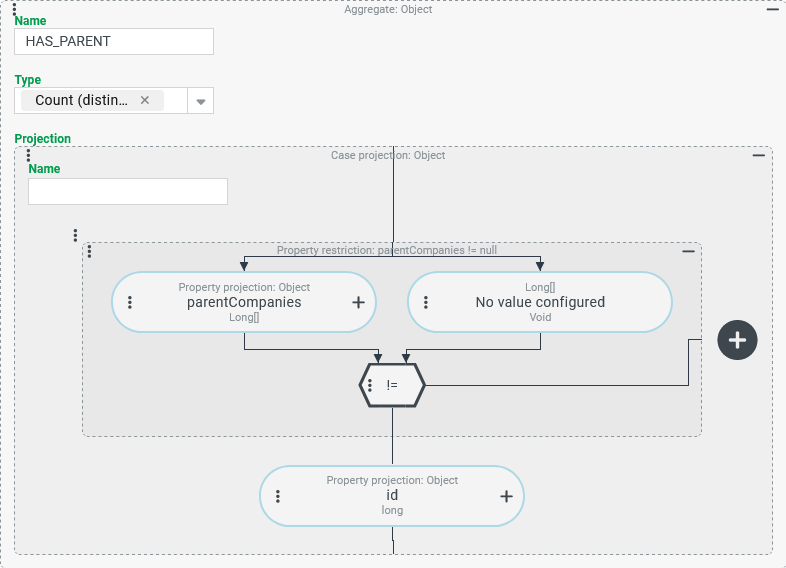
Based on the projection for the CAUTION This approach works formally in an "error-free" way, but by no means delivers the expected results. It is important to understand what happens when you add the projection shown on the right to the existing ones (see above). With the same company data as in the runtime example above, the extended tuple search returns the following result: |
|
| Without a direct comparison to the previous result, the result data makes a thoroughly "unsuspicious" impression. However, the Why? The added Aggregate refers to a multi-value property via Property projection (see also data type |
The aggregation functions process the result of the "cross product": The data linked directly or in a (1:1) relation with the company (here: the property values for
| |
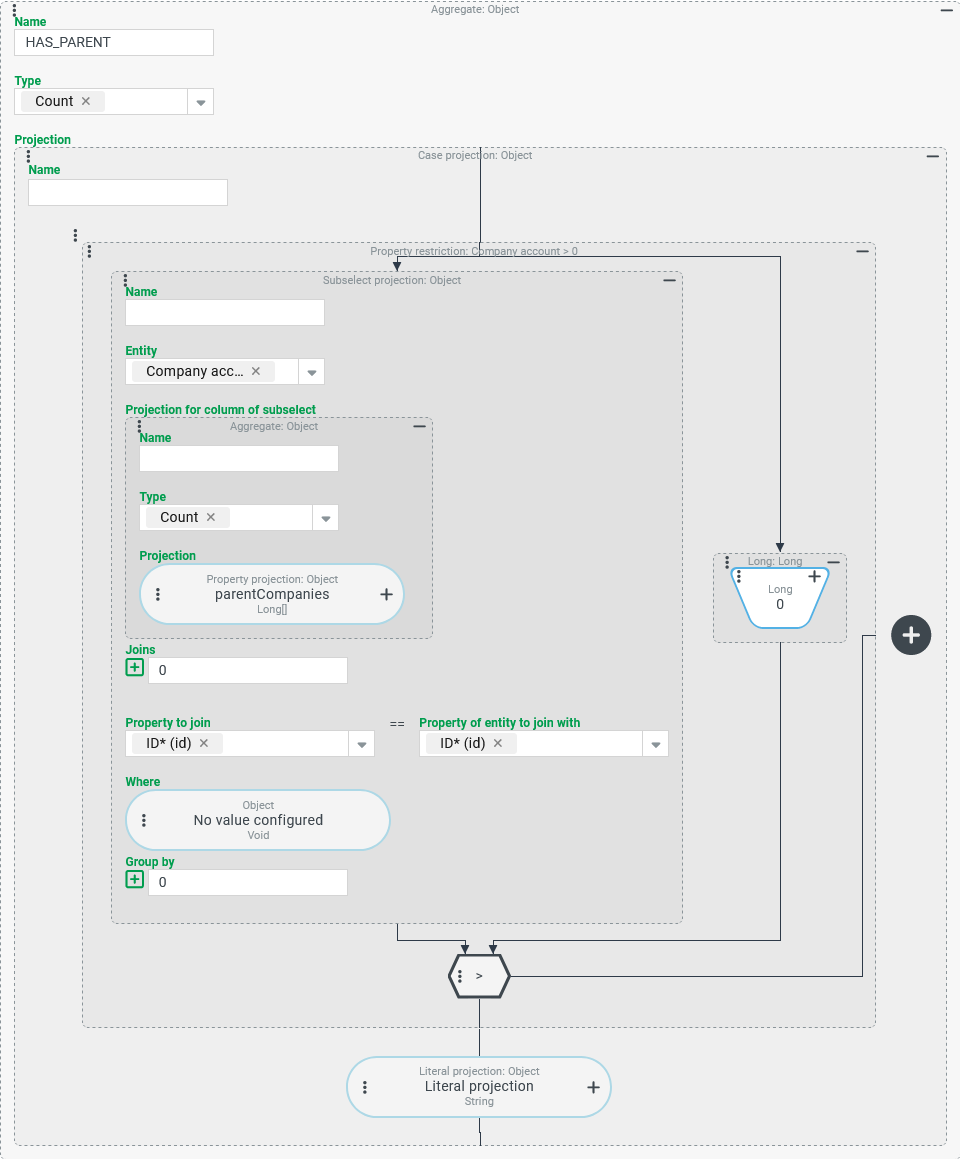
The following configuration for the HAS_PARENT column prevents the multiplication of the result rows before aggregation and ensures that the search returns correct data overall:
CAUTION If the database system used does not support the use of the Subsearch projection within an aggregation function, an error message is displayed. This is the case for MSSQL, for example (see "Alternative configuration" below).
Configuration:
An Aggregate with the Type "Count" should include all Companies/Clients that have at least one parent company. For this purpose, the Projection must return any value other than "no value" (
|
|
Alternative Configuration:
Since not every database system accepts the use of a Subsearch projection within an aggregation function, the following configuration is intended to show how the desired results can be achieved without a Subsearch projection in a given application.
In the previous approach, the Subsearch projection was used to avoid multiplying input data ("cross product" {companies} x {parent companies}) for the aggregation function.
The following alternative approach deliberately accepts the multiplication of the input data and compensates for its effect by adjusting the Type and Projection for the aggregation function.
Column | Previous projection | Conversion | Customized projection |
|---|---|---|---|
|
| Previously, the Companies/Clients could be counted using the Type "Count" ( The Aggregate are now converted to the Type "Count (distinct)" ( |
|
|
| The previous Aggregate utilized the effect that an aggregation with the Type "Count" ( Instead, we now use a Case projection within the Projection to explicitly check whether the address property "Country" ( For the Aggregate, the Type is changed to "Count (distinct)" ( |
|
|
| The projection for the Multiplying the input values for the aggregation does not change the variety of countries. | unchanged: |
| not yet available(or realized via Subsearch projection; see above) | The projection for the
|
|