See also: Custom client object structure, Check client object structure rule
Value resolver – Abstract
Purpose: Links an input value of an anonymous data object ("Client object") or a list of such objects with a defined target structure for one of the following purposes:
Skip verify
Input value is "passed through" unchanged.
The target structure is assumed within the configuration for the return value.
Verify only
Deviations from the target structure are recorded as findings.
Update casted values
Input value is "adjusted" if necessary.
In addition to the check (including findings), certain type conversions take place in the target structure depending on the field data type (e.g. string → dynamic enumeration value).
Simplify
Input value is "simplified" if necessary.
In addition to the check (including findings), "simplifications" are made for certain data types (e.g. dynamic enumeration value → string). In addition, "unexpected" data is omitted from the return value in the target structure. This "simplification" is useful for responses from a Rest API, for example.
Tooltip
Usage: The input value should be an anonymous "Client object" (not an entity, not a simple value), otherwise the check will result in a "Finding".
Parameter:
The Optional option determines whether "No value" (
$null) as an input value results in a finding when checking ("Optional" unchecked) or not ("Optional" checked).The Is collection of option must be checked if a list of objects corresponding to the Client object structure is expected as the input value.
The Mode decides whether the input value is checked and whether and, if so, which adjustments are required for the return value.
The Client object structure defines the target structure by selection from the dropdown or a "spontaneously" created definition.
The value configuration for Findings defines where the results of a check are written as entries in a list (e.g. in a variable).
Results:
The return value is derived directly or with customization from the input value.
If the Mode implies a check, this may result in a list of Findings.
NOTE The corresponding rule type (Check client object structure rule) with identical parameters is deemed to have passed if there are no Findings.
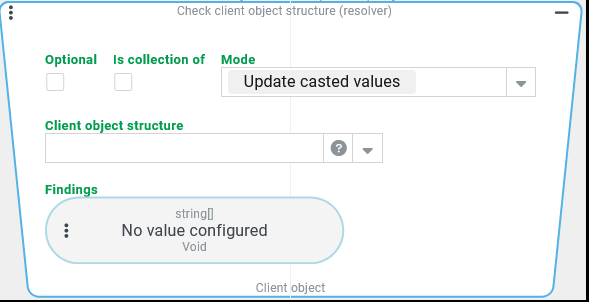
The Check client object structure (Resolver) resolver links an anonymous data object ("Client object") available as an input value or a list of such objects with a client object structure defined as a Custom client object structure or specifically in the context of the value resolver.
The selected Mode defines the effects of this link so that the value resolver can be used for different purposes:
Effects | Mode | |||||
|---|---|---|---|---|---|---|
Application | Return value | Findings | Skip verify | Verify only | Update casted values | Simplify |
Support configuration (e.g. Object property value resolver) based on the Client object structure. | Input value is "passed through" unchanged | None |
|
|
|
|
Check input value and collect deviations from the Client object structure as Findings. | All types of findings
|
|
|
|
| |
Automatic type conversion to the types specified in the Client object structure (as far as possible). | Input value is "adjusted" if necessary |
|
|
|
| |
Simplification of certain data types and removal of all content not contained in the Client object structure. | Input value is "simplified" if necessary | All types of findings except |
|
|
|
|
.svg)
.svg)
The individual modes therefore differ on the one hand in whether and, if so, how they change the return value compared to the input value.
On the other hand, they differ in whether and, if so, which types of Findings are expected from a check of the input value.
What are "Findings"?
If a "Client object" is checked against a defined client object structure, deviations are logged as Findings in a list of data objects of the type "Client object structure finding" (ClientStructureFinding), which can contain information in the following fields:
The
inputfield shows the evaluated input data for the executed check (if applicable).The
loc(location) field defines which position of the object structure was checked.The
msg(message) field shows the test result in plain English.The
typefield classifies a "Client object structure finding type" from the following list:MISSING→ There are no specifications for a non-optionally defined field in the object structure.WRONG_TYPE→ The data type found in the input value does not correspond to the data type declared by the object structure.INVALID_CONTENT→ The value found in the input value has not passed a validation defined in the object structure.UNEXPECTED_CONTENT→ The input value contains a field that is not contained in the object structure.
In the context of a
WRONG_TYPEfinding, thevalidValuesfield returns all values accepted as valid in the context of an enumeration.
NOTE The string image for the "Client object structure finding" class (ClientStructureFinding) generates an informative text, taking into account the fields listed here, so that the string image of a list of "findings" can look like this, for example:
[MISSING in [body, active]: missing mandatory value,
WRONG_TYPE in [body, salutation]: the value is not of type Salutation, valid values are [COMPANY, MR, MS],
UNEXPECTED_CONTENT in [body, nickname]: unexpected property found]The Findings parameter in the Check client object structure (Resolver) resolver defines where the list of "Findings" should be saved.
NOTE Typically, a Variable is used to save the list. However, you can also specify an Object property as the target, for example, if a suitable target object exists or save the check result as a file using the File reference value resolver.
Details of each mode
"Skip verify" mode
The "Skip verify" mode (SKIP_VERIFY) is used exclusively to support the configuration in the context of the value resolver:
The object present as the input value is provided unchecked and unchanged as the return value.
The data model selected as the Client object structure or defined ad hoc is declared for this return value so that the corresponding fields can be selected by dropdown in its context, e.g. in an Object property value resolver.
As no checks are carried out, no check results are expected. The Findings parameter is therefore hidden for this mode.
NOTE If there is no check, the Optional option, which would generate a determination in any other mode if the input value is "No value" (
$null), is also irrelevant.
Example:
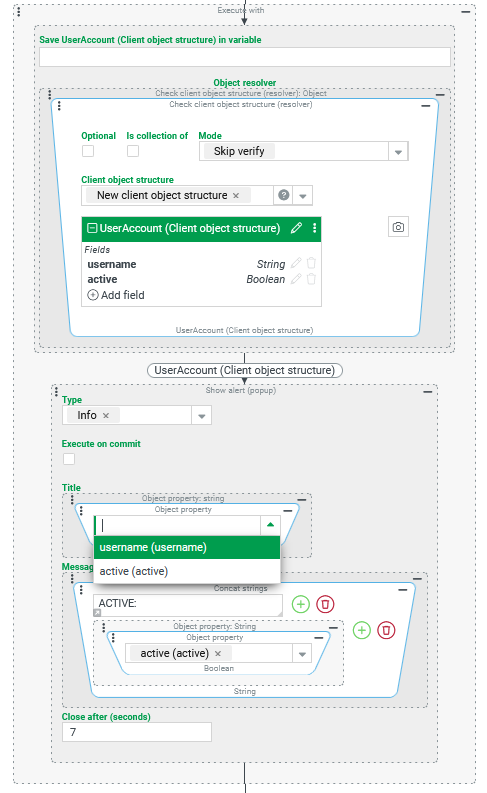
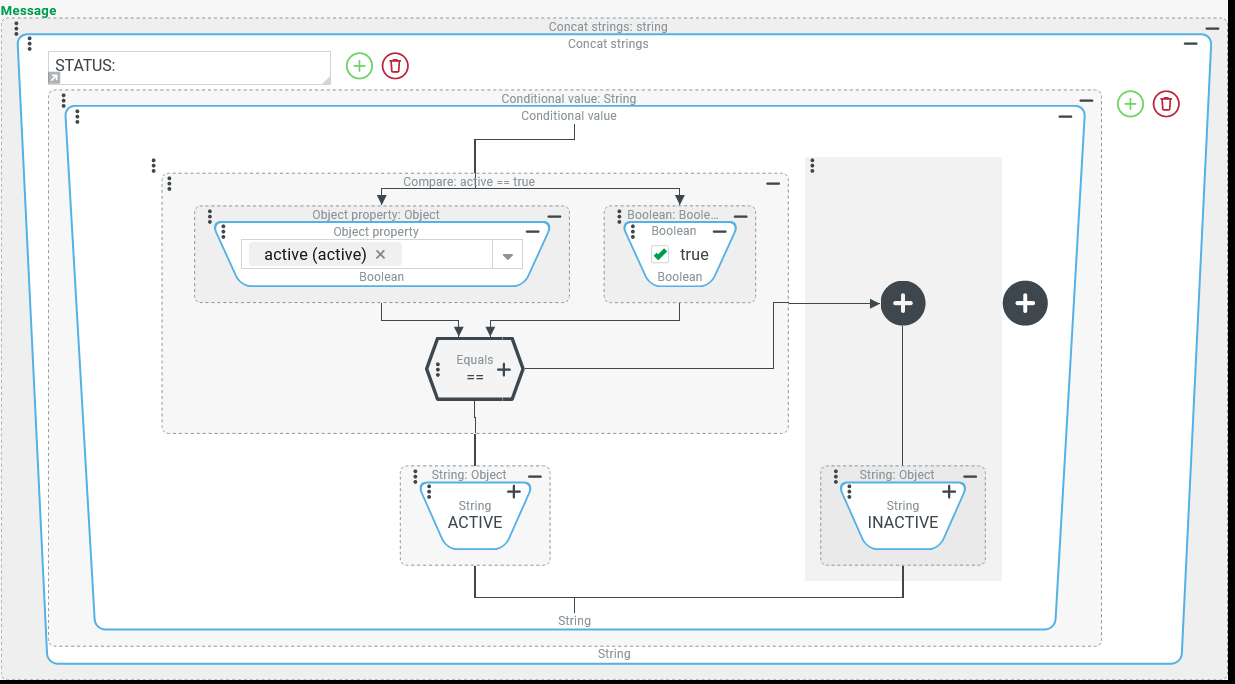
In the context of event handling, an anonymous data object ("Client object") is expected, e.g. from the form data of a portal, which may or may not necessarily have the "username" ( For a certain sequence of Event actions, it should be assumed that the object could have these two properties and that no other properties are relevant. The screenshot on the right shows an Execute with event action in the context of which the relevant Event actions are executed:
If a specific text is to be assigned for the Message (see below) depending on the |
|
| |
"Verify only" mode
The "Verify only" Mode (VERIFY_ONLY) validates the input value against the defined Client object structure and logs the Findings if the value configuration refers to a suitable target.
Support for the context of the configuration (see "Skip verify" Mode) is also guaranteed.
The validation checks the following aspects:
The Optional option determines how "No value" (
$null) is evaluated as an input value:If the Optional option is unchecked (default), then "No value" (
$null) results in the following statement as the input value:MISSING in [body]: missing mandatory valueThe reference body refers to the input value as a whole, which – because it is not "optional" – is objected to as "missing" (→detection type
MISSING).No further checks are required.
If the Optional option is checked, the input value is treated as "optional". The absence of the input value then does not generate a determination.
Further checks are no longer required.
If the input value is not an anonymous object – i.e. a simple value or a data object that is an instance of a specific class – then the only finding is always as follows:
WRONG_TYPE in [body]: value is not an anonymous objectThe reference
bodyrefers to the input value as a whole, whose type is unsuitable (→Finding typeWRONG_TYPE).If this is the case, no further checks are carried out.
If the input value is an anonymous object, its fields are evaluated as follows:
If the input value contains an unexpected property that is not contained in the Client object structure, the following statement is generated for this property:
UNEXPECTED_CONTENT in [body, statusCode]: unexpected property foundThe finding here refers to a direct field
statusCodeof the object in the input value, which is objected to as unexpected content (→ finding typeUNEXPECTED_CONTENT) because it is missing in the Client object structure.NOTE The finding type
UNEXPECTED_CONTENToften occurs if there is a typing error in a field name, for which an error in upper/lower case is sufficient.
If data is missing in the input value for a field that the Client object structure defines as a mandatory field (not "Optional"), a finding like the following is generated:
MISSING in [body, active]: missing mandatory valueThe finding here refers to a direct field
statusCodeof the object in the input value, which is objected to as unexpected content (→ finding typeUNEXPECTED_CONTENT) because it is missing in the Client object structure.IMPORTANT With an explicit assignment of $null as a value (e.g. via JSON structure
{ "active" : null }), a mandatory field is also consideredMISSING.
If the value for an expected field is an unexpected data type, it is flagged as inappropriate (→ detection type
WRONG_TYPE) as follows:WRONG_TYPE in [body, active]: the value is not of type BooleanThe
activefield in the Client object structure is obviously declared as a Boolean here. The text "false" was passed in the test (in JSON:{ "active" : "false" }wo{ "active" : false }would be correct.
WRONG_TYPE in [body, salutation]: the value is not of type Salutation, valid values are [COMPANY, MR, MS]This complaint concerns the salutation field that links the Client object structure with the dynamic enumeration Salutation (
Salutation). The input value in the test (in JSON:{ "salutation" : "TBD" }) returns a string value that does not correspond to a name for a value in this enumeration. The lists allvalid valueshere.
If the input value contains a suitable data type value for a field for which the Client object structure provides validators, these are all evaluated and, if necessary, the non-existence is objected to (→ finding type
INVALID_CONTENT):INVALID_CONTENT in [body, username]: >=5 characters requiredApparently the validation for the
usernamefield failed because the assigned text value did not contain enough characters.The specific "error message" (
>=5 characters required)is an optional part of the validator configuration in the Client object structure.
INVALID_CONTENT in [body, username]: user existsHere it was checked whether the text entered in the
usernamefield of the input value is already used to identify a user account (see Users)NOTE If the input value for the
usernameis less than 5 characters and the username in question is already in use, both findings may be generated.
Regardless of whether/which Findings were generated in the context of the validation, the input value is returned unchanged in "Verify only" Mode,
"Update casted values" mode
The "Update casted values" mode (UPDATE_CASTED_VALUES) performs the validation described for the "Verify only" Mode and logs the specified findings if the value configuration refers to a suitable target.
In addition, however, the type conversions implicitly performed in the context check (e.g. from String values to dynamic enumeration values with the addressed "name") are also explicitly mapped to the return value:
Successful type conversions are not documented via Findings.
Example:
| | IMPORTANT The successful type conversion for the |
NOTE The type conversion from a String name to a dynamic enumeration value is much more than a mere "formality". Only after a successful conversion of enumeration values in the return value does the full support for dynamic enumeration values in the context of the client object in the return value take effect. If configuration features are provided and maintained for the enumeration in question, these can be accessed in the context of the enriched "Client object" in the return value.
Example:
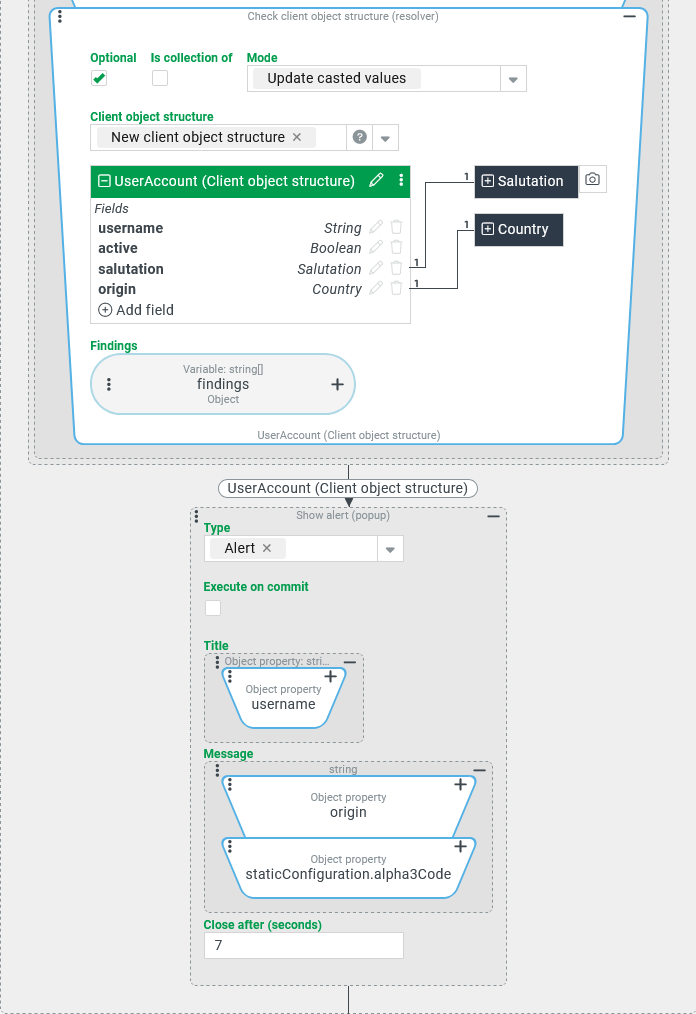
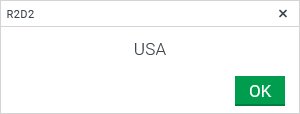
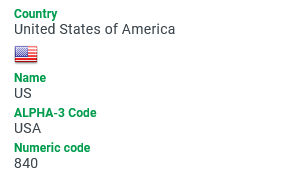
The input value contains an origin field with the character string US. The Client object structure relates this field to the dynamic enumeration Country. After the check with the "Update casted values" Mode, the return value supports extended configuration features:
Input value (JSON for object) | Return value (JSON for object) | Configuration |
|---|---|---|
| |
|
Configuration: In the context of the client object "enriched" by type conversion in the return value from the Check client object structure (Resolver) resolver, configuration features can be used for the Country addressed in the input value by the string "US": In the screenshot on the right, a Show alert event action is executed in the context of the return value:
NOTE The JSON representation for the return value (see above) maps the Runtime example:
NOTE In addition to the more or less extensive specific configuration features for a particular dynamic enumeration, generic fields can also be used for the enumeration value after the type conversion. In the example, the path to any icon or image file assigned in the enumeration for the national flag could be looked up, which can be found in the The corresponding icon/image may not appear in the Show alert event action, but it can appear alongside other details about the Country in an Image/Icon element in a portal that is opened with the return value as form data:
| ||
"Simplify" mode
The "Simplify" (SIMPLIFY) mode performs the validation described for the Mode "Verify only" and logs the described Findings if the value configuration refers to a suitable target.
The input value is revised according to the following rules:
Fields in the input value that are not contained in the Client object structure are omitted from the return value without any finding of the
UNEXPECTED_CONTENTtype appearing.Fields in the input value for which an unexpected data type (according to the Client object structure) is determined in the check are omitted from the return value and a determination of type
WRONG_TYPEis generated.Fields in the input value that do not pass a validation defined in the Client object structure appear in the return value and a statement of the
INVALID_CONTENTtype is generated.Fields in the input value whose data type supports a type conversion according to the Client object structure are converted – if necessary – to the simpler data type (e.g.
Stringfor an enumeration value).
This "simplification" is useful, for example, for responses from a Rest API (see REST API).
Example:
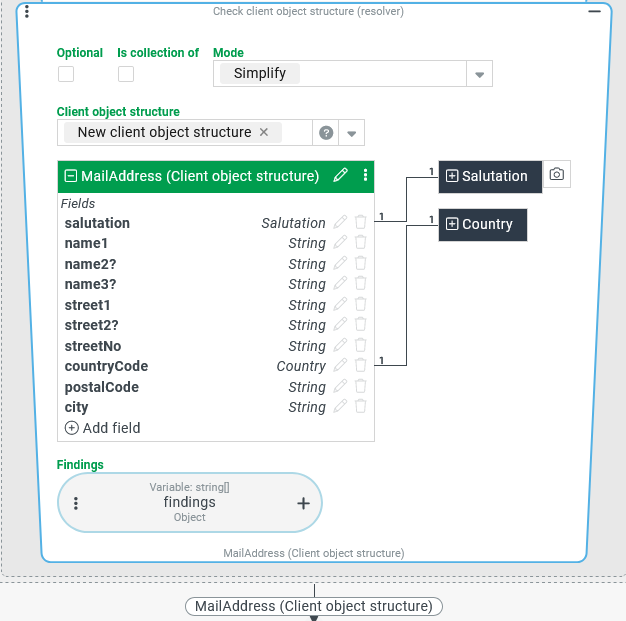
In the context of an Execute with event action, a block of event actions is executed with a client object structure (MailAddess) defined for this purpose, which specifies certain characteristics for the addressing of letter mail (hereinafter referred to as "Address").
The input value for the Execute with event action is a client object that maps form data from a portal in which many other characteristics (telephone numbers, customer numbers, etc.) can be entered in addition to the conventional address.
For the action block to be executed, only the fields relevant to the address that are checked using the Check client object structure (Resolver) resolver are of interest:
The temporary reference object for the action block of the Execute with event action should explicitly only reflect the fields from the client object in the input value that are defined for the
MailAddressobject.Some fields are mandatory (
salutation, name1, street1, streetNo, countryCode, postalCode, city), for which a value must be available.For fields with reference to a dynamic enumeration (
salutation, countryCode), only values from the relevant enumeration are permitted.Other fields are optional (
name2,name3,street2). They are transferred to the temporary reference object if a value is available.
Configuration:
The screenshot on the right shows an excerpt from the configuration for the "Object value resolver" in the header of the Execute with event action, with the definition for the
|
|
Runtime example:
Input value JSON image | Return value of the resolver JSON image | Findings (→ JSON image |
|---|---|---|
| | |
The only "finding" in the
findingsvariable of theMISSINGtype refers here to the mandatory fieldpostalCodefor the ZIP code.Although the data structure in the input value provides a ZIP code (
87654), it uses azipcodefield.The
zipcodefield does not appear in the return value of the value resolver, just like all other fields of the input value object that are not defined in theMailAddressclient object structure.
The values for the
salutationandcountryCodefields are checked against the respective dynamic enumeration (Salutation, Country).If the text value in the input value does not refer to the name of a known enumeration value, the relevant field in the return value is omitted.
If the text value in the input value matches the name of a value in the relevant enumeration, only it appears in the return value (in contrast to the "Update casted values" mode).
The return value in "Simplify" mode could be described as the intersection between the data from the input value and the Client object structure.
NOTE The field names of the input value and the Client object structure MailAddress are chosen here – apart from the postalCode field – based on the predefined data structure for Addresses in Lobster Data Platform/Orchestration. Nevertheless, the attempt to use an "Address" instance directly as an input value for the Check client object structure (Resolver) in order to obtain the "intersection" with a custom "Client object structure" (here: MailAddress) fails. This is because the entity type "Address" (Address) is not considered an anonymous object. Instead, the only statement in this case is: WRONG_TYPE in [body]: value is not an anonymous object and the return value is "No value" ($null).