See also: Client workflows, Subscribe to message (Form)
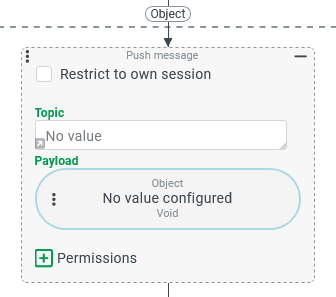
The Push message event action sends a Payload to all active subscribers that match a given Topic. It is only available in Event handling. Messages are always pushed from the server to client sessions.
How it works
When the event action fires, the server delivers the Payload to every subscriber that is currently active and registered for the same Topic. A subscriber is any process that meets all three of the following conditions at the moment the push message is sent:
It is already running in an active client session.
Its configured Topic matches the one set in this event action (case-sensitive, exact match).
It passes any optional Permissions criteria configured in this event action.
Subscribers can be one of two types:
Client workflows — included in the client session's menu structure via Association criteria (including those running in 'Hidden' mode).
Subscribe to message (Form) elements placed in open forms (Input forms, Portals, Dashboard).
How a subscriber reacts to the incoming message is defined in its own configuration: via Event actions for client workflows, and via Behaviors triggered by the 'Receive message' Events (Form designer) for forms.
IMPORTANT
A push message has no visible effect if the subscriber has no Client Workflow or Behaviors configured to handle it.
Parameters
No specific reference object is required by this event action. An existing reference object is available as an input value for value configurations in parameters.
Parameter | Description |
|---|---|
Restrict to own session Option | Controls which sessions receive the Payload.
|
Topic Text field / value configuration | A string that identifies the push message channel. Only subscribers configured with the same Topic will receive the message.
The Topic value is case-sensitive and must match exactly in both sender and subscriber.
|
Payload Value configuration | The data object delivered to all matching subscribers. The Payload is optional and can be The return value of the value configuration is transferred directly—not converted to a string—to the subscribers.
|
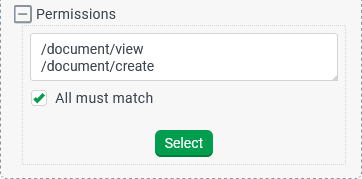
Permissions Expandable element | Optional permission requirements that a subscriber session must satisfy before the Payload is delivered. Uses the same parameters as the Has permission rule type. In the example, view and create permissions for Documents are required. With All must match selected, both permissions must be present in the subscriber session.
|


![Payload value configuration — String[] example](https://cdn.document360.io/4be90b94-ec83-41d8-963e-962df16110d4/Images/Documentation/image-2024-12-17_17-54-29-version-1-modificationdate-1734454469182-api-v2.png)
WARNING
Do not push large data objects (such as media files or large documents) as the Payload. The Payload is delivered to every matching session simultaneously. Large payloads degrade performance.
Note on Topic string rendering
IMPORTANT
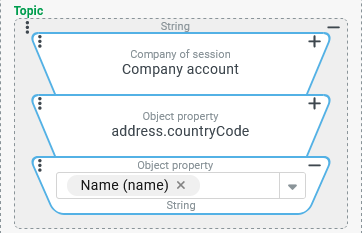
When a value configuration is used for the Topic, the string is resolved using server-side defaults. This is because the event action runs in the server's event handling context, not in the client.
For example, a dynamic enumeration value resolves to its internal name on the server (e.g., CH), not to the localized label a client would display. A subscriber's value configuration runs in the client context and may return a different string for the same value.
To avoid a mismatch between sender and subscriber, use value configurations that reliably return the same string in both contexts—for example, an Object property that explicitly reads the internal name property.