Advantages
The XML V4 parser offers significant performance gains with extremely low memory consumption. Compared to the XML-V3 parser, the memory requirement drops to about 10%. For input files up to about 100 MB, the runtime drops to about 5% compared to version 3. Further significant performance gains are possible via optional XPath filters.
In addition, extremely large XML input files of up to a maximum of 250 GB can be parsed. However, the runtime will then significantly increase again because of the necessary disk accesses.
Furthermore, the data from the XML input file can be combined into virtual elements (chunks) during parsing. Data outside the parsing realm can also be inserted into these chunks.
Preparser
If a preparser is used with the XML V4 parser, the backup file must be overwritten with the result of the preparser.
Match codes
The XML V4 parser does not require match codes. These are inserted when the source structure is automatically generated, but they are not necessary.If match codes are set, only the first condition is observed. Further conditions are ignored and not OR-ed, as is usually the case.
You can use match codes to restrict the data that is read in. For more information, see section "Optional XPath Filter".
Settings
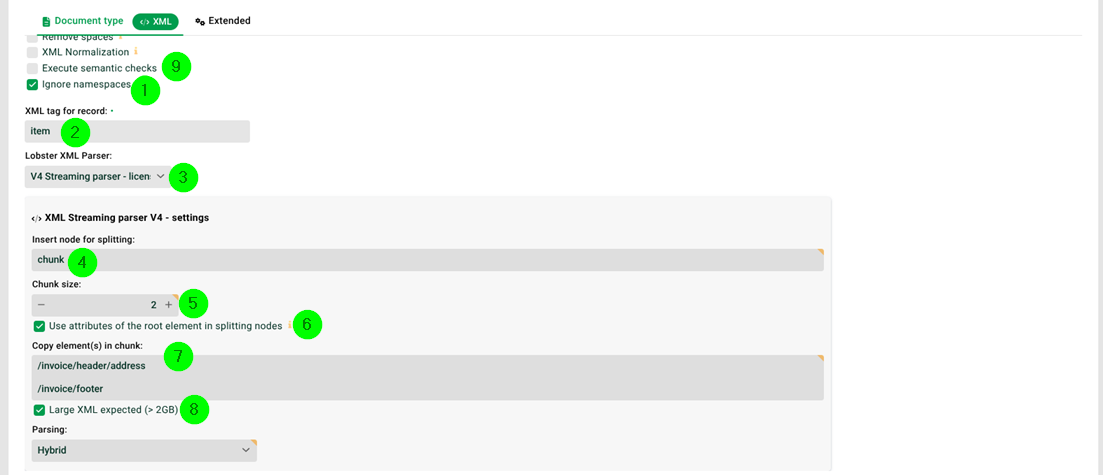
(1) Ignore namespaces: Must be set.
(2) XML tag for record: Specifies the tag name (element) below which you want to parse. An entry must be made here, even if the entire XML structure is to be parsed. If you want to parse a partial document, it must also conform to the XML convention (well-formed). Example: "item".
Note: Can also be an XPath 1.0 expression, e.g. /inventory/books[@title="xxxx"]. Note: See also section Field "XML tag for record".
(3) Lobster XML parser: Must be set to "V4".
(4) Insert node for splitting: We do not want to create a new record per "item". Instead, we want 2 "item" elements in each record, see (5). Therefore we create a new, artificial root element "chunk". See section "Generating chunks" below.
(5) Chunk size: The number of "item" elements per record, i.e. per "chunk" element, see (4). See section "Generating chunks" below.
(6) Use attributes of the root element in splitting nodes: We have two attributes "date" and "ref" in root element "invoice". We need these in the mapping, so we activate this checkbox and all available attributes are copied into "chunk" (4).
(7) Copy elements in chunk: The specified elements, including their child elements, are copied into each "chunk" element (4). All XPath 1.0 expressions are allowed. See section "Copy attributes and elements redundantly into each record" below. Example:
/invoice/header/address /invoice/footer |
(8) Large XML expected: If the XML file is smaller than 2 GB, please uncheck this checkbox, otherwise set it. Automatically set if the file is larger than 2 GB, but then uses conservative parsing method "Disk".
In Memory | If you have enough main memory, choose this option to do everything there. |
Disk | Only a part of the XML file is loaded into the memory. This works much like a cursor select on databases. |
Hybrid | Best 'choice of weapons'. The parsing takes place in mode Disk, but generated records are processed in memory. This reduces hard disk access and thus increases the processing speed. |
(9) Execute semantic check: Incoming files can be checked with semantic rules. See section Semantic check.
Example
We will use the following XML file:
<?xml version="1.0" encoding="ISO-8859-1"?>
<invoice date="07.03.13" ref="R-0001">
	<header>
		<customer>Lobster</customer>
		<address>
			<name>Lobster GmbH</name>
			<street>Münchner Str. 15a</street>
			<zip>82319</zip>
			<city>Starnberg</city>
		</address>
	</header>
	<positions>
		<item type="1" desc="billing">
			<pos>1</pos>
			<article id="A-001" name="Article 1" price="1050" amount="1" />
			<note>Attention- Glas!</note>
		</item>
		<item type="0" desc="return">
			<pos>2</pos>
			<article id="A-002" name="Article 2" price="920" amount="2" />
		</item>
		<item type="1" desc="billing">
			<pos>3</pos>
			<article id="A-003" name="Article 3" price="90" amount="3" />
			<note>See counter</note>
		</item>
	</positions>
	<footer>
		<note code="001">Complete</note>
	</footer>
</invoice>
If repeated subelements (here item) are to lead to multiple records, you should not specify the real root element (invoice) of the XML document in (2) (see section Field "XML tag for record"). Previous parsers (prior to V4) lost all attributes of the root element and any parent or sibling elements that were not within the element item. With the XML parser V4, data from these 'blind' areas of the XML document can be copied into each record, as described in section Copy Attributes and Elements Redundantly into Each Record below.
Generating chunks
If the structure of the input data would lead to a large number of small records, for example, because it contains several million item elements, the performance would suffer. In this case, it would make sense to combine several item elements in one record. However, there would be no natural structure in the input data to support that. However, you can force the parser to create a virtual element (4) (here chunk). This 'chunk' element then appears as a root element that contains several item elements.
The generation of chunks with (4) and (5) is optional. If (4) remains empty, a record is generated per (2) (in the example per item). In that case, the root node of the source structure should correspond to the item element.
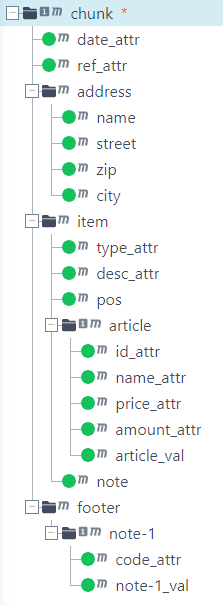
If a virtual chunk element is used in (4), an additional root node corresponding to the chunk element (here chunk) must be used in the source structure. This node receives a match code as in (4) to parse the virtual chunk element (so Equals=chunk). And here the fitting source as screenshot. Match codes can be defined as usual, but they are already created when the source structure is created automatically. Use the file for_structure_EN.xml for this purpose: And here the complete profile: Profile-XML_V4_EN.pak
Copying attributes and elements redundantly into each record
Suppose that we use element "item" as the "XML tag for record" for our source file above. The attributes of the element "invoice" and all data in element "header" will then be outside the parsed area. As of version V4, the attributes of the real root element can be transferred to every record generated, see checkbox (6). Similarly, in (7), you can enter those elements that are actually outside "item" but that you want to include in each record. The required adjustment of the profile source structure currently needs to be done manually (already done in our example structure).
Internal XML based on the prior settings
Internally, based on our prior settings, the input XML looks like this.
<?xml version="1.0" encoding="ISO-8859-1"?>
<chunk date="07.03.13" ref="R-0001">
	<address>
		<name>Lobster GmbH</name>
		<street>Münchner Str. 15a</street>
		<zip>82319</zip>
		<city>Starnberg</city>
	</address>
	<item type="1" desc="billing">
		<pos>1</pos>
		<article id="A-001" name="Article 1" price="1050" amount="1" />
		<note>Attention- Glas!</note>
	</item>
	<item type="0" desc="return">
		<pos>2</pos>
		<article id="A-002" name="Article 2" price="920" amount="2" />
	</item>
	<footer>
		<note code="001">Complete</note>
	</footer>
</chunk>
<?xml version="1.0" encoding="ISO-8859-1"?>
<chunk date="07.03.13" ref="R-0001">
<address>
<name>Lobster GmbH</name>
<street>Münchner Str. 15a</street>
<zip>82319</zip>
<city>Starnberg</city>
</address>
<item type="1" desc="billing">
<pos>3</pos>
<article id="A-003" name="Article 3" price="90" amount="3" />
<note>See counter</note>
</item>
<footer>
<note code="001">Complete</note>
</footer>
</chunk>Optional XPath filter
Suppose we only want to take "item" elements whose attribute "type" has the value "1" into the target tree. Instead of iterating over all "item" occurrences (given by the path), we can specify an optional XPath filter in V4 (target structure node "item") in attribute "Opt. XPath-Filter".
Node | Node attribute | Value |
|---|---|---|
item | Opt. XPath-Filter | [@type='1'] |
With [@type='1'] the path specification "item" is restricted to all elements with attribute type='1'. Instead of entering node "item" twice in the first record, this now only happens once, since the second element "item" has the value "0" for attribute "type". The difference in performance and memory requirements can be huge, when many elements are filtered out. Note: Internally, the parser does not even read in elements that have been excluded with an XPath expression, so it is not just a performance improvement in the target structure. However, you will be shown the full source structure in a mapping test.
Match codes
The same effect described above can be achieved by using XPath expressions in the match codes. However, the syntax is slightly different there.
Condition | Value |
|---|---|
Equals | item[@type='1'] |
The name of the "item" element must be used here as a prefix in the XPath expression (comes from the "Path" attribute when used in the target structure).
To put it more simply, normally you would have the value "item" in the match code. And now you place your XPath expression behind it as a constraint.
Notes:
If you exclude elements like this, they will not even be shown in a mapping test.
Only the first condition is recognised. Any further conditions that are specified will be ignored.
All valid XPath expressions are accepted. However, if multiple paths are specified, only the first is used. Example: somepath|someotherpath
XPath syntax
The XPath syntax will not be discussed here. However, you will find many examples on the Internet.