Files such as XML or JSON can be generated dynamically here (Velocity).
Settings
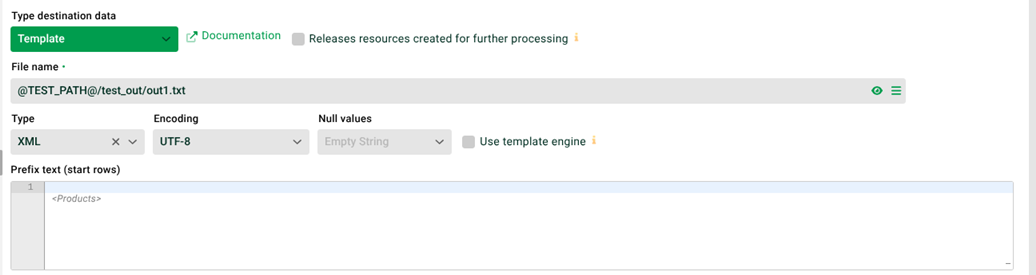
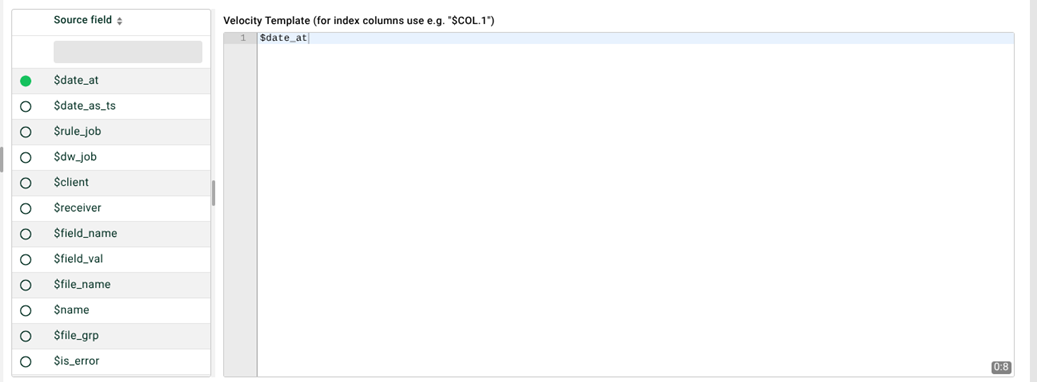

(1) File name with absolute path: The path and name of the destination file to be created. Paths below the installation directory of the Integration Server can be specified relatively with "./". NOTE Variables, see (3), and placeholders, see tooltip, can be used.
(2) Icon right of (1): Displays the destination file.
(3) Icon right of (2): Selection of ETL/ELT variables.
(4) Type: Select XML or JSON.
(5) Null values: The replacement value for destination fields without value.
(6) Prefix text: The prefix text is generated once per task.
Example:
<?xml version="1.0" encoding="iso-8859-1"?>
<Products>
(7) Velocity template: This area is generated per row. ETL/ELT fields and ETL/ELT variables can be used. Velocity syntax is allowed. NOTE : Each time (6), (7) and (8) are executed, an empty line is placed in front of the generated text in the destination file. Example:
<Product>$COL.1</Product>(8) Suffix text: The suffix text is generated once per task. NOTE : You cannot use custom ETL/ELT fields from this task (in which the template destination data is defined). However, it is possible to use custom ETL/ELT fields from higher-level tasks or ETL/ELT variables.
Example:
</Products>(9) Use template engine: If you are not using any Velocity engine functions, you can deactivate this option (faster processing).
(10) Miscellaneous ETL driver settings: Opens a dialog for special driver properties of the template engine. Which properties take effect depends on Type (4) and Use template engine (9).
Available properties when Type = XML with the template engine enabled:
escape_xml: Escapes XML special characters in inserted variables when set totrue.force_wrap_variables: Resolves inserted variables robustly even without explicit Velocity wrapping syntax when set totrue.
Available properties when Type = JSON:
force_wrap_variables: Resolves inserted variables robustly even without explicit Velocity wrapping syntax when set totrue.
NOTE : When Type = JSON, only force_wrap_variables is evaluated. escape_xml has no effect in this case.