Actions – Abstract
This action adds or removes one or more CSS (Cascading Style Sheets) classes for a form element.
This action adds or removes one or more CSS (Cascading Style Sheets) classes for a form element.
NOTE This action is intended for advanced configurations regarding animations or custom styles and requires basic knowledge of Cascading Style Sheets.
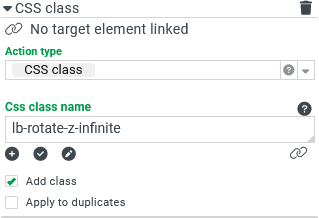
The CSS class action features the following parameters:
The "Target element" defines which element the action will be applied to. The element containing the action serves as a default.
The CSS class name defines which CSS classes should be added or removed for the "Target element". In accordance with HTML, multiple class names are separated by a space (e.g. Class1 Class2 Class3). In addition, the value entered here is interpreted as a Calculation expression, which means that the class names can also be derived and combined as desired.
Depending on the Add class option, CSS classes are being added (checked) or removed (unchecked).
Custom CSS classes for use with this action can be configured as "Expert settings" in the menu item Styles.
NOTE Static assignments of CSS classes to Form elements are possible by the "CSS class" property without executing actions.
Example
When a button in a form is clicked, a Lobster_data profile is run, which may have a relatively long runtime of several seconds.
To inform the user that this profile call is already being executed, the neighboring image (cog icon) should appear "in rotation" as long as the profile runs.
This can be achieved by a predefined CSS class lb-rotate-z-infinite, which is added and removed by two separate behaviors of the button:
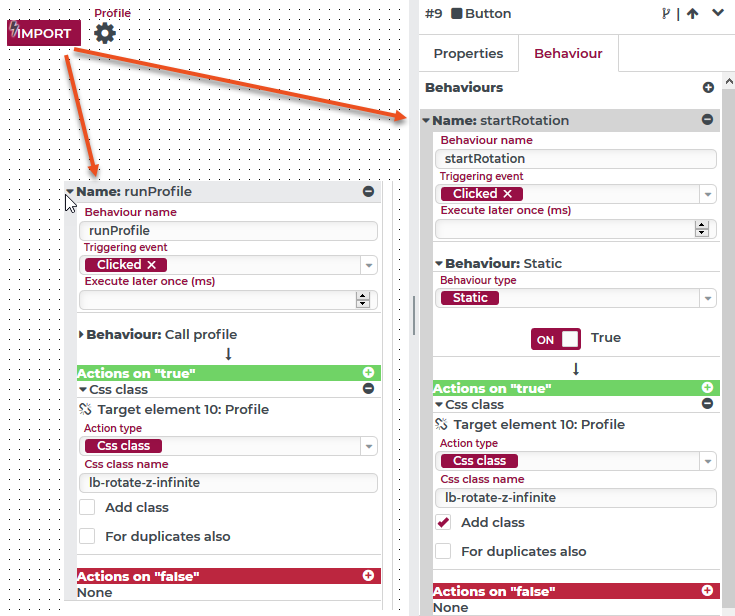
This screenshot was manipulated, so both behaviors are visible in full and side by side.
Both behaviors respond to the Click event of the buttons and are executed in the configured sequence (startRotation, runProfile).
The Behavior name "startRotation" adds the CSS class name
lb-rotate-z-infiniteto the icon element labelled as "Profile" (Add class option checked)."runProfile" runs the profile per behavior and removes the CSS class name
lb-rotate-z-infinitewhen finished (Add class option unchecked)
Effect:
When the button is clicked in the operative portal (or in test mode) the icon rotates until the profile is finished.