The Lobster Data Platform (LDP) forwards HTTP requests differently than the legacy system _data 4.6. By default, everything runs through a passive NIO tunnel. Anyone performing migration or troubleshooting must be able to distinguish between the three mechanisms: forward.properties, addStandardServlets, and tunnelHttp. This article explains the default behavior, the three extension options, and the differences from the legacy configuration.
NOTE This behavior applies to the LDP starting with version 26.1.2.
Default behavior of the LDP
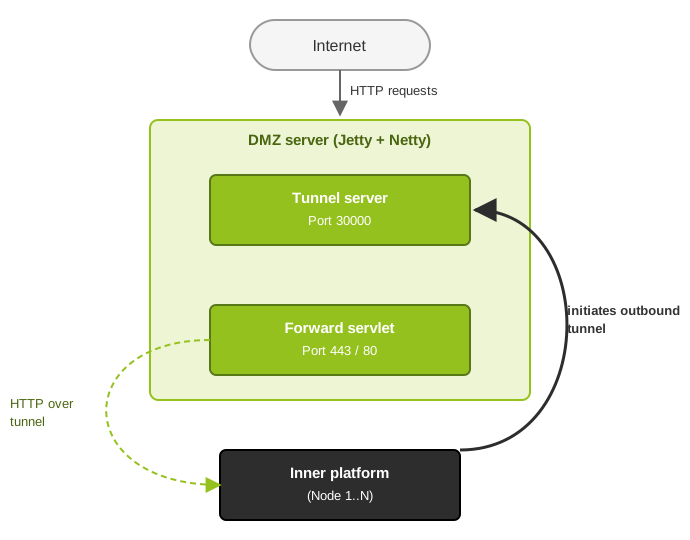
By default, the LDP uses a tunnel-based reverse proxy on the DMZ server. The component is called dmz.server. It forwards the entire HTTP root (/) to the inner platform via a passive NIO tunnel.
This has three implications for the configuration:
You do not need to enable
addStandardServlets. The DMZ server automatically forwards all HTTP requests.You do not need a
forward.propertiesfile. Ideally, the file shouldn't exist at all.The entire platform UI is accessible via the DMZ, including the login page. This is by design.
In a high availability (HA) setup, the DMZ server distributes requests to the working nodes using the round-robin method. It routes authenticated requests to the correct node using session affinity. To do this, it uses the X-ENV-SessionToken header.
Connection direction
The connection direction is reversed compared to the legacy behavior. The inner platform establishes the tunnel connection to the DMZ server. Inbound firewall rules from the DMZ network to the inner network for HTTP traffic are not required.
Required ports
Port | Direction | Protocol | Purpose |
|---|---|---|---|
30000 | Inner → DMZ | TCP (TLS) | Tunnel connection. The inner platform connects outward. |
8020 | Inner ↔ DMZ | TCP | MessageService communication, bidirectional. |
443/80 | External → DMZ | TCP | HTTPS or HTTP for external requests. |
Auto-discovery
If no DmzServerApp is configured in the startup_dmz.xml file, the DmzServerAutoConfigurator takes over. It automatically starts a DMZ server with the following default values:
Tunnel port:
30000. You can change the port using the system propertydmz.tunnel.port.Tunnel secret: generated automatically. The LDP stores it in
./etc/dmz_tunnel_secret.property.Proxy context:
/. The DMZ server forwards the entire HTTP root.Load balancing: enabled.
Restrict login access to the DMZ
The LDP makes the entire platform UI available via the DMZ. This means that the login page is also accessible from outside the network. This might surprise you. You are used to the legacy behavior, where the DMZ only forwards specific paths.
Administrators control access through user and role management. Each has a flag for DMZ login. Set the flag to prevent the role from logging in via the DMZ.
Example: Monitoring roles are allowed to log in via the DMZ. Administrative roles are restricted to internal access.
NOTE For details on configuration, see Roles in the "Administration" documentation.
addStandardServlets: Enable additional servlet contexts
The addStandardServlets parameter in the CommunicationForwardManager enables additional HTTP forwarding servlets on the DMZ server. These servlets use the legacy mechanism. They operate in parallel with the tunnel proxy. The legacy mechanism consists of HttpForwardServlet and forward.properties.
Configuration
<Call name="addApplication">
    <Arg>
        <New class="com.ebd.hub.datawizard.app.CommunicationForwardManager">
            ...
            <Call name="addStandardServlets">
                <Arg type="boolean">true</Arg>
            </Call>
            ...
        </New>
    </Arg>
</Call>
Active contexts
When addStandardServlets=true is set, the LDP activates the following servlets on the DMZ server.
IMPORTANT Case sensitivity matters. Define both variants for Request/request and Trigger/trigger.
Servlet | Context and path | Purpose |
|---|---|---|
|
| DataWizard trigger endpoint, lowercase. |
|
| DataWizard trigger endpoint, uppercase. |
|
| DataWizard request endpoint, lowercase. |
|
| DataWizard request endpoint, uppercase. |
|
| DataWizard registration endpoint. |
|
| OAuth 2.0 callback endpoint. |
| AS2 partner communication. Active only if | |
|
| Monitoring endpoint via |
|
| Cloud integration endpoint. |
|
| Link endpoint. |
Requirement: forward.properties
CAUTION
If you enable
addStandardServlets, the file./etc/forward.propertiesmust exist and be configured correctly. Each servlet resolves its destination viaforward.properties. Without the appropriate entries, requests will return an HTTP 404 error.
Sample configuration:
/dw/request/*=http://<URL/IP and port of the inner Integration Server>/dw/request
/dw/Request/*=http://<URL/IP and port of the inner Integration Server>/dw/Request
/dw/trigger/*=http://<URL/IP and port of the inner Integration Server>/dw/trigger
/dw/Trigger/*=http://<URL/IP and port of the inner Integration Server>/dw/Trigger
/dw/oauth2/*=http://<URL/IP and port of the inner Integration Server>/dw/oauth2
/dw/cloud/*=http://<URL/IP and port of the inner Integration Server>/dw/cloud
/dw/register/oauth2/*=http://<URL/IP and port of the inner Integration Server>/dw/register/oauth2
/partner/AS2Retrieve/*=http://<URL/IP and port of the inner Integration Server>/partner/AS2Retrieve
When do you need addStandardServlets?
In most LDP installations, you do not need addStandardServlets. The tunnel proxy already forwards the entire HTTP root.
There are two cases in which it makes sense to enable this feature:
You want to route specific paths through the legacy mechanism. The legacy mechanism operates via a direct HTTP connection or a MessageService tunnel.
You need compatibility with existing configurations. These are based on
forward.properties.
NOTE
After the servlet is registered, the
CommunicationForwardManagerautomatically callsstartDMZServerApp(). This triggers theDmzServerAutoConfigurator. The LDP therefore also starts the tunnel proxy, unless it is already configured in the XML. Both mechanisms then run in parallel – the tunnel proxy and the legacy servlets.
tunnelHttp: Tunnel HTTP requests via the MessageService
The tunnelHttp option provides an alternative transport method. The DMZ server does not establish a direct HTTP connection to the inner system. Instead, it tunnels HTTP requests through the MessageService on port 8020.
Configuration
<Set name="tunnelHttp">true</Set>Method of operation
With tunnelHttp=true, the LDP processes an external request in five steps:
External HTTP requests are received by the
HttpForwardServlet.The servlet resolves the destination using
forward.properties.Instead of a direct HTTP connection, the MessageService sends the request to the inner platform via
tunnelByMessage().The inner platform processes the request. It sends the response back via the same MessageService.
The DMZ side skips the virus scan. Instead, this is handled by the inner platform.
Requirements
You must set
handleAS2totrue. The startup validation enforces this with the message AS2 service must run locally if HTTP tunnel is used.You must configure
forward.properties. The file resolves the target paths.
Comparison of transportation routes
Aspect | NIO tunnel (dmz.server) | tunnelHttp (MessageService) | Direct HTTP connection |
|---|---|---|---|
Proxy scope | Complete HTTP root. | Individual paths defined in | Individual paths defined in |
Connection direction | Inner → DMZ. Passive. | Bidirectional via port 8020. | DMZ → Inner. Active. |
Firewall rules | Tunnels only: Inside → DMZ. | Only MessageService on port 8020. | DMZ → Inner. HTTP and HTTPS ports. |
Performance | High. NIO with connection pooling. | Subject to MessageService constraints. | Central. Direct connection. |
Configuration | XML or Auto-discovery. |
|
|
Cluster support | Round-robin and session affinity. | No. A single target. | No. A single target. |
NOTE
The
tunnelHttpmode is less efficient than the NIO tunnel approach. It is subject to the limitations of the MessageService. It is only suitable for scenarios that do not use an NIO tunnel or a direct HTTP connection. Which configuration should be used when?
Scenario | addStandardServlets | forward.properties | tunnelHttp | Tunnel proxy |
|---|---|---|---|---|
Standard LDP, recommended. |
| Not necessary |
| Automatically enabled. |
Legacy paths in addition to the tunnel. |
| Required |
| Automatically enabled. |
Legacy paths via MessageService. |
| Required |
| Automatically enabled. |
Legacy only, no tunnel. |
| Required | Optional | Manually disabled. |
NOTE
For new LDP installations, we recommend the default configuration. It does not require
addStandardServletsorforward.properties. The tunnel proxy handles all HTTP redirects. It also provides cluster support, WebSocket support, and dynamic node management.
Comparison: LDP and Legacy _data 4.6
Aspect | LDP | Legacy _data 4.6 |
|---|---|---|
Proxy scope | Entire HTTP root. Full platform UI. | Individual paths such as |
Connection direction | The inner platform connects to the DMZ. Passive. | DMZ connects to the inner platform. Active. |
Firewall rules | Tunnel: Inner → DMZ. No incoming HTTP ports to the inner network. | DMZ → Inner. Inbound access to HTTP server ports is required. |
User management | Platform users with role-based access control. | Separate WebMonitor users on the DMZ. |
WebMonitor | Not necessary. The Inner platform proxies the UI. | Separate |
Cluster support | Round-robin and session affinity. | None. One target per path. |
WebSocket-Support | Full WebSocket proxying. | HTTP only. |
Configuration | XML ( | File |
Login to the DMZ | Possible. Can be restricted via roles. | WebMonitor login only. Separate user. |
Migration notes from _data 4.6
When migrating from _data 4.6 to the current platform, check these three points:
Remove WebMonitorApplication. Delete the entry from
startup_dmz.xml. Also remove the associated WebMonitor database configuration fromdatabase.xml.Check forward.properties. If you are using only the tunnel proxy, you no longer need this file. You can delete it.
Migrate users. Platform users with the appropriate roles will replace the WebMonitor users.