Important note: Databases and JDBC drivers used to access databases are third-party products and are neither supported nor provided by Lobster. Any support or advice on databases or JDBC drivers that may nevertheless be provided by the Lobster support is voluntary and in no way implies a transfer of responsibility to them. The installation, operation and maintenance of databases/JDBC drivers, or measures carried out on them, are always and without exception the responsibility of the customer. The Lobster support will of course be happy to assist you with the configurations necessary in your system to connect functioning third-party systems.
This guide describes how to connect a MongoDB database. This does not cover the setup of MongoDB itself. Please use the MongoDB manuals for this.
Basic requirements
You should already have the MongoDB driver "mongo-java-driver.jar" in your "./lib" directory. If not, please contact our support staff.
Configuration file ./etc/mongodb.xml
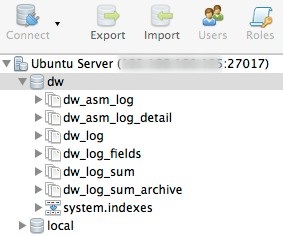
The database alias for logging must be named _data. If this is not done, the logging will not be switched to the MongoDB!
Pooling and caching is done by the driver itself. Option catalogName references to the database holding the so-called collections. Since MongoDB supports clustered servers, you can define multiple servers under one alias. Following an example.
Important note: The following configuration variant is only valid from Lobster Integration version 4.6.5 (before that, the old variant applies).
<Configure class="com.ebd.hub.services.nosql.mongo.MongoDBConnectionService">
	<Set name="verbose">False</Set>
	<Call name="initPool">
		<Arg>
			<New class="com.ebd.hub.services.nosql.mongo.MongoDBSettings">
				<Set name="alias">_data</Set>
				<Call name="addDatabaseEntry">
					<Arg>mongodb://[username:password@]host1[:port1][,...hostN[:portN]][/[defaultAuthDB][?options]]</Arg>
				</Call>
				<Set name="catalogName">hugo</Set>
			</New>
		</Arg>
	</Call>
</Configure>
So, for example:
...
 <Call name="initPool">
	<Arg>
		<New class="com.ebd.hub.services.nosql.mongo.MongoDBSettings">
			<Set name="alias">_data</Set>
			<Call name="addDatabaseEntry">
				<Arg>mongodb://mongouser:mongopassword@localhost/admin</Arg>
			</Call>
			<Set name="catalogName">dw</Set>
		</New>
	</Arg>
</Call>
...
The password can also be specified in obfuscated form with the placeholder <password> (in escaped form, exactly as shown below, whereby mongouser and myObfuscatedPassword still have to be replaced, of course.) and an additional line.
... <Arg>mongodb://mongouser:<password>@localhost/admin</Arg> <Arg>OBF:myObfuscatedPassword</Arg> ... |
Reacting to change events
It is possible to respond to change events in MongoDB. If a defined change event occurs, a macro can be triggered. The macro must have the access type “Everyone” and can be specified by ID or name. Specifying the name is helpful if the macro does not yet exist at startup and is only created later (and you do not yet know the ID).
Note: Listeners are only active on the node controller in a load balancing system. If listeners are defined on a working node and the working node becomes the node controller, these listeners are activated.
Note: If the connection is briefly interrupted (error), the process will resume after the last event received (MongoDB refers to this as “resumeAfter”). This does not apply to server restarts or restarts of the MongoDB service. In this case, the process will start with the first event after the restart.
...
<Call name="initPool">
	<Arg>
		<New class="com.ebd.hub.services.nosql.mongo.MongoDBSettings">
			<Set name="alias">some_alias</Set>
			<Call name="addDatabaseEntry">
				<Arg>mongodb://mongouser:mongopassword@localhost/admin</Arg>
			</Call>
			<Set name="catalogName">myDB</Set>
			<!-- Change event listener -->
			<Call name="addListener">
				<Arg>
                    <New class="com.ebd.hub.datawizard.app.listener.MongoDBMacroListener">
                        <Arg>myDB</Arg> <!--database -->
                        <Arg>events</Arg> <!-- collection -->
                        <Arg><![CDATA[[{"$match": {"operationType": {"$in": ["update", "replace"]}}}]]]></Arg> <!-- aggregate pipeline -->
                        <Arg>Macro MongoDBEvent</Arg> <!-- macro name or id
                        <Arg type="integer">-577739628</Arg> macro id -->
                        <Arg>-1</Arg> <!-- client id -->
                        <Arg type="boolean">false</Arg> <!-- report full document (true) or only _id  (false) -->
                        <Set name="logging">true</Set> <!-- show result of macro in log -->
                    </New>
                </Arg>
            </Call>
		</New>
	</Arg>
</Call>
...
Parameter | Description |
|---|---|
database | The database. |
collection | The collection. |
aggregate pipeline | This defines which events are responded to. In this case, “update” and “replace.” |
macro name or id | Specify the macro by name or ID. |
client id | The client (ID) for which the listener applies. Here, -1 for the default client. |
report full document or only id | If false, only the _id of the document is passed to the macro. If true, the entire document is passed. |
show result of macro in log | If true, the result of the macro is logged. |
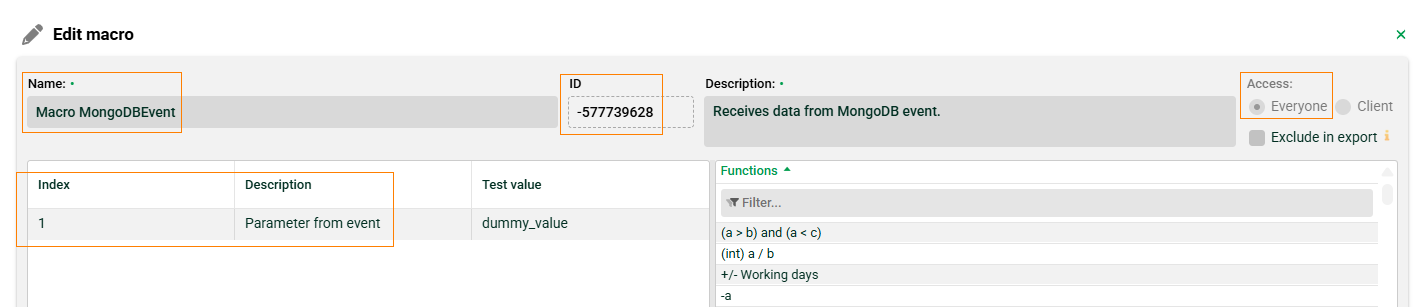
Another example where events of type “update/insert” and “replace” are handled with different macros:
...
<Call name="addListener"><Arg>
	<New class="com.ebd.hub.datawizard.app.listener.MongoDBMacroListener">
		<Arg>myDB</Arg> <!--database -->
		<Arg>events</Arg> <!-- collection -->
		<Arg><![CDATA[[{"$match": {"operationType": {"$in": ["update", "insert"]}}}]]]></Arg> <!-- aggregate pipeline -->
		<Arg>Macro MongoDBEvent for UPDATE and INSERT</Arg> <!-- macro name -->
		<Arg>-1</Arg> <!-- client id -->
		<Arg type="boolean">false</Arg> <!-- report full document (true) or only _id  (false) -->
		<Set name="logging">true</Set> <!-- show result of macro in log -->
		</New>
	</Arg>
</Call>
<Call name="addListener"><Arg>
	<New class="com.ebd.hub.datawizard.app.listener.MongoDBMacroListener">
		<Arg>myDB</Arg> <!--database -->
		<Arg>events</Arg> <!-- collection -->
		<Arg><![CDATA[[{"$match": {"operationType": {"$in": ["replace"]}}}]]]></Arg> <!-- aggregate pipeline -->
		<Arg>Macro MongoDBEvent for REPLACE</Arg> <!-- macro name -->
		<Arg>-1</Arg> <!-- client id -->
		<Arg type="boolean">false</Arg> <!-- report full document (true) or only _id  (false) -->
		<Set name="logging">true</Set> <!-- show result of macro in log -->
	</New>
	</Arg>
</Call>
...
Configuration file "./etc/factory.xml"
Enable or add the following section in your file ./etc/factory.xml (right after adding the MongoDBConnectionService).
<Call name="addService">
	<Arg>com.ebd.hub.services.nosql.mongo.MongoDBConnectionService</Arg>
	<Arg>etc/mongodb.xml</Arg>
</Call>
Next job number
The next available job number can be created by two methods. Using the internal storage service or a database. When using MongoDB, you have to use the database. Important note: If the database does not return a job number (e.g. because the database hub cannot be reached), Lobster Integration is terminated. Note: You can find examples in file ./conf/samples/db_sequence.sql
Example for MySQL
CREATE TABLE `seq_jobnr_dw` (
  `val` bigint(16) unsigned NOT NULL
)
SET GLOBAL log_bin_trust_function_creators = 1;
delimiter //
create function getNextJobNr() returns bigint
begin
update hub.seq_jobnr_dw set val=last_insert_id(val+1);
RETURN last_insert_id();
end
//
Then add the following option to the configuration file ./etc/startup.xml.
<Set name="sequenceProcedureCall">select getNextJobNr()</Set>Example for MSSQL
create sequence getNextJobNr as BIGINT start with 1 increment by 1;Then add the following option to the configuration file ./etc/startup.xml.
<Set name="sequenceProcedureCall">SELECT NEXT VALUE FOR getNextJobNr</Set>Example for Oracle
CREATE SEQUENCE GetNextJobNr
START WITH     1
INCREMENT BY   1;
Then add the following option to the configuration file ./etc/startup.xml.
<Set name="sequenceProcedureCall">SELECT GetNextJobNr.NEXTVAL FROM dual</Set>Archive option in "./etc/startup.xml"
By using MongoDB, you can move outdated log entries of jobs into a different collection. To do so, add the following.
<Call name="setLongTimeArchive">
    <Arg type="int">30</Arg>
    <Arg type="int">900</Arg>
</Call>
In this example, all log entries older than 30 days will be moved to the archive collection and will be deleted from there after 900 days. When requesting log entries older than 30 days, they will be searched for in the archive collection rather than in the normal one.
The archive is accessed when a time period within the archive is requested under Control Center → Logs → Overview.
Log migration
When your system has been started successfully, you can merge your old log messages of the SQL database into MongoDB. The migration will be done in the background, so do not stop the server until the job has finished!
Open the Admin Console and navigate to "Class Execution". Enter com.ebd.hub.datawizard.log.mongodb.TransferLogEntries as the class name and the used database alias of the SQL logging (normally this is hub). Optionally, you can enter the DataCockpit alias if configured. Execute the class and check file ./logs/wrapper.log on Windows or ./logs/console.txt on Unix/Linux systems. A message like Finished, overall time is XXXs will be output at the end. Only table dw_log_sum will be migrated to the MongoDB. If you need old detail logs, you have to select them from the old dw_log table.
MongoDB and DataCockpit
If you are using a MongoDB and DataCockpit, please insert an entry like the following in file ./etc/startup.xml
<Call name="addApplication"><Arg>
		<New class="de.lobster.webmon.apps.WebMonitor">
			<Set name="alias">hub</Set>
			<Set name="remoteHost"></Set>
			<Set name="remotePort">8020</Set>
			<Set name="mailSender">first.last@lobster.de</Set>
			<Set name="retainHeaderLogs">999</Set>
			<Set name="cleanUpTime">2</Set>
			<Set name="serverName">Main Server</Set>
		</New>
	</Arg></Call>
and additionally in file ./etc/mongodb.xml
<Call name="initPool">
	<Arg>
		<New class="com.ebd.hub.services.nosql.mongo.MongoDBSettings">
			<Set name="alias">_data</Set>
			<Call name="addDatabaseEntry">
				<Arg type="String">mongodb://localhost:27017</Arg>
			</Call>
			<Set name="catalogName">hugo</Set>
		</New>
	</Arg>
</Call>

<Call name="initPool">
	<Arg>
		<New class="com.ebd.hub.services.nosql.mongo.MongoDBSettings">
			<Set name="alias">hub</Set>
			<Call name="addDatabaseEntry">
				<Arg type="String">mongodb://localhost:27017</Arg>
			</Call>
			<Set name="catalogName">hugo</Set>
		</New>
	</Arg>
</Call>