Checking the existing configuration of an SAP alias
If the SapConnectionService is licensed and installed as an add-on to the Lobster Integration Server, access to a specific SAP system has been configured via an SAP alias in the configuration file ./etc/sap.xml. Here is an example of this XML section.
<Call name="initPool">
	<Arg>
		<New class="com.ebd.hub.services.sap.SapSettings">
			<Set name="alias">sap</Set>
			<Set name="allowGrowing">true</Set>
			<Set name="host">192.168.130.236</Set>
			<Set name="system">00</Set>
			<Set name="user">MY_USER</Set>
			<Set name="password">MY_PASSW</Set>
			<Set name="minSize">1</Set>
			<Set name="idleTime">300000</Set>
			<Set name="client">000</Set>
			<Set name="unicode">False</Set>
			<Call name="setRequestServerSettings">
				<Arg>192.168.130.236</Arg>
				<Arg>sapgw00</Arg>
				<Arg>LOBSTER_T</Arg>
			</Call>
			<Set name="language">D</Set>
		</New>
	</Arg>
</Call>
The Call section configures the request server for the SAP alias sap. The request server of the Lobster Integration Server registers itself at the SAP system as a 'registered server program' with the program ID LOBSTER_T (2).
In the SAP system, in SM59 (3), a RFC destination with name LOBSTERTESTSYSTEM and connection type T has been defined, see (1).
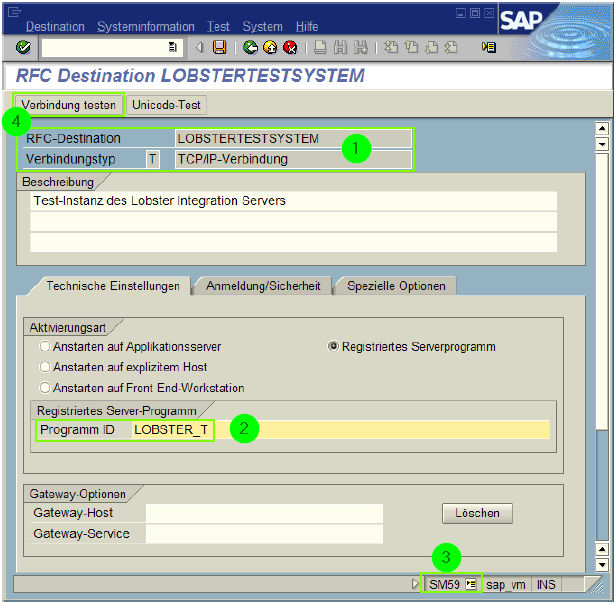
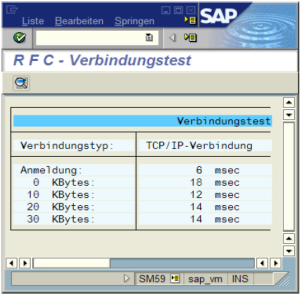
Use button (4) to test the connection.
Checking the existence of the DTD file
The XML file used to define the interface of the RFC to be provided must comply with a specific structure defined by a DTD file. This DTD file is expected under path and name ./etc/dtd/sap_rfc_configure_1_0.dtd. If this file does not exist in your system, please contact our support staff.