This page shows all existing Google Pub/Sub connections. Google Pub/Sub is a fully-managed cloud messaging service.

Creating a new connection (synchronous subscription)
Use the context menu to create a new connection. Synchronous subscribers only process the next message if the previous has been acknowledged.
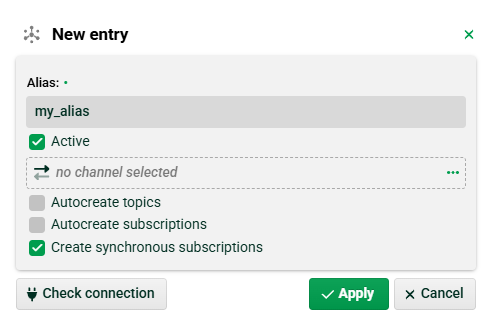
(1) Alias: You can use any name for the alias.
(2) Active: Set this checkbox to activate the connection.
(3) Channel: You need to select a Google Pub/Sub channel that contains the credentials. See section below.
(4) Autocreate topics: If this checkbox is set and you specify a topic (e. g. in Input Agent Google Pub/Sub) that doesn’t yet exist, it will automatically be created. NOTE This requires the configuration of appropriate Identity and Access Management (IAM) settings on the Google Cloud side for your service account (ask your Google Pub/Sub administrator).
(4) Autocreate subscriptions: If this checkbox is set and you specify a subsription (e. g. in Input Agent Google Pub/Sub) that doesn’t yet exist, it will automatically be created. NOTE This requires the configuration of appropriate Identity and Access Management (IAM) settings on the Google Cloud side for your service account (ask your Google Pub/Sub administrator).
(5) Create synchronous subscriptions: Set this checkbox.
Creating a new connection (asynchronous subscription)
Use the context menu to create a new connection. Asynchronous subscribers processes multiple messages in parallel.
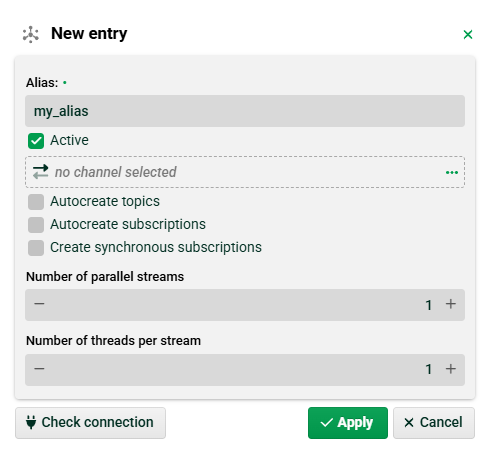
(1) Create synchronous subscriptions: Do not set this checkbox.
(2) Number of parallel streams: Determines how many streams are opened to the Pub/Sub server. Each individual stream has a physical throughput limit (approximately 10 MB/s). If you need to ingest more, you must increase the number of parallel streams to avoid a bottleneck. NOTE See “setParallelPullCount()” on page https://docs.cloud.google.com/pubsub/docs/concurrency-control#java
(3) Number of threads per stream: If your threads are too slow (not enough threads) to clear the messages, it could lead to a memory overflow. NOTE See “setSystemExecutorProvider()” on page https://docs.cloud.google.com/pubsub/docs/concurrency-control#java
Google Pub/Sub channel
Create a new channel of type “Google Pub/Sub“.
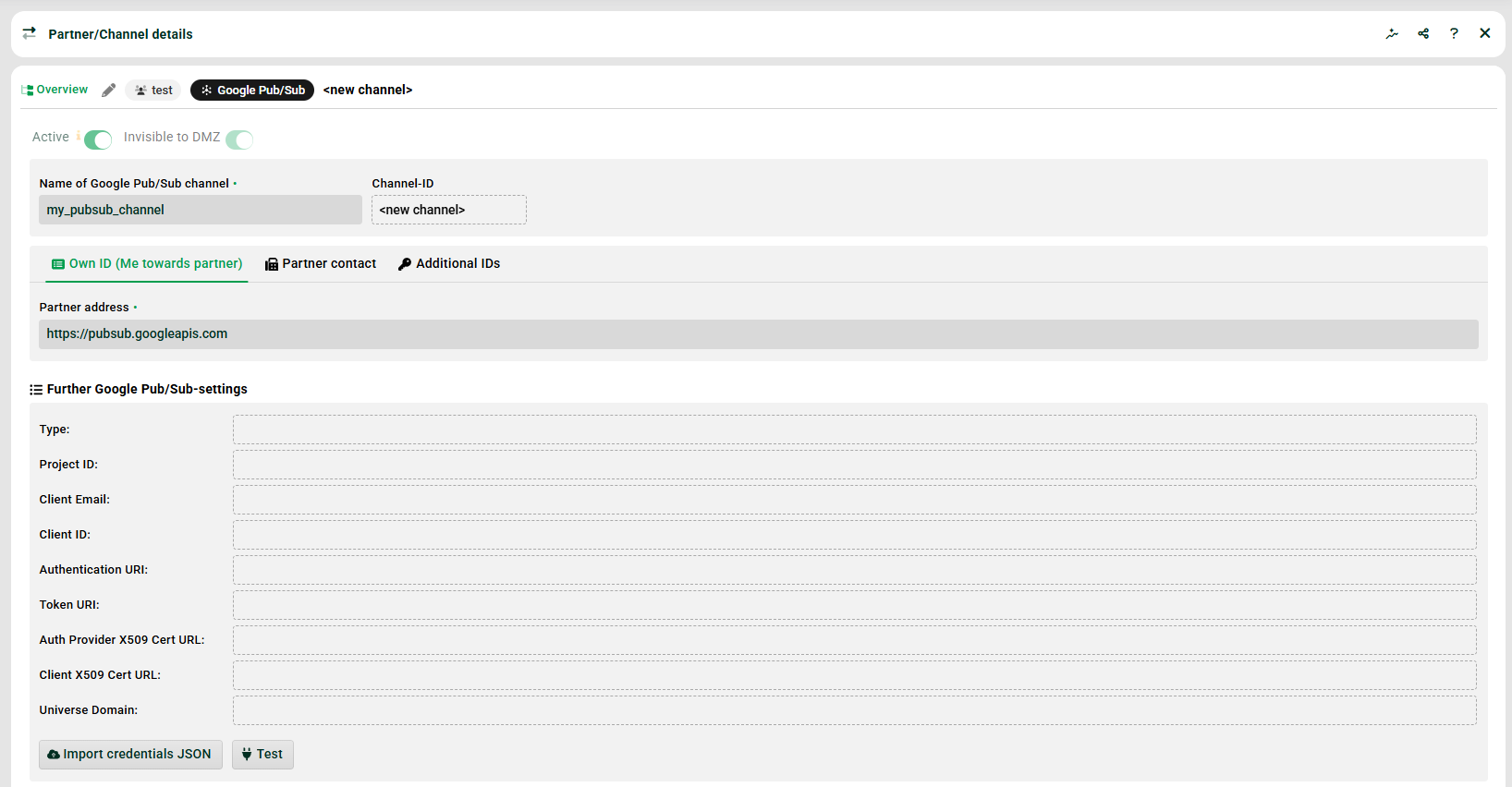
(1) Name of Google Pub/Sub channel: You can use any name here.
(2) Partner address: Use the global endpoint “https://pubsub.googleapis.com”. NOTE You can also use regional endpoints here, but that is usually not necessary (ask your Google Pub/sub administrator).
(3) Further Google Pub/Sub settings: These values are read-only and will appear once you have imported the credentials JSON file (4).
(4) Import credentials JSON: Use this button to upload your credentials JSON file (also known as a Service Account key). This file has to be created and downloaded in your Google Cloud Console (this can only be done by your Google Pub/Sub administrator).