See also: MQTT (Control Center).
This page shows all existing MQTT connections. Via the context menu, you can edit and delete these or create new ones.
Lobster Integration always acts as an MQTT client and not as a server and supports MQTT 3.1.1 and MQTT 5.
Creating a connection
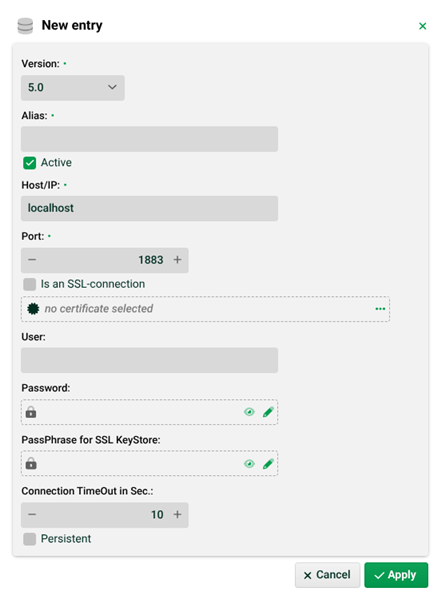
(1) Alias: The alias (name) of the connection).
(2) Active: Only active connections (set this checkbox) can be used to receive and send messages.
(3) Host/IP, Port: The URL/IP and the port of the MQTT server to connect to. IMPORTANT Lobster recommends the use of HiveMQ as MQTT server.
(4) Is an SSL connection: If SSL is used, the keystore, with the client certificate in format PKCS#12, is expected as file ./conf/mqtt/<alias>/keycert.p12. The truststore, containing the public key of the server, is expected as file ./conf/mqtt/<alias>/trustStore. The keystore and truststore have to be protected with the same passphrase (7). Obfuscation is allowed. See also (5).
(5) Certificate selection: As an alternative to using a truststore, a certificate can be selected here. The certificate need to have option TLS Client set. If one has been selected, the value in (7) is deleted and the field disappears.
(6) User, Password: The username and password for the MQTT server. For Vault passwords see section Vault provider configuration.
(7) PassPhrase for SSL KeyStore: If (4) is set, but there is no passphrase specified (and (5) is not set), the SSL connection will not use a client certificate and the server certificates will not be checked. Keystore and truststore are not necessary in that case. For Vault passwords see section Vault provider configuration.
Note: In most cases, option (4), that is only SSL, will suffice and no client certificate will be necessary.
Converting HTTP requests into MQTT messages
It is possible to transform HTTP requests into MQTT messages.
The purpose is to be able to convert a large number of HTTP requests into MQTT messages in a simple way without much logging and without many jobs and to then process them (and maybe filter them) as a single job.
Example: Trucks send GPS data every 5 minutes. You would like to collect these for a period of one hour and then process them together.
Servlet
You have to insert the following servlet in configuration file ./etc/hub.xml, preferably before section <Ref id="RequestLog">.
The servlet is mounted under the context /mqtt, i.e. HTTP requests to http(s)://<URL-or-IP-of-the-Integration-Server>/mqtt/ are processed by the servlet.
<Ref id="Contexts">
	<Call name="addHandler">
		<Arg>
			<New id="mqtt" class="org.eclipse.jetty.servlet.ServletContextHandler">
				<Arg type="int">1</Arg>
				<Set name="contextPath">/mqtt</Set>
			</New>
		</Arg>
	</Call>
</Ref>
<Ref id="mqtt">
	<Call name="addServlet">
		<Arg>
			<New class="org.eclipse.jetty.servlet.ServletHolder">
				<Set name="className">com.ebd.hub.datawizard.mqtt.HttpToMqtt</Set>
				<Set name="name">Http2Mqtt</Set>
			</New>
		</Arg>
		<Arg>/*</Arg>
	</Call>
</Ref>
Configuration file
You also need a configuration file ./etc/admin/datawizard/http2mqtt.properties. There you can define HTTP request paths (below /mqtt) and the MQTT alias and topic of the MQTT server to which the HTTP requests transformed into MQTT messages are redirected.
# path=alias:topic
# where a path like /a/b/c is used as a.b.c (no leading / and all / are replaced by .)
#
# sample:
proxy.gps=proxmox:gps
proxy.gps.separator=##new message##
Here HTTP requests (GET and POST) to path /mqtt/proxy/gps are converted into MQTT messages to topic gps of the MQTT server behind alias proxmox.
The entry <path>.separator (here proxy.gps.separator) defines a delimiter line (+NL) that is inserted before the payload. This is useful if you want to collect messages in an MQTT Input Agent (to be able to recognise what the individual messages are).
Example
The (GET) HTTP request https://<URL-or-IP-of-the-Integration-Server>/mqtt/proxy/gps?l=30&b=46&id=0815 is stored on topic gps (of the MQTT server behind alias proxmox) with the following payload.
l=30 b=46 id=0815 |
The query data is separated with NL (newline) and URL-decoded. NOTE With POST, the query string is inserted at the beginning, as with GET, and the body is then appended, separated with NL. URL decoding is done for ContentType "application/x-www-form-urlencoded".