Navigate to Administration → Base settings → Vault provider configuration.
A vault is a secure, encrypted storage system – comparable to a digital safe – that centrally stores credentials (usernames, passwords), tokens, and certificates. On this page, you configure your vault providers. Azure Key Vault and HashiCorp Vault are supported.

Adding a new provider
Open the context menu and select the desired provider type. The following sections describe the fields per provider type.
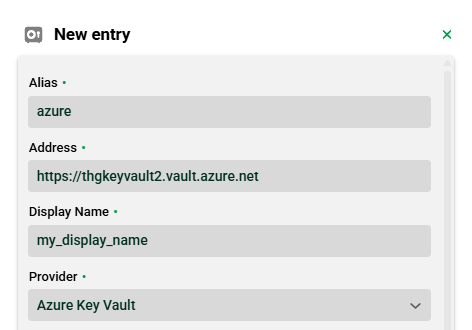
Azure Key Vault
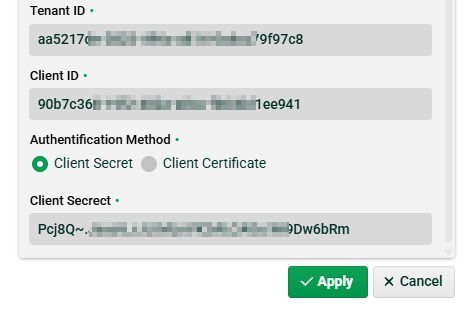
Field | Description |
|---|---|
Alias | Unique technical identifier of the vault provider. Freely selectable. Referenced in vault password identification strings and used as a prefix for the keystore alias. See section Keystore for certificates. |
Address | Endpoint URL of your Azure Key Vault (e.g., |
Display Name | Freely selectable name, used only for display in the GUI. |
Provider | Fixed value |
Tenant ID | Azure tenant ID. Provided by your Azure administrator. |
Client ID | Azure client ID (app registration). Provided by your Azure administrator. |
Authentification [sic] Method | Either Client Secret or PEM certificate. Your Azure administrator provides the respective credentials. |
Client Secrect [sic] or PEM | Depends on the selected authentication method. Stored securely in the vault provider entry. |
Activate KeyStore | Checkbox. Enables keystore access for certificates via this vault. See section Keystore for certificates. |
HashiCorp Vault
Field | Description |
|---|---|
Alias | Unique technical identifier of the vault provider. Freely selectable. Referenced in vault password identification strings. |
Address | Endpoint URL of your HashiCorp Vault server (e.g., |
Display Name | Freely selectable name, used only for display in the GUI. |
Provider | Fixed value |
Authentication [sic] Method | Token. The token is provided by your HashiCorp administrator. |
Token | Vault token for authentication against the HashiCorp server. |
Optional settings (expandable):
Field | Description |
|---|---|
Namespace | Optional HashiCorp namespace (enterprise feature). |
Connection Timeout(s) | Timeout for establishing a connection, in seconds. |
Read Timeout(s) | Timeout for read operations, in seconds. |
Read retries | Number of retry attempts for failed read operations. |
Read retry interval (ms) | Wait time between retry attempts, in milliseconds. |
KeyStore alias and mount | Checkbox. Enables keystore access for certificates via this vault. See section Keystore for certificates. |
Keystore for certificates
A keystore provides access to certificates stored in the vault. Configuration is done in the provider dialog and differs per provider type. External certificates are later selected via the keystore alias—not via the provider alias (see Certificates).
Azure Key Vault
Each Azure vault has exactly one keystore. It provides access to all certificates stored in the vault.
Enable the Activate KeyStore checkbox in the provider dialog.
The keystore alias is generated automatically according to the following convention:
<provider_alias>_keystore.
Example: provider aliasazure→ keystore aliasazure_keystore.
HashiCorp Vault
Multiple keystores per HashiCorp provider are possible—one keystore per mount point.
The mapping is defined under Optional settings in the KeyStore alias and mount table.
Column | Description |
|---|---|
Name | Keystore alias – freely selectable. This alias is used later for certificate selection. |
Value | Mount point in HashiCorp Vault under which the certificates of this keystore are stored. |
NOTE
The keystore alias is the reference value for certificates. For Azure, it is fixed by the naming convention; for HashiCorp, you define it per mount point.
Using vault passwords
Vault passwords can be used in the following places in the GUI:
Channels (FTP, HTTP, IoT, Mail, OFTP, SSH, X.400)
AMQP, MQTT, and TCP connections
Database connections
Transport manager connections
HTTP inbound agents
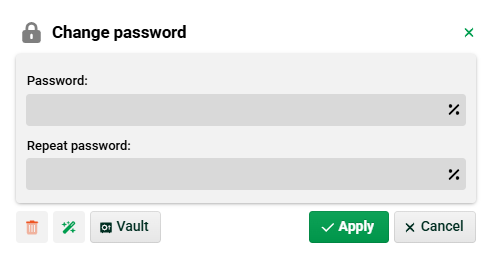
In the password dialog, click the Vault button. The selection dialog displays all passwords accessible via the configured providers.
NOTE
The selection depends on the provider type. Azure Key Vault uses direct access via an identifier key; HashiCorp Vault uses a deeper path hierarchy. Fields not required for the selected provider are filled in automatically and cannot be edited.
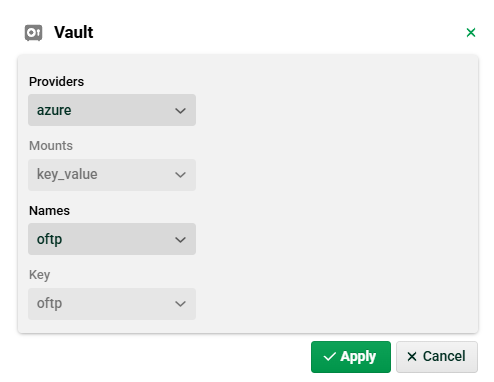
Field | Description (Azure) | Description (HashiCorp) |
|---|---|---|
Providers | Select the configured Azure provider. | Select the configured HashiCorp provider. |
Mounts | Not required (default: | Select the mount point. |
Names | Identifier key of the password. | Name of the secret at the mount point. |
Key | Not required (taken from Names). | Key within the secret. |
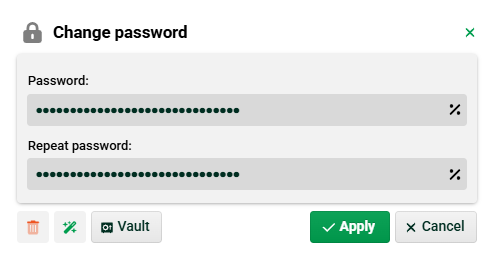
Once applied, the password is referenced in the dialog:

When displaying the password, you do not see the actual password but the vault password identification string:
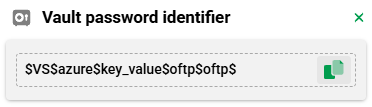
The format of this string is:
$VS$<provider_alias>$<mount>$<name>$<key>$
For Azure, <mount> is automatically set to key_value and <key> to the value of <name>.
Using vault certificates
External certificates from a vault are selected via the keystore alias, not the provider alias:
Azure Key Vault: Keystore alias follows the convention
<provider_alias>_keystore.HashiCorp Vault: Keystore alias corresponds to the name defined in the KeyStore alias and mount table.
For details on certificate selection, see the Certificates page.