Settings
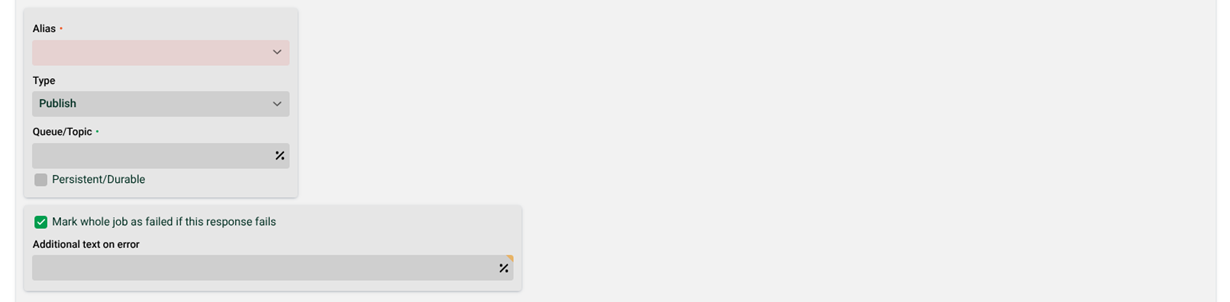
(1) Alias: Selection of an AMQP alias.
(2) Type: Selection of the type ("Publish", "Routing", "Topic" or "RPC"). The type "RPC" is synchronous, the others are asynchronous. Note: If you are using style "RPC", you have to specify a subsequent profile. See (4). The reason is that an RPC call generates a response and this response is processed by the subsequent profile.
(3) Queue/Topic: Name of the queue or the topic to send to. Note: See https://www.rabbitmq.com/getstarted.html, for example.
(4) Following profile: If you have selected type "RPC" in (2), you must specify a subsequent profile here. The profile must be active and have an Input Agent of type "Message".
(5) Max. execution/life time: Specifies the time in seconds the sending and processing of a message are allowed to take.
With a synchronous message, the profile waits until the target profile has finished processing (successfully or with errors). If the time set here is exceeded, this Response terminates with an error, although the target profile may eventually finish successfully.
In the case of an asynchronous or persistent message, the profile does not wait for the target profile, but the Response ends successfully after the data has been transferred. The message itself has a finite lifetime. If it could not be accepted by the target profile after this time, it will be deleted. The time set here is the maximum lifetime of the message. Note: The minimum lifetime is 12 hours (regardless of the set value).
(6) Message type: There are three different types of messages.
Synchronous. The profile sends the message and does not continue until the response has been received.
Asynchronous. The profile sends the message and continues immediately. The response is irrelevant for the further profile execution.
Persistent. Works almost like Asynchronous. Additionally, however, if the remote system cannot be reached, the message will be stored and resent every 50 ms. If the message could not be delivered after a maximum time (5), it is lost.
(7) Persistent/Durable: Set this checkbox if (3) is a durable queue (such a queue will survive a broker restart). Note: Does not apply to type "RPC".
(8) Routing key: The routing key is a message attribute that the server uses to decide how the message should be routed to queues. For details please refer to the documentation of the AMQP server used, e.g. here for RabbitMQ. Note: Does not apply to type "Publish".
(9) Mark whole job as failed if this response fails: Normally a job is not necessarily considered to be erroneous if a single Response fails (see section Status of Response - Error behaviour). But it can be enforced with this option here.
(10) Additional text on error: Here you can specify an additional log text for the error case.
AMQP message properties
To set a message property, you have to define a system variable of the form "AMQP_<name of the message property>" (upper and lower case in the property is considered). Example: With the variable AMQP_Year you can set the message property Year.
AMQP 0.9.1
If you are using AMQP 0.9.1, only certain message properties can be set with the following system variables.
AMQP_091BASIC_CONTENT_TYPE
AMQP_091BASIC_CONTENT_ENCODING
AMQP_091BASIC_MESSAGE_ID
AMQP_091BASIC_TIMESTAMP
AMQP_091BASIC_EXPIRATION
AMQP_091BASIC_APP_ID
AMQP_091BASIC_USER_ID
AMQP_091BASIC_TYPE
AMQP_091BASIC_PRIORITY
AMQP_091BASIC_CORRELATION_ID
AMQP 1.0
For the Message Properties MessageId and CorrelationId, the default is:
If no value is assigned to
CorrelationId, an automatically generatedUUIDis assigned.If there is no value assigned to
MessageId, a randomStringis assigned.
Starting with LDP Release 26.2.0, you can override this default behavior if necessary by assigning a value (as shown in the table) to a custom profile variable AMQP_SYS_MESSAGE_CORRELATION_ID_FORMAT.
IMPORTANT Requirements for using non-standard logic for
CorrelationIdandMessageID
Since variables can only be defined in the context of Phase 3 (Mapping), Mapping may need to be enabled for this purpose.
The
AMQP_SYS_MESSAGE_CORRELATION_ID_FORMATvariable must be explicitly defined in the profile (type:String).The
AMQP_SYS_MESSAGE_CORRELATION_ID_FORMATvariable must be assigned one of the values listed below when executing the response.
Assignment ( | Effect on | Effect on |
|---|---|---|
| Output as Default value: A string representation of an automatically generated | Output as Default value: random |
| Output as Default value: Hash value ( | Output as Default value: random |
| Output as Byte Array Default value: byte array of the string representation of an automatically generated | Output as Byte-Array Default value: random |
Standard* | Output as Default value: automatically generated | Output as Default value: random |
*) The default behavior, which is consistent with previous versions, applies if the variable does not exist, no value has been assigned, or a value not listed here has been assigned.
AMQP message headers
If you are using AMQP 1.0, you can set message headers with system variables of the form "AMQP_SYS_<name of the header>" (upper and lower case in the header is considered).
Message type
By default, the Response AMQP/JMS transfers data to the receiving server as byte message. To change this, since some servers cannot cope with this, the system variable AMQP_JMS_TEXTMESSAGE can be created in the profile with value true. The data will then be transferred as text message. In addition, the encoding in the Response must be set to UTF-8.
Body type
See system variable AMQP_SYS_BodyType.