This input agent enables communication via OPC UA. Lobster Integration can act either as an OPC UA client (subscription model) or as an OPC UA server.
Enable services
Add the client and/or server service to ./etc/factory.xml depending on the role:
...
<Call name="addService">
    <Arg>com.ebd.hub.services.iot.IoTServerService</Arg>
    <Arg>etc/iotserver.xml</Arg>
</Call>

<Call name="addService">
    <Arg>com.ebd.hub.services.iot.IoTClientService</Arg>
    <Arg>etc/iotclient.xml</Arg>
</Call>
...
Subscription model (client)
Lobster Integration acts as an OPC UA client and subscribes to values from a server.
Create the configuration file
Create ./etc/iotclient.xml. Each alias describes a connection to an OPC UA server:
<?xml version="1.0" encoding="ISO-8859-1"?>
<!DOCTYPE Configure PUBLIC "-//Lobster//DTD Configure 1.0//EN" "http://www.lobster.de/dtd/configure_1_1.dtd">

<Configure class="com.ebd.hub.services.iot.IoTClientService">
    <Set name="verbose">false</Set>

    <Call name="addAlias">
        <Arg>
            <New class="com.ebd.hub.services.iot.opcua.OpcUaClientSettings">
                <Set name="alias">boiler</Set>
                <Set name="endpointURL">opc.tcp://opcua.demo-this.com:51210/UA/SampleServer</Set>
                <Set name="minSize">4</Set>
                <Set name="maxSize">4</Set>
                <Set name="allowGrowing">true</Set>

                <!-- Optional: basic authentication -->
                <!--
                <Set name="username">some_user</Set>
                <Set name="password">some_password</Set>
                -->

                <!-- Optional: security policy (crypto suite) -->
                <!-- <Set name="opcSecurityPolicy">Basic256Sha256</Set> -->

                <!-- Optional: security mode (None / Sign / SignAndEncrypt) -->
                <!-- <Set name="opcSecurityMode">SignAndEncrypt</Set> -->

                <!-- Optional: certificate lookup (common name) -->
                <!-- <Set name="certificateSearchTerm">*CertificateName*</Set> -->
            </New>
        </Arg>
    </Call>
</Configure>
GUI
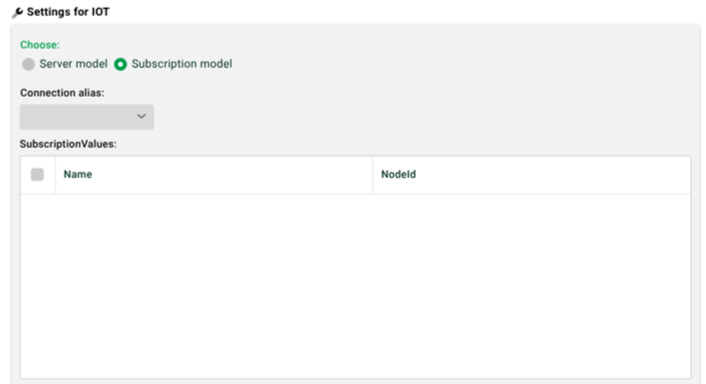
(1) Connection alias: At least one alias must be defined in the configuration file (see above) for the subscription model to be selectable.
(2) Subscription values: Selectable in the OPC UA browser via the context menu. A change to any of these values triggers the profile (see also (4)). The read values (3) are queried along with the trigger.
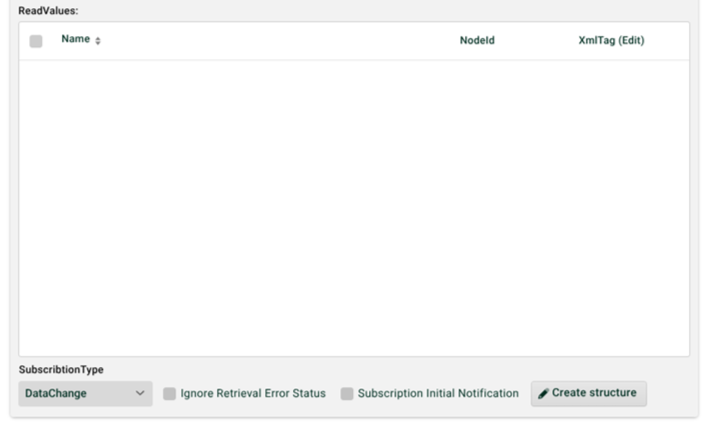
(3) Read values: Selectable in the OPC UA browser via the context menu. NOTE You can also use the context menu to add entries manually and organize them hierarchically; read values can then be moved there via drag-and-drop (see also (7)).
(4) Subscription type: DataChange triggers the profile on every value change. Direct polls the values at regular intervals.
(5) Ignore retrieval error status: Every received record carries a status. If the checkbox is set, the bad status is ignored. Otherwise, the profile aborts with an error.
(6) Subscription initial notification: If set, all values are queried once when the profile is activated.
(7) Generate structure: Creates a matching source structure for phase 3.
Client security
Three mechanisms are available for securing access and can be combined:
Basic authentication via the username and password parameters.
Crypto suite via opcSecurityPolicy (e.g.,
Basic256Sha256) and certificate via certificateSearchTerm (common name).Security mode via opcSecurityMode. Defines whether traffic is signed and/or encrypted.
Define the security mode (opcSecurityMode)
Available from: patch/release 25.1.8, 26.1.2, 26.2.0
Use opcSecurityMode to enforce a specific OPC UA security mode per alias when the connection is established. This is relevant when a server advertises multiple endpoints but only accepts certain modes in practice or when internal security requirements (e.g., mandatory encryption) must be enforced.
Allowed values:
Value | Meaning | Use case |
|---|---|---|
| No signature, no encryption | Testing/closed networks |
| Signature, no encryption | Integrity without confidentiality |
| Signature and encryption | Recommended default for production environments |
Default behavior: If opcSecurityMode is not set, the client uses the first endpoint advertised by the server that matches the remaining settings, as before. The selection then depends on the server's endpoint order. The result is not always deterministic across servers.
Example:
<New class="com.ebd.hub.services.iot.opcua.OpcUaClientSettings">
    <Set name="alias">boiler</Set>
    <Set name="endpointURL">opc.tcp://opcua.demo-this.com:51210/UA/SampleServer</Set>
    <Set name="opcSecurityPolicy">Basic256Sha256</Set>
    <Set name="opcSecurityMode">SignAndEncrypt</Set>
    <Set name="certificateSearchTerm">*CertificateName*</Set>
</New>
Policy vs. mode
opcSecurityPolicydefines which crypto suite is used (e.g.,Basic256Sha256,Aes256_Sha256_RsaPss).opcSecurityModedefines whether traffic is signed and/or encrypted (None,Sign,SignAndEncrypt).
Together, both settings determine which server endpoint can be used.
Troubleshooting
Connection fails even though policy and certificate appear correct?
Check which security modes the server actually offers and accepts on its endpoints.
Set
opcSecurityModeexplicitly (typicallySignAndEncrypt).Make sure
opcSecurityPolicyis compatible with the chosen mode. TheNonepolicy cannot be combined withSignAndEncrypt, for example.Retry.
Parameter reference (client)
Parameter | Required | Description |
|---|---|---|
| yes | Unique name of the connection (referenced in the profile). |
| yes | OPC UA endpoint of the target server. |
| no | Pool sizing of the client connections. |
| no | Basic authentication on the server. |
| no | Crypto suite: |
| no | Security mode: |
| no | Common name of the client certificate (wildcards allowed). |
Server model
Lobster Integration acts as an OPC UA server and exposes data to external clients.
Create the configuration file
Create ./etc/iotserver.xml. The OPC UA server is reachable by default at opc.tcp://<URL/IP Integration Server>:4840/opcua_server. The port can be changed via listenPort.
<?xml version="1.0" encoding="ISO-8859-1"?>
<!DOCTYPE Configure PUBLIC "-//Lobster//DTD Configure 1.0//EN" "http://www.lobster.de/dtd/configure_1_1.dtd">

<Configure class="com.ebd.hub.services.iot.IoTServerService">
    <Set name="verbose">false</Set>
    <Call name="addDevice">
        <Arg>
            <New class="com.ebd.hub.datawizard.iot.IoTDashboardDevice"/>
        </Arg>
    </Call>
    <Call name="addServer">
        <Arg>
            <New class="com.ebd.hub.services.iot.opcua.IoTOpcUAServer">
                <!-- <Set name="tlsSubjectName">*IoT Testserver*</Set> -->
                <!-- <Set name="anonymousLoginAllowed">false</Set> -->
                <!-- Only set if you need to change the default port 4840 -->
                <!-- <Set name="listenPort">Port</Set> -->
            </New>
        </Arg>
    </Call>
</Configure>
GUI
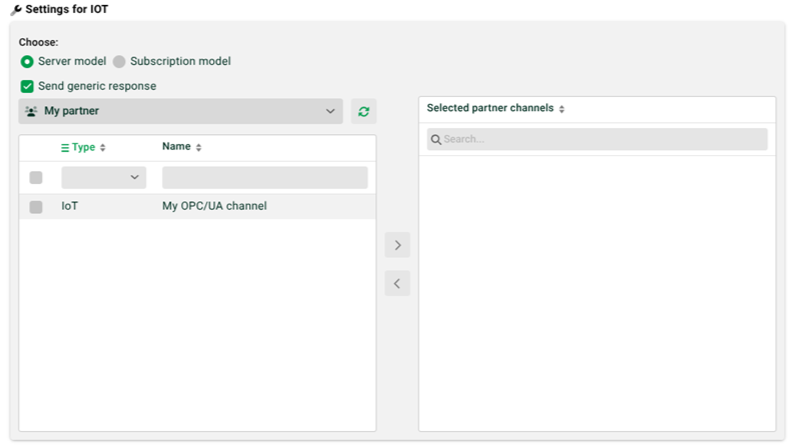
(1) Send generic response: If set, the client receives a simple OK/error response after the profile runs. Otherwise, the target structure can be used to build a response with dynamic return values. All fields under the root-level IOT_Result node become part of the response.
(2) Selection field below (1): partner selection.
(3) Arrows in the middle: at least one channel must be selected.
Server security
To protect the endpoint with basic authentication, set anonymousLoginAllowed to false. The profile must then use an IoT channel where the partner ID and partner password are configured under Partner access.
Server certificate and Subject Alternative Name (SAN)
The OPC UA server requires a TLS certificate. The certificate must contain a Subject Alternative Name of type URI. This URI must match the server's application URI. Otherwise, many clients reject the connection.
If nothing is set in
iotserver.xml, the defaulturn:de:lobster:iot:integrationserverapplies.Add this URI to the certificate's alternative names in the certificate dialog. Then reference the certificate by name via
tlsSubjectName.
Parameter reference (server)
Parameter | Required | Description |
|---|---|---|
| no | Search term for the TLS server certificate (subject). Wildcards allowed, e.g., |
| no | Controls anonymous access. Default |
| no | Port of the OPC UA endpoint. Default |