The SshService is used for data exchange via SSH. The service behaves like an SSH server that allows sending or receiving files via SFTP and SCP.
XML configuration
Complete XML options
The following file shows all available options in the XML configuration file. If you want to use an element, replace “NoSet” with “Set” and “NoCall” with “Call”. Some element are described in detail in the following sections.
<?xml version="1.0"  encoding="ISO-8859-1"?>
<!DOCTYPE Configure PUBLIC
 "-//Lobster//DTD Configure 1.0//EN"
 "http://www.lobster.de/dtd/configure_1_1.dtd">
<Configure class="com.ebd.hub.services.ssh.SSHService">
    <Set name="verbose">false</Set>
    <!-- bind service to ip address and port; 0.0.0.0 are all addresses -->
    <Call name="addListenAddress"><Arg>0.0.0.0</Arg><Arg type="int">1022</Arg></Call>

    <!-- Sets the name of the AuthenticationService to be used if different from the default -->
    <NoSet name="authenticationServiceName"></NoSet>

    <!-- Sets the name of the CommunicationLogService to be used if different from the default -->
    <NoSet name="communicationLogServiceName"></NoSet>

    <!-- Sets the name of the LogLogService to be used if different from the default -->
    <NoSet name="LogServiceName"></NoSet>
    <!-- Sets if transfer information should be logged -->
    <NoSet name="logTransfer">true</NoSet>
    <!-- Sets the name of the log manager to be used for transfer logs -->
    <NoSet name="transferLogManagerName"></NoSet>
    <!-- Sets the log subdirectory name for the SSH transfer log -->
    <NoSet name="transferLogDirectoryName"></NoSet>
    <!-- Sets if existing transfer logs should be kept when the service starts
    	and no log manager already exists -->
    <NoSet name="appendTransferLog">true</NoSet>

    <!-- Sets the name of the MessageService to be used if different from the default -->
    <NoSet name="messageServiceName"></NoSet>
    <!-- Sets the consumer queue to be used for event notification -->
    <NoCall name="setConsumerQueue">
        <Arg>System</Arg>
        <Arg>ssh</Arg>
    </NoCall>

	<!-- define white access list here -->
	<NoCall name="getWhiteAccessList">
		<Call name="addIpAddress"><Arg>a single ip address</Arg></Call>
		<Call name="addAddressRange"><Arg>base ip address</Arg><Arg>a netmask</Arg></Call>
	</NoCall>

	<!-- define black access list here -->
	<NoCall name="getBlackAccessList">
		<Call name="addIpAddress"><Arg>a single ip address</Arg></Call>
		<Call name="addAddressRange"><Arg>base ip address</Arg><Arg>a netmask</Arg></Call>
	</NoCall>

    <!-- Number of allowed failed login attempts before a user gets deactivated -->
    <NoSet name="autoblockLoginAttempts"></NoSet>

	<!-- Sets the charset being used during SFTP sessions -->
    <NoSet name="sftpCharset"></NoSet>

    <Set name="sSHConnectionManager">
        <New class="com.ebd.hub.services.ssh.maverick.ConnectionManager">
            <!-- If set to true received empty files will lead to internal
                notification and not ignored -->
        	<Set name="notifyReceivedEmptyFiles">true</Set>
            <!--
                Explicitly defines a server identification to be used. Setting this
                will lead to a server identification, even if server hiding is defined in
                factory.xml. -->
            <NoSet name="serverIdentification">My_Server_Ident</NoSet>

            <!-- Allos you to set partiuclar filenames for server keys of different algorithms
                If an empty value is set the key of that particular algorithm won't be used -->
            <NoSet name="hostKeyFilenameDSA"></NoSet>
            <NoSet name="hostKeyFilenameENDSA256"></NoSet>
            <NoSet name="hostKeyFilenameECDSA384"></NoSet>
            <NoSet name="hostKeyFilenameECDSA521"></NoSet>
            <NoSet name="hostKeyFilenameED25519"></NoSet>
            <NoSet name="hostKeyFilenameRSA"></NoSet>

            <!--  if you want to specify specific ciphers, MACs and/or key exchanges
                  you can uncomment one or all of the following lines and specify
                  the ciphers/algorithms in a comma separated list. The first
                  value is considered the preferred element
             -->
            <NoSet name="ciphersCS">aes256-ctr,aes256-cbc,aes128-ctr,...</NoSet>
            <NoSet name="ciphersSC">aes256-cbc,aes256-ctr,aes128-ctr,...</NoSet>
            <NoSet name="macsCS">hmac-sha2-512,hmac-sha256,hmac-sha1,hmac-sha1-etm@openssh.com,...</NoSet>
            <NoSet name="macsSC">hmac-sha256,hmac-sha2-512,hmac-sha1,hmac-sha1-etm@openssh.com,...</NoSet>
            <NoSet name="keyExchanges">diffie-hellman-group14-sha1,diffie-hellman-group1-sha1,...</NoSet>

            <!-- If set to a positive number, this restricts the number of parallel sessions
                 a user can create -->
            <NoSet name="maximumUserConnections">0</NoSet>
        </New>
    </Set>
</Configure>
Services
The following XML fragment sets the services to be used.
<Set name="authenticationServiceName">AuthenticationService</Set>
<Set name="communicationLogServiceName">CommunicationLogService</Set>
<Set name="messageServiceName">MessageService</Set>
<Set name="LogServiceName">LogService</Set>
The values to be specified should be self-explanatory. They only need to be changed if services other than the standard ones are to be used.
Logging
The following XML fragment determines the log behavior.
<Set name="transferLogManagerName">SSHLog</Set>
<Set name="appendTransferLog">true</Set>
<Set name="transferLogDirectoryName">SSHLog</Set>
The parameters have the following meaning.
Parameter | Description |
|---|---|
transferLogManagerName | This parameter sets a LogManager to which log messages are sent. If this manager does not exist, it will be generated. By default, i.e. without specification in the XML file, a FileLogManager with the name SSHLog is generated. |
appendTransferLog | With this parameter you can set, if at the start of the service the set LogManager should create a new file or attach it to an existing file. |
transferLogDirectoryName | Specifies in which directory the LogManager should save the log messages. |
Setting message queue and message context
The following XML fragment sets the values to be used for message queue and message context.
<Call name="setConsumerQueue">
	<Arg>System</Arg>
	<Arg>ssh</Arg>
</Call>
The first argument is the context, the second is the queue.
With these settings, SSH events, such as file reception or file pickup, are passed to the MessageService.
Adding list addresses
The following XML fragment adds a list address.
<Call name="addListenAddress">
    <Arg>127.0.0.0</Arg>
    <Arg type="int">21</Arg>
</Call>
Setting whitelist and blacklist
You can set a whitelist for the SshService (IP addresses of the clients that are allowed to establish a connection via SSH) and a blacklist (IP addresses of the clients that are not allowed to establish a connection via SSH). The following XML fragment sets a whitelist.
<!-- define white access list here -->
<Call name="getWhiteAccessList">
	<Call name="addIpAddress"><Arg>a single ip address</Arg></Call>
	<Call name="addAddressRange"><Arg>base ip address</Arg><Arg>a netmask</Arg></Call>
</Call>

<!-- define black access list here -->
<Call name="getBlackAccessList">
	<Call name="addIpAddress"><Arg>a single ip address</Arg></Call>
	<Call name="addAddressRange"><Arg>base ip address</Arg><Arg>a netmask</Arg></Call>
</Call>
With "addIpAddress", a specific IP address can be added. With "addAddressRange" (via IP and associated netmask) you can add an address range. The setting of a blacklist is analogous, with the call "setBlackAccessList".
Setting the ConnectionManager
The following XML fragment sets the ConnectionManager.
<Set name="sSHConnectionManager">
	<New class="com.ebd.hub.services.ssh.maverick.ConnectionManager">
		<Set name="sshRoot">./ssh/</Set>
		<Set name="hostKeyFilenameRSA">./etc/ssh_host_rsa_key</Set>
		<Set name="hostKeyFilenameDSA">./etc/ssh_host_rsa_key</Set>
		<Set name="logDebugMessage" type="boolean">true</Set>
		<Set name="notifyReceivedEmptyFiles">false</Set>
		<Set name="maximumUserConnections">5</Set>
    </New>
</Set>
The "sshRoot" parameter specifies the default user directory for the SSH server.
The parameters "hostKeyFilenameRSA" and "hostKeyFilenameDSA" specify the files from which the keys to be used for the encrypted communication are to be read. If these files do not exist, new files with new keys are automatically generated.
The log behavior of the actual SSH connection can be controlled with the "logDebugMessage" parameter .
"maximumUserConnections" globally defines the maximum number of parallel connections of a user, where "0" stands for unlimited.
Accepting empty files
For the service to accept empty files (0 bytes), the option "notifyReceivedEmptyFiles" must be set to "true".
General settings (GUI)
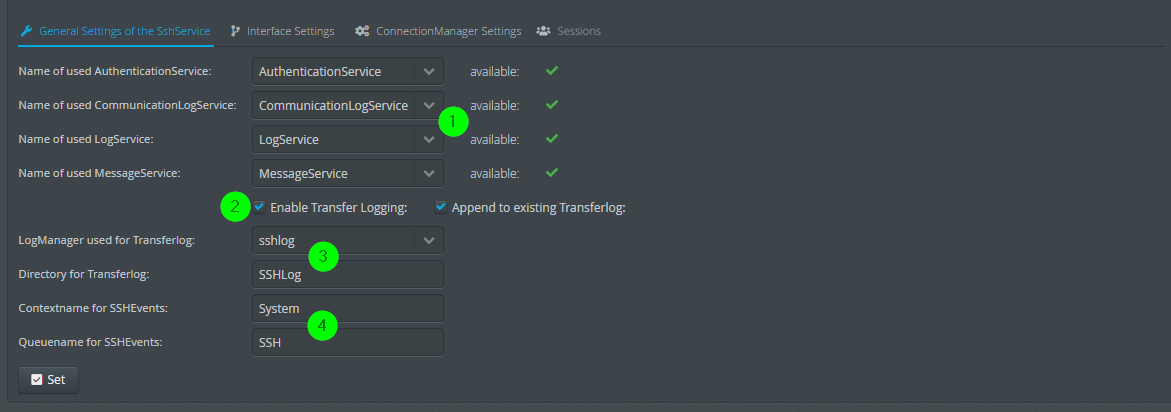
(1) Here you can set the services required for the operation of the SshService.
(2) Change of log behavior.
(3) Here you can select the LogManager and the associated directory.
(4) The context and queue to which the SshService forwards SSH events.
Main interface settings (GUI)

(1) Here you can add or remove listening addresses.
(2) Here you can edit the whitelist.
(3) Here you can edit the blacklist.
ConnectionManager settings (GUI)

(1) Here the base directory of the ConnectionManager can be changed.
(2) The logging of debug messages for the ConnectionManger can be set here.
(3) The files to store the keys. If the files do not exist, new files with associated keys are created.
Sessions (GUI)
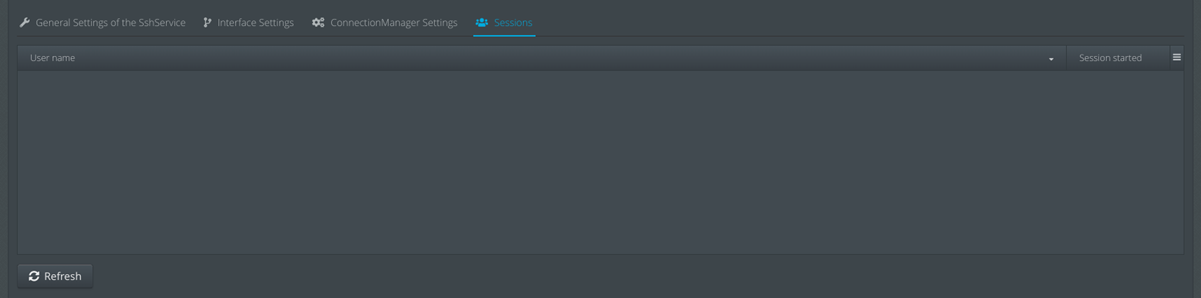
Existing SSH sessions can be closed here.