See also: Business objects and attributes.
Input forms for shipments can be created with the form designer (see also Form designer).
Shipments can contain attributes of the following types:
Text attributes
Numerical attributes
Date attributes
Indicator attributes
Reference attributes
Free enumerations
Company attributes
Address attributes
Shipment header
Additionally, the following specific elements are offered in the form designer:
Section | Element | Type | Content |
|---|---|---|---|
Shipment | ID | Unique numeric ID of the shipment within Lobster Data Platform/Orchestration; automatically assigned upon creation of the shipment, therefore the element should be defined as inactive or read-only. | |
Shipment type | Defined via the dynamic enumeration Shipment type. | ||
International commercial term | Defined via the dynamic enumeration Incoterms. | ||
Service type | Defined via the dynamic enumeration Service type. | ||
Mode of transport | Defined via the dynamic enumeration Mode of transport. | ||
Number of packages | Numeric value for the number of packages. | ||
Working state | Defined via the dynamic enumeration Working state. | ||
Line items | Line items of the shipment with its own configuration (see following sections). | ||
Delivery instruction attributes | Delivery instruction attribute | Defined via the dynamic enumeration Delivery instruction; multiple elements of the enumeration can be assigned to the same shipment, by selecting a delivery instruction type per Combobox. Depending on the configuration per type (in dynamic enumeration), a Text field is available for input details; restrictions for permitted combinations of delivery instructions can be controlled by Delivery instruction combinations. | |
Elements per Delivery instruction | Elements of the dynamic enumeration Delivery instruction can also be added as individual elements in a form. The type of Delivery instruction appears as a label of a Column layout container with a Text field that is visible depending on configuration in the enumeration. Delivery instructions that are explicitly included in a form are automatically created, when the shipment is saved. | ||
Loading aid summary attribute | Elements per Loading aids | For each element of the dynamic enumeration Loading aids, a loading aid summary attribute is available. The Column layout container provided features a Text field for calculation results (see Sum loading aid (Shipment). | |
Packaging summary attribute | Elements per Type of packaging | For each element of the dynamic enumeration Type of packaging, a packaging summary attribute is available. The Column layout container provided features a Text field to indicate the calculated results (see Sum packaging (Shipment)). | |
Loading aid definition | Loading aid definition | Multiple loading aid definitions can be assigned to the same shipment, including an indication of 'Type' (Combobox for Loading aids) and a Text field 'Barcode'). |
Shipment line items
On the level of line items of a shipment, i.e. inside a shipment line item element, the following specific content is available:
Section | Element | Type | Content |
|---|---|---|---|
Shipment line item | Line item no. | Systematic line item number of the current line item. Automatically assigned on create/update with a hierarchical structure (see Line item type). | |
Parent line item no. | Systematic line item number of the parent line item. Automatically assigned on create/update with a hierarchical structure (see Line item type). | ||
Referenced line item | Element picks reference from the current line item to a line item of another Line item type (e.g. from Line item type 'Default' to Line item type 'Service') within the same shipment. When the element is added to a form, target Line item type and level (starting from 0) must be specified. | ||
Number of packages | Numeric value for the number of packages; also used as input for calculating packaging summaries per Type of packaging on position level (see Sum packaging (Shipment)). | ||
Aggregated number of packages | Numeric value for the aggregation of packages in sub line items (as a product of 'Number of packages' of the sub line item x 'Number of packages' of the parent line item)(see Calculate attributes down (Shipment)). | ||
Type of packaging | Defined by the dynamic enumeration Type of packaging; required input for calculation of packaging summaries per Type of packaging (see Sum packaging (Shipment)). | ||
Product search | Search ► product | Search (Combobox) for product selection with an expandable section for product data (see also section 'product search' below). NOTE Includes the element 'Product', which therefore cannot be selected separately. | |
Produ.ct | ► product | Row layout container for attributes or Products, including Dangerous goods (see below). NOTE Not available if 'Product search' is in use. | |
Line items | Repeatable element ► shipment line items | Sub line items of the current line item, which may in turn contain further sub line items. Line items may be cascaded to build a hierarchy of arbitrary depth, reflected in the systematically assigned 'Line item no.' values. | |
Aggregate numeric attribute | Elements per Numeric types | For each element of the dynamic enumeration Numeric types, an aggregate numeric attribute is available. By default the provided Column layout container contains a Text field for the numeric value and a Combobox for the applicable unit. Optionally, another numeric Text field 'Aggregate value' is available, to populate with calculated values by Calculate attributes down (Shipment) | |
Barcode attribute | Barcode attribute | For each shipment, line item multiple barcodes can be assigned as elements of a plural typed attribute (see Plural attributes). Each element provides a Column layout container with the Text field 'Barcode' and a Text field 'Barcode reference'. The Text field 'Barcode' may be populated automatically by Generate barcodes (Shipment) via Number range. | |
Loading aid definition | Quantity | Numeric value for number of Loading aids of a line item. | |
Type | Defined via the dynamic enumeration Loading aids; defines the category for the calculation of a loading aid summary (see Sum loading aid (Shipment)). | ||
Reference | Optional reference to an element of loading aid definition in the shipment header; a dropdown shows a combination of 'Type' and 'Barcode', whereas the internally assigned ID (long) of the element is stored. | ||
Linked line item | Elements per (applicable) Linked line item type | A shipment line item may specify one outbound link for each Linked line item type configured with a source line item type of 'Shipment line item'. Each link is represented by a Column layout container containing one Combobox to specify the business object to link to an another for one of its line items. Additionally, a 'Link line items' button can be added (see also Working with 'Linked line items'). |
Product data (within shipment line item)
Definition of a 'Product search':
The selection box allows for the editing of service configuration
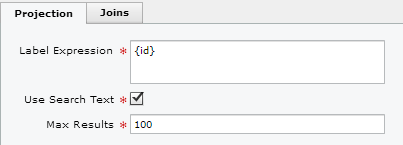
Since the product search always returns product entities, no Joins for the Label Expression can be formed.
To access product attributes, the ta function (TypedAttribute function) can be used.
This example refers to the short description:
{$ta(de.lobster.scm.base.product.attributes.ProductDescription,de,shortDescription)}
In so doing, indicate the attribute's class, as well as the language (the name from the enumeration Locale (en)) and the member (shortDescription) of the class.
'ProductDescription' has the members 'shortDescription' and 'longDescription'.
Product data
Products may feature typed attributes of the following types:
Text attributes
Numerical attributes
Indicator attributes
Free enumerations
The following elements are specific for product data:
Section | Element | Type | Content |
|---|---|---|---|
Product | Add to product catalog | Button | Standard procedure for adding the current product to an existing product catalog. |
Product ID | Product ID | Multiple 'Product IDs' can be assigned to the same product, as long as they are linked to a unique combination of Product ID context and Product ID type; for each 'Product ID' Text field this combination must be specified when it is added to a form. There is no repeatable element to handle 'Product ID' entries across types. NOTE There is no check to ensure the added combination of Product ID context and Product ID type in the form is unique. If the same combination is linked to more than one Text field, the same value (at least after saving) will be shown. | |
Product description | Short description[ <Locale> ](one element per Locale) | Single line of text for locale-specific product description. | |
Long description[ <Locale> ](one element per Locale) | Potentially multi-line text for locale-specific product description. | ||
Price attribute | Price attribute featuring the following details:
| Multiple price attributes can be assigned to the same product, provided a unique combination of Price context, Country and Currency is specified; for each Column layout container added to a form, this combination must be specified. There is no repeatable element to handle price attributes across types. NOTE In contrast to 'Product ID', there is a check if a combination of Price context, Country and Currency is unique within a form. Each price attribute features Text field elements for 'Net value', 'Gross value' and 'Base value' as well as Combobox elements for 'Base unit' and Tax rate. | |
Dangerous goods attribute | Dangerous goods attribute (see below) | Multiple dangerous goods attributes can be assigned for the same product, featuring specific attributes (see below) and references to Dangerous goods master data. |
Dangerous goods data
For Dangerous goods attributes, the following elements are available:
Section | Element | Type | Content |
|---|---|---|---|
Dangerous goods attribute | Dangerous substance | Configurable search for Dangerous goods (see NOTE below). | |
Dangerous substance expandable | Configurable search for Dangerous goods including an expandable container to indicate the dangerous substance details. | ||
Dangerous substance select | Button | Opens an overview of Dangerous goods for the selection dangerous substances. | |
Dangerous substance label | Indicates the 'Name' of a dangerous substance as a label. | ||
Inner quantity value | Numeric value for inner quantity. | ||
Inner quantity unit | Inner quantity unit. | ||
Outer quantity value | Numeric value for outer quantity.. | ||
Outer quantity unit | Outer quantity unit | ||
NEQ value | Numeric value for NEQ (net explosives quantity). | ||
NEQ unit | Unit of NEQ (net explosives quantity). | ||
Limited quantity | Flag value. | ||
Quantity outer packaging | Numeric value for the outer packaging quantity. | ||
Quantity inner packaging | Numeric value for the inner packaging quantity. | ||
Inner packaging | Selection for the inner packaging (see Dangerous goods packaging type). | ||
Hazard-inducing substance | Selection for Dangerous substance. | ||
Hazard-inducing substance text | Plain text for the hazard-inducing substance. | ||
Recovery package | Flag value. | ||
Recovery pressure vessel | Flag value. | ||
Dangerous for environment | Flag value. | ||
Outer packaging | Configurable search for the outer packaging (see Dangerous goods package). |
NOTE Combobox 'Dangerous substance' must be included in a form, when 'Dangerous substance select' (Button) and 'Dangerous substance label' are used. However, the Combobox may be defined as 'invisible'.