Enables the scanning of one or more barcodes via a connected camera. Using the read barcode trigger, the Barcode scanned can be passed on to the behavior. To control barcode reading, two actions are offered: Start scanning barcodes and Stop scanning barcodes.
Barcode reader properties
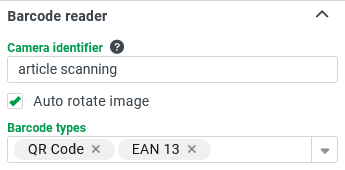
Camera identifier: An arbitrairy ID which is mapped to the user selected camera and gets stored in the local memory of the browser. If a user loads a barcode reader with the same identifier, the same camera will be initially used.
Auto rotate image: Automatically rotates the image to increase the possibility of a detection. This is a bit slower, but prevents the user from rotating the camera or the document in order to get a proper scan.
Barcode types: Limits the barcode types to be scanned. If no barcode types are selected, all will be identified. NOTE The fewer types that are defined, the better the performance of the identification.
Once the barcode reader detects a code during run time, the Barcode scanned trigger will be dispatched.
Barcode reader behavior
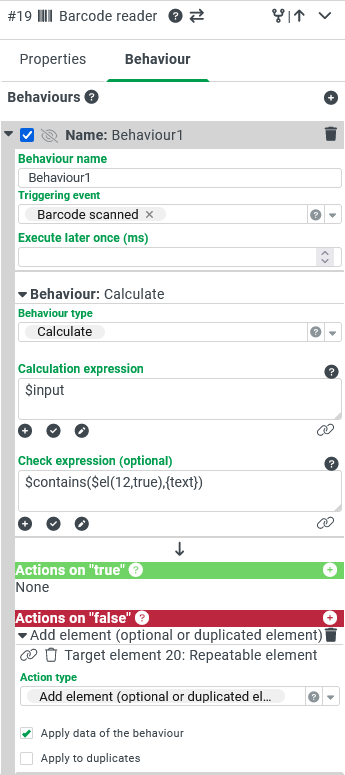
Triggering event: Barcode scanned triggers the behavior. (A barcode was detected).
Behavior type: With the "Calculate" behavior, for example, the read barcode and the barcode type can be further handled. Here only the input is determined.
Check expression (optional): Further behavior can be determined with a check expression. For example: with $contains($el(12,$true), {text}) it can be checked whether the read barcode has already been read (prevent duplicates). The element with the ID 12 is a repeated text field, which loads the read barcode texts as value.
If, in this example, the check expression returns false, the barcodes are added as a new repeated entry.
Barcode reader element at runtime
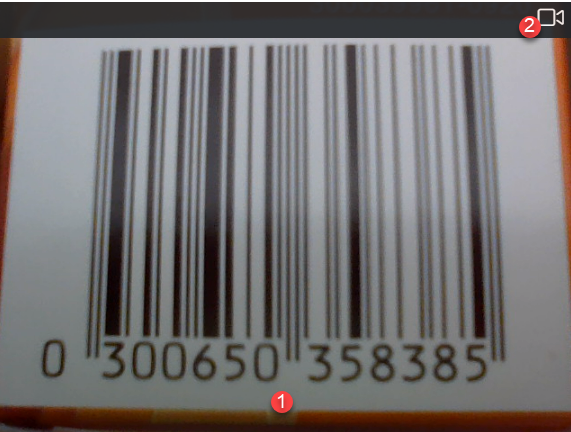
(1) Video – camera image: The scanning happens automatically and with the behavior and the actions it is possible to react to it.
NOTE The barcode reader does not stop automatically when a code is detected. However, this can be triggered by the Stop scanning barcodes action.
(2) Camera icon: Selection of the camera to use.