See also: Populate element data
Actions – Abstract
The value of the linked element is set to the specified value.
The value of the linked element is set to the specified Value (in the example below the number 5). However, this value can also be created using calculation expressions Calculation expression.
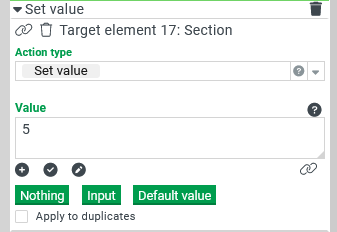
With the Nothing button, the keyword $null is set as the value, which represents no value.
NOTE An empty text is not equivalent to "Nothing" and should only be used in the context of input fields in order to empty them.
The Input button is used to accept the keyword $input as the value. This serves as a placeholder for the input data of the action (i.e. the data that is passed on by the behavior).
Example for $input:
A text field 1 triggers a "Statically true" behavior for "Changed", for which a "Set value" action is configured on another text field 2. If $input is now set as the value of the action, any input from field 1 is copied directly into field 2.
By pressing the button Default value the keyword $init is set as value, which is representative for the default value of the target element. Elements can thus be re-initialized.
NOTE This function is only available in version 4.1.0 and higher!