The Behavior type "Logical condition" checks whether a certain condition is met, which is formulated with reference to other behaviors configured for the same executing element.
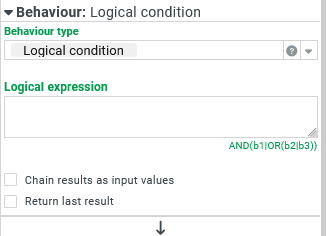
The Logical expression defines an arbitrarily complex logic based on the three basic logical operations: conjunction (AND), disjunction (OR) and negation (NOT) in the following syntax.
Behavior names are used as arguments for these functions, which return the truth value (true/false) of the Behavior type at runtime. In contrast to a direct call of the respective behavior, it is only determined whether their behavior would execute the Actions on "true" or the Actions on "false". In fact, no actions of the evaluated behavior are executed. The behavior does not have to contain any actions to return a truth value.
If the Logical expression returns
true, the Actions on "true" are executed.If the Logical expression returns
false, the Actions on "false" are executed.
In the event of an error, two processes can be distinguished:
Either the Actions on "false" are executed with an error message as data (
$input) which can be displayed e.g. by the Show alert action. Afterwards, the chain of behavior continues.Or the chain of behavior is broken completely, e.g. because there is a misconfiguration in one of the behaviors evaluated. This can be determined via the Log to console action. The behavior is only superficially ineffective.
CAUTION If the Behavior type of a behavior, which is checked during the evaluation of the Logical expression, also returns a value in the form of data in addition to the check result ("true"/"false"), this value overwrites any input data (
$input) with immediate effect. At the same time, the evaluation of the behaviors addressed in the logical expression may be terminated, depending on the result of a single check, without all behaviors having been evaluated (see details on the AND/OR operation below). Which data a Logical condition effectively passes as$inputto the actions and under which conditions must be carefully examined with regard to these dependencies. It is not generally guaranteed that input data passed from the Triggering event or from calling the behavior by the Execute behavior action is passed to the actions.
Syntax for logical operations
Operation | Syntax | Behavior |
|---|---|---|
Evaluation of a behavior | Behavior | Returns the value Returns the value NOTE A faulty configuration in the evaluated behavior (e.g. the absence of a required parameter) can lead to the evaluation being terminated. |
Negation |
| Determines the return value of an expression and applies a logical negation. Here NOTE A multiple negation is pointless, but technically possible with brackets: The expression |
AND concatenation (Conjunction) | AND (Expression1 | Expression2 | ...) | Within the AND-concatenation, the expressions separated by the pipe symbol "|" are evaluated from left to right.
|
OR concatenation (Disjunction) | OR (Expression1 | Expression2 | ...) | Within the OR concatenation, the expressions separated by the pipe symbol "|" are evaluated from left to right.
|
CAUTION
An incorrect expression (e.g. a typo in a behavior name) only results in an error message for the entire behavior if the expression in question is actually evaluated. Since the evaluation of expressions in an AND concatenation is terminated at the first
falsereturn value and in an OR concatenation at the firsttruereturn value, incorrect expressions in these functions may remain undetected for a long time before they become an acute source of error.
The expression
AND(almost always false|does not exist)functions as long as there is a behavior called "almost always false" and it returnsfalse. Whether there is a behavior "does not exist" is then almost always irrelevant.The expression
OR(almost always true|does not exist)functions as long as there is a behavior called "almost always true" and it returnstrue. Whether a behavior "does not exist" is then almost always irrelevant.
A Logical condition should therefore be subjected to intensive systematic tests, which also cover unusual combinations of input data.
NOTE
The Logical expression can be brought into a clear structure by inserting line breaks and spaces. Expressions and behavior are trimmed on both sides before interpretation.
Behavior names should be chosen so that conflicts with the above syntax are avoided as far as possible. Spaces within the name are not a problem. The pipe symbol must not be included in a behavior name because it is also a separator outside AND() and OR(). The use of a leading exclamation mark should be avoided. Round brackets are used in pairs "( ... )" as part of the name, for example, in a behavior name like "Consignee address (CNE)".
If a Behavior name is not unique within the same executing element, the behavior at the top of the list is evaluated.
Example
In an input form for shipments, a specific button should appear exactly when a critical combination of certain characteristics is given for the planned time schedule.
The following rules must be observed in order for the "time schedule" to be accepted as feasible:
The Pickup date fixed is a mandatory field and must contain a valid date in the future. In addition, only values that are less than or equal to the Delivery date requested are permitted (per Validators).
The Delivery date requested must also contain a date in the future.
In addition, the pick-up date and delivery date may only be identical if a Service type is selected that is considered an "express service".
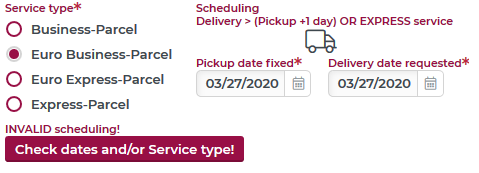
If even one rule is violated, the button Check dates and/or Service type! appears as a note.
Configuration:
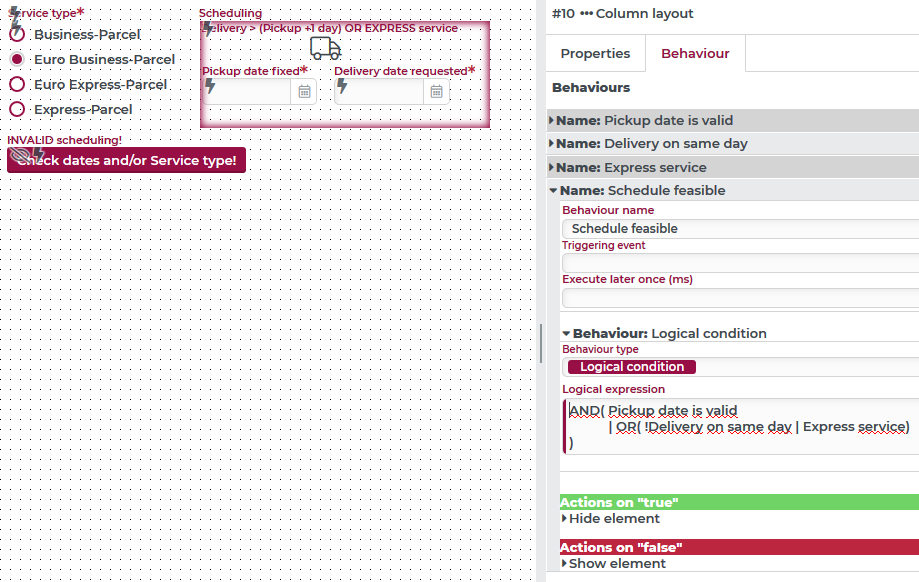
Whether the time lapse for a shipment is considered "feasible" is to be determined by a Logical condition that has been configured around the date selection in the example for a Column layout container. The behavior must be called by the Execute behavior Execute behavior action from all input fields involved, as often a change is made there (see triggering event Changed).
For the same container, a behavior (without custom actions) has also been set up for each individual rule:
The Pickup date is valid behavior checks with Validate element, whether a valid entry for Pickup date fixed exists.
The Delivery on same day behavior checks with Calculate, whether the Pickup date fixed and Delivery date requested are identical.
The Express service behavior checks with Filled with for the service type "Express-Parcel" or "Euro Express-Parcel".
The Logical expression in the Schedule feasible behavior links these input data as follows:
AND( Pickup date is valid
           | OR( !Delivery on same day | Express service)
)
NOTE Line breaks and spaces have been inserted manually here for transparency.
Depending on the result, the action Show element or Hide element is executed for the button.