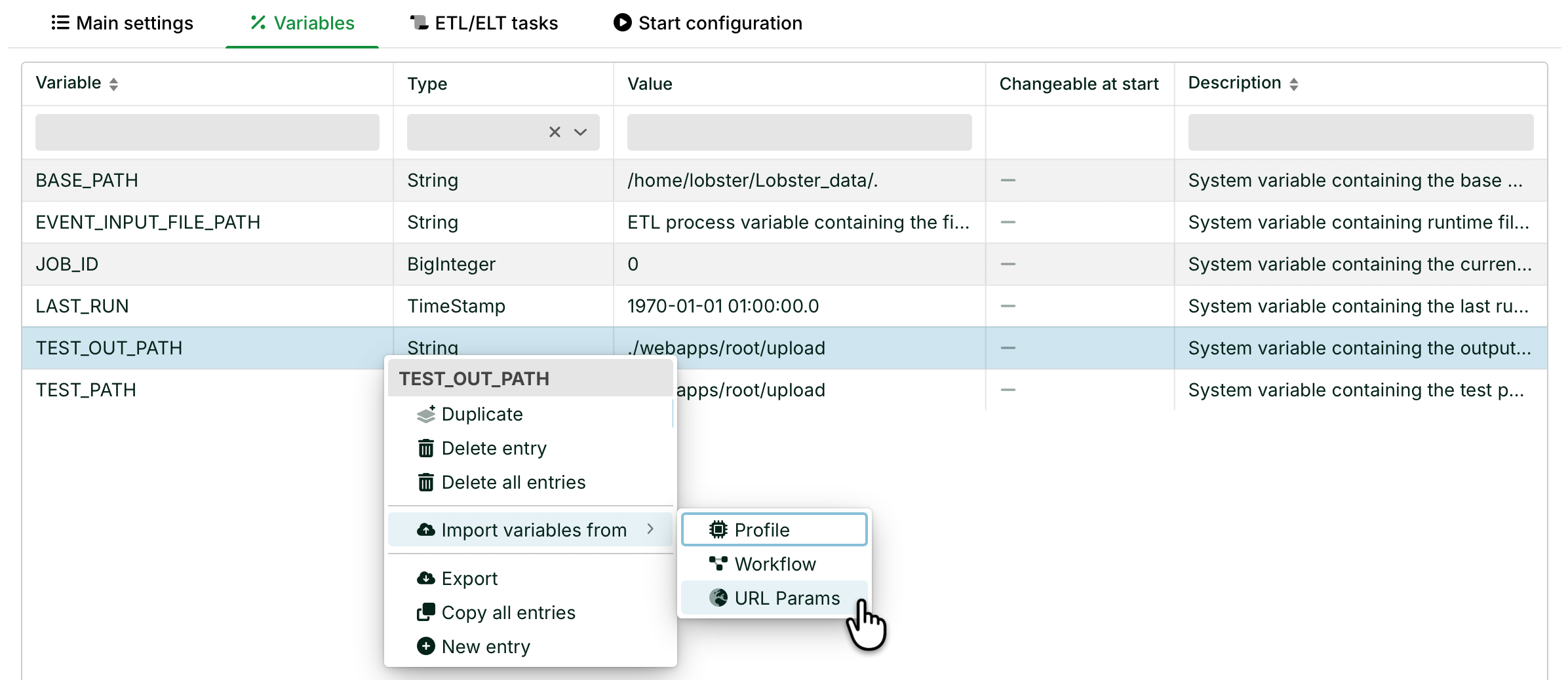
In this menu, you create, modify, and delete ETL/ELT variables. You can also import variables from profiles or workflows.
Navigate to Integration > ETL/ELT Pipelines. Open a pipeline, then go to the Variables tab.
Settings
Plus icon (+): Creates a new variable.
Changeable at start: A workflow calls an ETL/ELT pipeline. It passes the values of its workflow variables to ETL/ELT variables with the same name. Set this option for the affected ETL/ELT variables. See Workflows.
Context menu
Name | Description |
|---|---|
Duplicate | Creates a copy of the entry with the suffix |
Delete entry | Deletes the selected entry. |
Delete all entries | Deletes all entries at once. |
Import variables from | Imports variables from a specific profile, workflow, or URL params into the ETL/ELT pipeline. |
Export | Exports variables as a CSV file. |
Copy all entries | Copies all entries to the clipboard. |
New entry | Creates a new variable. |
ETL/ELT system variables
Name | Description |
|---|---|
| The system automatically sets the value to the path of the Integration Server installation directory. NOTE Changes have no effect. The system always sets the value again automatically. |
| ETL process variable containing the file path as a query source. |
| Analogous to |
| The system fills the variable with the job ID at runtime. |
| The time of the last run of the ETL/ELT pipeline. |