You can create templates for partial structures (snippets) in the target structure. You start from a node and reuse the snippet later.
Creating snippets
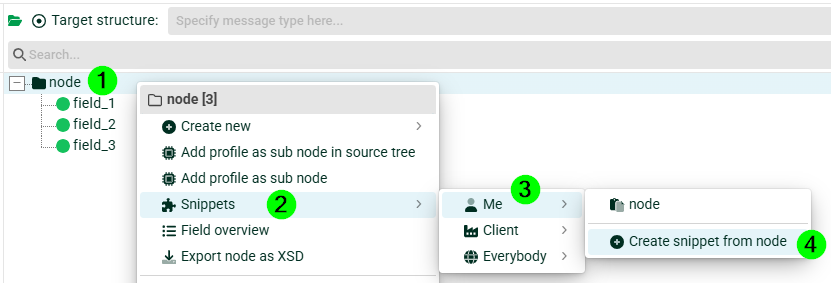
(1) Select your node.
(2) Select Snippets via the context menu.
(3) Select the visibility scope:
Me: only for you.
Client: for everyone in the client you are currently logged into.
Everybody
(4) Select Create snippet from node.
Pasting snippets
Start with an empty target structure. If a target structure already exists, do not select any nodes.
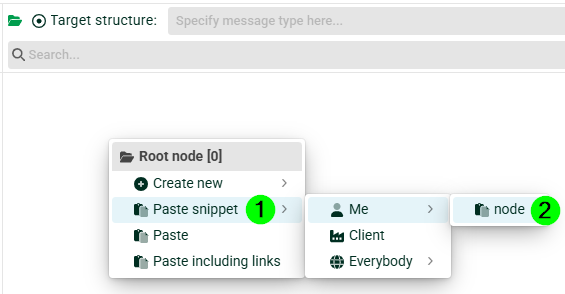
(1) Select Paste snippet via the context menu.
(2) Select your snippet.
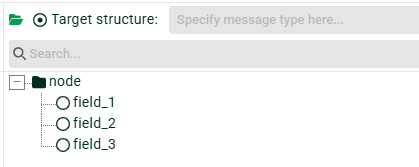
Alternatively, you can insert your snippet into an existing node.
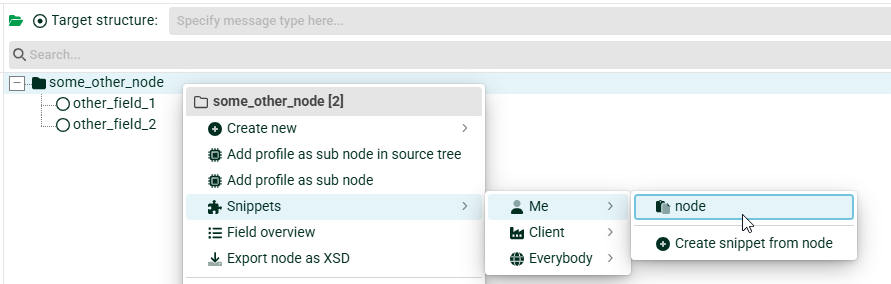
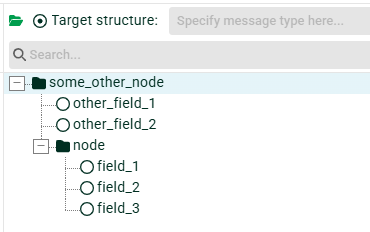
Managing snippets
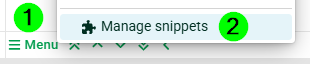
To manage your snippets, open the target structure menu and select the Manage snippets option.
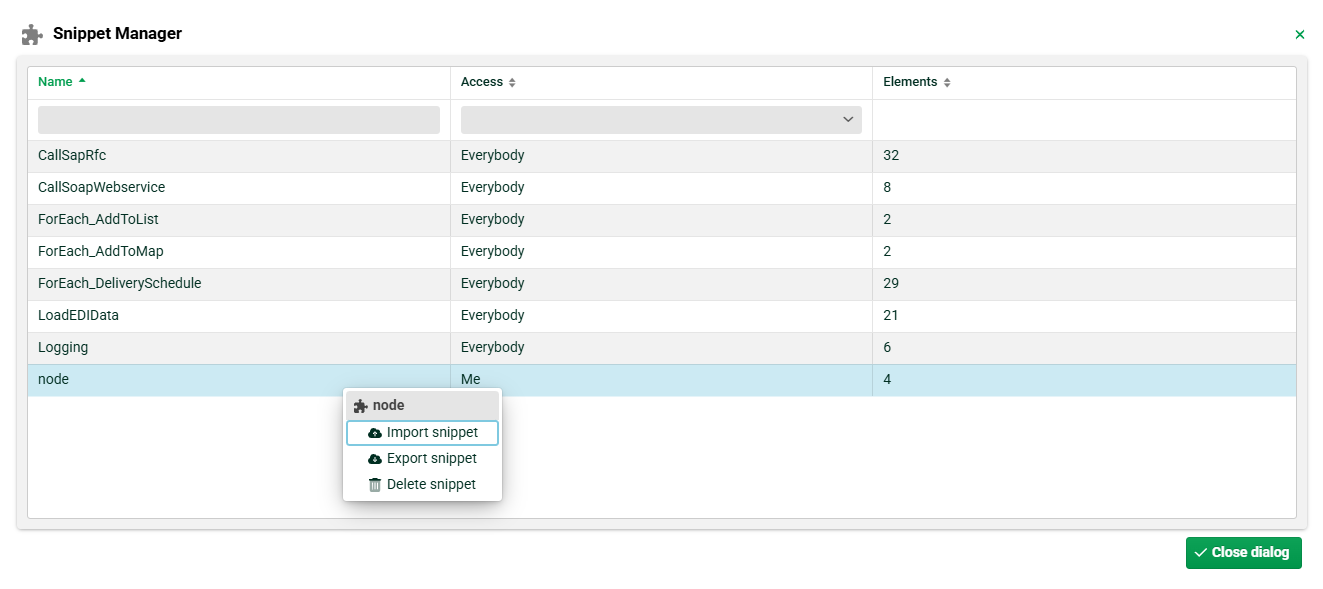
In the Snippet Manager, you can export, import, and delete your snippets using the context menu.
Default snippets
Default snippets are ready-made help structures that encapsulate recurring mapping tasks and can be reused in your own profiles. You can insert them at the relevant point in the target structure and adapt them to the specific use case via their parameters or the configured source path.
For the iterating variants (ForEach_*, LoadEDIData), the path to the source node to be traversed must be set before use.
Overview
Snippet | Purpose |
|---|---|
| Calls an SAP RFC or BAPI via a function. |
| Calls a SOAP web service via a function. |
| Traverses a source node and writes values to a list. |
| Traverses a source node and writes key-value pairs to a map. |
| Evaluates delivery schedule / date segments from EDIFACT source structures. |
| Loads EDIFACT segment data into maps in a structured way. |
| Generates log messages for job logging. |
CallSapRfc
Help structure for calling an SAP RFC or BAPI from within the mapping.
Technology: SAP RFC (Remote Function Call) via the SAP RFC Java library (TCP/IP). Input parameters are passed as a named map (fields, structures, and tables). The result is returned in a named list.
Functions used
call-sap-rfc(alias, rfc, [inMap, timeout, filter, outList, debug, …])– executes the RFC/BAPI call.fill-map-from-fields(map, prefix, index, hidden, [processing])– populates the input map from field values.
Typical use cases
Master data lookup during mapping (e.g.,
RFC_READ_TABLEto query an SAP table for country/region data).Real-time enrichment of data from SAP (e.g., prices, stock levels, partner data) during EDI-to-IDoc processing.
Executing BAPIs to trigger SAP business processes (e.g., goods receipt posting, order creation) directly in the mapping.
Validation against SAP, such as checking whether material, customer, or plant numbers exist.
For a detailed description, refer to: call-sap-rfc()
CallSoapWebservice
Help structure for calling a SOAP web service from within the mapping.
Technology: SOAP 1.2. The request is based on an XML template using @placeholder@ syntax that is filled with field and variable values at runtime. The response is evaluated via XPath and stored in named lists. HTTP authentication, certificate-based TLS, and configurable timeouts are supported.
Function used
call SOAP-WebService(…)– calls the web service via SOAP 1.2.
Typical use cases
External data enrichment via third-party services (e.g., address validation, credit check, currency conversion) during mapping.
Connecting ERP/WMS systems, e.g., querying stock availability or shipment status.
Cross-system lookups, such as retrieving order or invoice data from a connected ERP.
E-invoicing/Peppol, e.g., calling external services for tax validation or document submission.
For a detailed description, refer to: call SOAP-WebService()
ForEach_AddToList
Help structure for traversing a node of the source structure and writing values to a list.
Technology: Iteration over a repeating source node (ForEach).
Function used
add to list(value, name of list, [delimiter])– appends values to a named list.
Configuration: The snippet’s path must be set to the repeating source node to be traversed.
Typical use cases
Collecting line-item values, e.g., all EAN codes, article numbers, or quantities of an order for later batch processing.
Building inputs for aggregations, such as collecting all delivery dates for later deduplication or summarization.
Preparing function parameters that expect a list as input (e.g., for multi-value lookups).
Cross-references, e.g., collecting IDs from one branch of the source structure to match against another branch.
For a detailed description, refer to: add to list()
ForEach_AddToMap
Help structure for traversing a node of the source structure and writing key-value pairs to a map.
Technology: Iteration over a repeating source node (ForEach).
Functions used
add to map(key, value, name of map, [skip empty])– writes key-value pairs to a named map.get value from map(key, name of map, …)– reads a value by key.get key(s) from map(…)– returns the keys of a map.
Configuration: The snippet’s path must be set to the correct source node.
Typical use cases
Mapping dates from EDIFACT DTM segments: iterating over the DTM segments and storing qualifier → date value (e.g. "137" for the document date, "2" for the delivery date), then outputting the correct date by qualifier.
Collecting address data, e.g., building a map of party qualifier → address data from NAD segments.
Building lookup tables at runtime (e.g., product code → price) for calculations in target fields.
Caching configuration data, e.g., reading values from a CSV/source structure into a map for repeated access during mapping.
For a detailed description, refer to: add to map()
ForEach_DeliverySchedule
Help structure for evaluating delivery schedule and date segments from EDIFACT source structures.
Technology: EDIFACT parser structures with ForEach iteration over repeating date/schedule segment groups. Extracts quantity/date combinations.
Configuration: The snippet’s path must be set to the relevant EDIFACT segment group.
Typical use cases
DELFOR (delivery forecast): reading planned delivery quantities and dates per schedule line.
DELJIT (just-in-time): evaluating JIT call-offs with precise delivery windows.
ORDERS with delivery dates: processing orders with multiple requested delivery dates and quantities per line item.
Processing scheduling agreements, e.g., extracting cumulative quantities and delivery calendar data.
For a detailed description, refer to: EDIFACT (document type)
LoadEDIData
Help structure for loading EDIFACT segment data into maps in a structured way.
Technology: EDIFACT parsing combined with maps. Iterates over standard EDIFACT segment groups and loads data (dates, addresses, references) into named maps via add to map(). The data is then accessed by qualifier/key via get value from map(). Typically used together with EDIFACT templates.
Functions used
add to map(…)– stores the segment data in named maps.get value from map(…)– retrieval by qualifier/key.
Configuration: The snippet’s path must be set to the EDIFACT segment structure to be evaluated.
Typical use cases
EDIFACT-to-XML/CSV conversion: loading all DTM (date/time), NAD (name/address), and RFF (reference) segments into maps so they can be output in any order in the target format.
Processing ORDERS, ORDRSP, or DESADV, e.g., converting incoming orders, order responses, or dispatch advices into IDoc, XML, or database formats.
Address enrichment: reading NAD addresses into a map and enriching them with external data (e.g., postal code → city from a CSV configuration).
Handling multiple date qualifiers: loading all dates (document, delivery, expiry date, etc.) into a map and selectively outputting them in the target.
For a detailed description, refer to: EDIFACT (document type), add to map()
Logging
Help structure for generating log messages.
Technology: Writes entries via the Lobster Data Platform job logging (log pools, logging, and log files). The messages appear in the job log and are visible in the Control Center monitoring view. Different log levels are supported; the values of the Display 1–3 columns can be set for monitoring.
Typical use cases
Debugging during development: temporary log output to trace field/map contents or branching during profile development.
Audit trail: logging key business values (document number, sender/receiver IDs, record count) for traceability and compliance.
Error diagnostics: logging intermediate states to narrow down the cause of unexpected mapping results.
Monitoring: outputting structured messages that can be filtered in the Control Center (e.g., via the Display 1–3 columns for operational dashboards).
For a detailed description, refer to: set display column()