Before describing the specific settings for X.400, we go back to the already described area for the access data, since there are a few special features for X.400. NOTE The program UAFI is not supported.
Own ID

(1) Own ID: Your X.400 address, e.g. "S=USER-NAME;O=YOUR-COMPANY;A=viaT;C=de".
(2) Own password: Your password that you received from your X.400 provider.
(3) Partner address: In Germany, for the X.400 provider Telekom, the URL is "x400s://securep7.telebox400.de:5432". Ask your provider if necessary.
Partner ID

(4) Partner ID: For the partner access, the corresponding data of the partner system must be entered. Enter the X.400 address of your partner. Example: "S=PARTNER-USER-NAME;A=VIAT;C=DE;O=PARTNER-COMPANY".
The other settings for X.400 are settings which control the connection build-up over all OSI levels.
Further X.400 settings
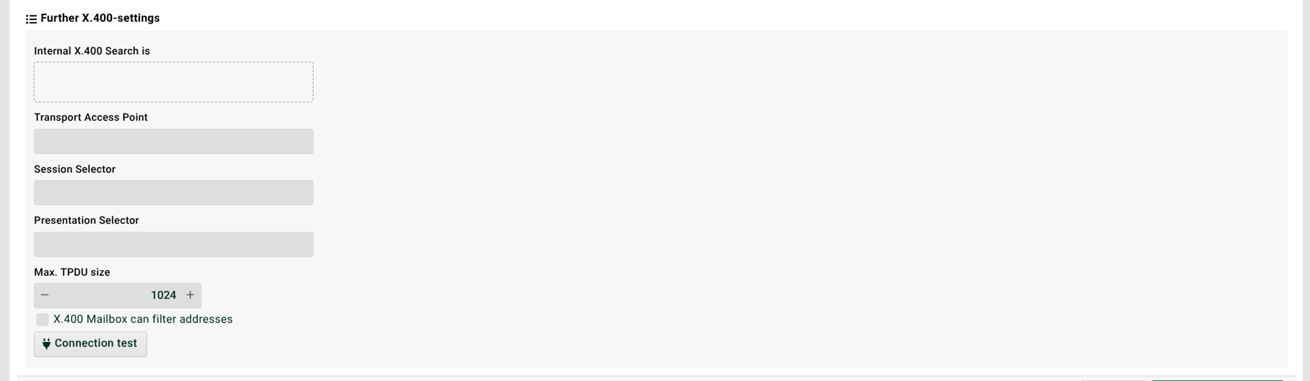
(5) Internal X.400 search is: The internal X.400 search term. The internal search term is used to assign an incoming X.400 message to a channel. The search term is taken from the "Partner ID" in tab "Partner ID (Partner towards me)".
(6) Transport Access Point: The access point for the transport layer (OSI level 4). NOTE To omit sending this information, use value [empty] in this field (including the brackets). If the field is just left empty, a non-empty default value will be used.
(7) Session Selector: The session selector for the session layer (OSI level 5). NOTE To omit sending this information, use value [empty] in this field (including the brackets). If the field is just left empty, a non-empty default value will be used.
(8) Presentation Selector: The presentation selector for the presentation layer (OSI level 6). NOTE To omit sending this information, use value [empty] in this field (including the brackets). If the field is just left empty, a non-empty default value will be used.
(9) Max. TPDU size: The maximum size of the Transport Protocol Data Unit in kB.