Event action – Abstract
Purpose: Aborts Event handling immediately with or without displaying an error message and performs a rollback for the transaction. In a Client Workflow behavior, an 'error information' object is passed to the actions on 'false'.
Tooltip
Usage: Allows the abort of event processing in an event handler or client Client Workflow behavior.
Parameter:
The Error type parameter controls the output of the error message in an event handler. In the Client Workflow it is only reflected in the
errorLevelfield of the 'error information' object.A Resource name from the Resource bundle
errorcan be specified as the Error code to output the corresponding localization as an error message.The Default error message defines by direct input or as a value configuration text that appears as an error message if no Error code is specified or no localization is defined for it.
A definable Parameter optionally replaces associated placeholders (
{0},{1}, ...) in the text of the error message.Output:
In Event handling: Notification (according to Error type) and transaction abort/rollback.
In the Client Workflow: Passing of an 'error information' object to the Actions on "false".
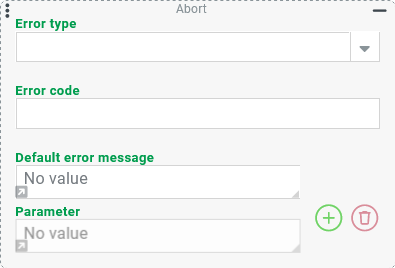
Executing the Abort event action terminates event processing immediately. Depending on the context, this has different effects:
Effect | in a Client Workflow behavior (form) | |
|---|---|---|
Workflow | An abort of event processing and (as far as applicable) rollback of the transaction | Aborts the Client Workflow behavior and executes the Actions on "false" with an 'error information' ( |
Feedback | Depending on the Error type ( | No message appears independent of the selected Error type. NOTE Notification can be done either by a Show alert (Popup) event action executed in advance in the Client Workflow or by Show alert action under the Actions on "false". In the process, |
The text for the error message (errorText) that may be output is determined by one of the following methods:
Direct input in the Default error message parameter (without regard to the Current locale).
Value configuration for the Default error message parameter (can be localized via the Value from localization resolver, if necessary).
Reference to an Error code localized in the Localization (Bundle:
error, Resource: <Error code>) or via Company specific localization localization.
Optionally, the configuration can define a Parameter that replace placeholders ({0}, {1, ...) in the Default error message or localization text for the specified Error code at runtime, if available.
NOTE The values of the Parameter can be determined either by static direct input or by value configuration. If required, the Value from localization resolver can also be used here to return localized texts as parameter value.
Parameter
Error type
The optional selection for the Error type parameter determines in Event handling and in a Client Workflow the value for the errorLevel field (see table column) in the 'Error information' object (ErrorInfo) returned on the abort.
The choices for the Error type are predefined by the static enumeration 'Abort type' (
AbortType).Without selection the default Error type 'Process exception' (
ProcessException) is triggered or theerrorLevelvalue1is assigned.
Error type | Error level | Description | Display |
|---|---|---|---|
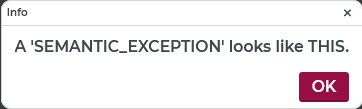
Semantic exception ( | 0 | The error message is displayed as an information dialog, which can be closed by clicking the 'OK' button or the 'X' icon in the upper right corner. |
|
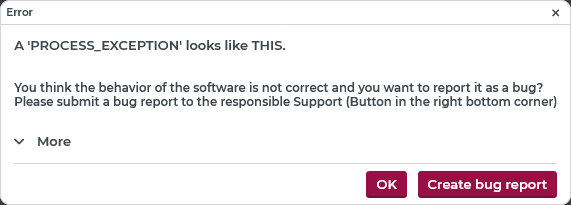
Process exception ( | 1 | The error message is displayed as an error dialog, which can be closed by clicking the 'OK' button or the 'X' icon in the upper right corner. By clicking on 'More', details of the error (or abort) can be displayed. Among other information, the text value of the Error code parameter (if used) appears there. By clicking the 'Create bug report' button, this data can also be downloaded as an error report (html document). |
|
Notification: Success ( | 2 | On the right side of the screen the error message appears for a few seconds as a notification of the 'Success' type with the title 'Info'. |
|
Notification: Warning ( | 3 | On the right side of the screen the error message appears for a few seconds as a notification of the 'Warning' type with the title 'Warning'. |
|
Notification: Error ( | 4 | On the right side of the screen the error message appears for a few seconds as a notification of the 'Error' type with the title 'Error'. |
|
Notification: Info ( | 5 | On the right side of the screen, the error message appears for a few seconds as a notification of the 'Info' type with the title 'Info'. |
|
Suppress ( | 6 | The workflow canceled without any notification. | (no feedback for the user) |




NOTE
Regardless of the selection for the Error type, the execution of the Abort event action at runtime is always evaluated as a 'Process exception'. In the context of Event handling, a rollback is therefore always triggered.
The configured feedback does not appear when running Tests. Instead, an 'error information' object (
ErrorInfo) always appears as the result. The Error type will be reflected in itserrorLevelfield (see also table column above).If the Abort event action is executed within a Try/Catch actor, the same 'error information' object (
ErrorInfo) is available in the 'Catch' block.If the aborted event processing was triggered by a Lobster_data profile (e.g. an Import), a 'Process exception' is always reported there.
If a notification of any type is displayed as feedback, a mouse click on the notification opens the error message as a dialog as for the Error type 'Process exception'.
Error code
If a static text value is entered for the optional Error code parameter, a check is made at runtime to determine whether a localization entry exists for this text as a Resource name in the error bundle (Localization or Company specific localization).
If a localization entry exists for the Error code in the
errorbundle, the localization for the Current locale from this localization entry is used as the error message. The Default error message parameter is then ignored.If the Parameter resolver is configured, it is mapped to placeholders in the localization text for the error code, if necessary.
Example:
The Error code CORESYSTEM_BaseDataManager_failedToDelete is localized by default in the Localization as follows:
Resource bundle | Resource name | English | German | ... |
|---|---|---|---|---|
|
|
|
|
The error message can be individualized via the placeholder {0} per Parameter:
Configuration:
| Runtime example: Current locale: 'English'
Runtime example: Current locale: 'Deutsch'
|
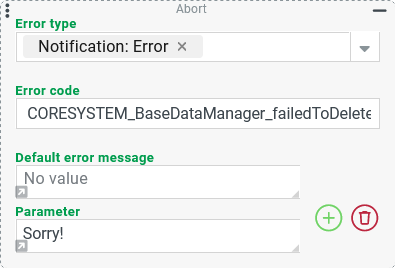


NOTE In practice, instead of the simple static text ('Sorry!') in the first Parameter ({0}), a value configuration would certainly be more likely to be encountered, for example to specify which object could not be deleted and/or why.
Default error message
In the Default error message parameter, a static plain text can be entered by direct input or – after clicking on the small gray arrow at the bottom left – a value configuration can be made:
Direct input | Value configuration |
|---|---|
|
|
Runtime example: with Error type 'Notification: Warning'.
| Runtime example: with Error type 'Notification: Warning' |

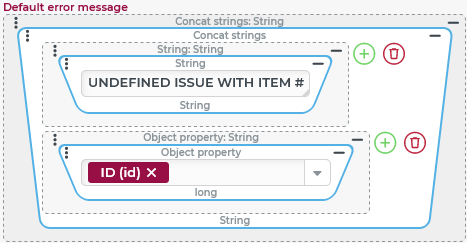


The Default error message defines the text that will be output as an error message or appear in the errorText field exactly when the following condition is met:
No Error code was specified or no localization entry is found for the
errorbundle whose Resource name exactly matches the specified Error code.
If the text entered statically or determined at runtime by value configuration contains placeholders, these can be filled by a Parameter (see below).
NOTE
If the Error code returns a locale entry for which the locale for the Current locale is an empty string, the empty string will be set as the error message instead of the Default error message.
Parameter

Optionally, definitions for a Parameter can be added to the configuration by clicking on the .svg) icon.
icon.
Each Parameter defines a text, for the placeholder in the text for the error message, which refers to the index number of the parameter in the configuration.
The first Parameter addresses the placeholder
{0}, the next addresses the placeholder{1}, and so on.The same Parameter can be addressed multiple times in the error message by using the placeholder repeatedly.
Placeholders can be included in the localization text for an Error code (see above) as well as in the Default error message (see above).
For each Parameter a static plain text can either be directly input or – after a click on the small gray arrow in the lower left corner – a value configuration can be made.
In the following examples, both options (direct input, value configuration) are used for one Parameter each.
Default error message with placeholders in static text | Error code with placeholders in localization text |
|---|---|
NOTE The Object property resolver for the first parameter returns the field 'ID' (
| Localization for error code:: (according to Access denied: Can't access {0} for {1}
|
Runtime example: with Error type 'Notification: Error'
| Runtime example: with Error type 'Notification: Error'
|
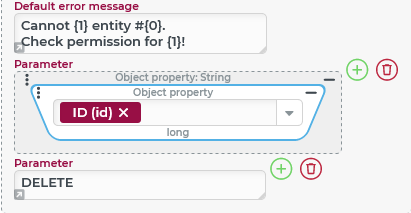
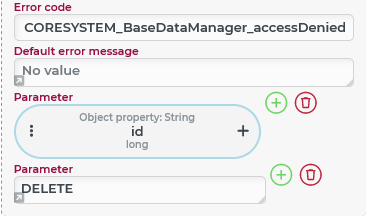


NOTE Direct input of the text 'DELETE' may make sense in the left case, because the error message as a whole does not consider localization. On the right, however, the use of 'DELETE' is critical if a Current locale other than 'German' is used. Because then the error message would be localized but not the text for the Platzhalter {1}.
Special case
If the value configuration for a Parameter returns the value of a dynamic enumeration as a whole, the localization for the Current locale will EXCEPTIONALLY take effect in the context of Event handling as well.
Examples
Simple use case: Cancel Client workflow without message
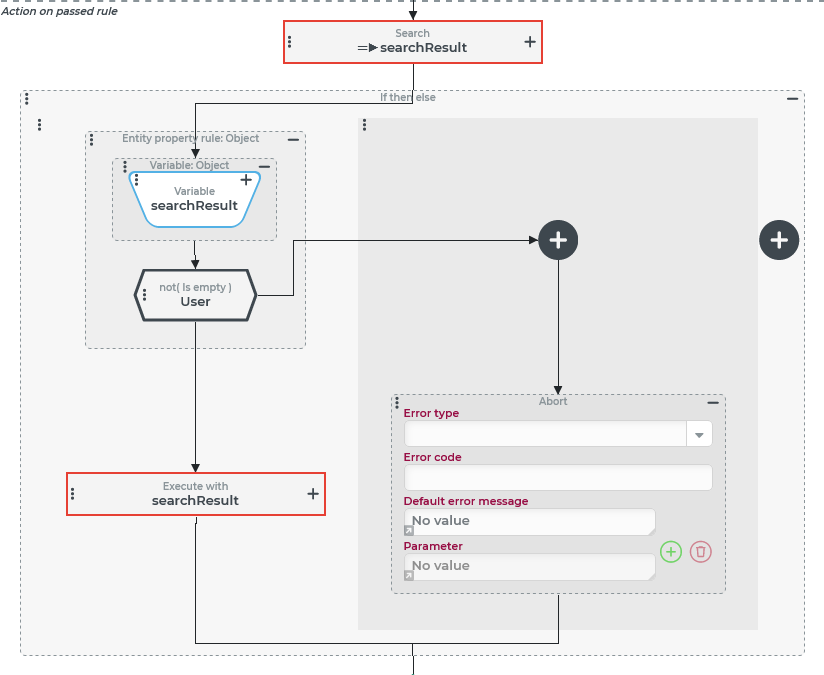
In the context of a form (see Portals or Input forms) a Client Workflow behavior should be aborted if the initially executed Search (Event action) does not return a result, which should access a user account (see Users).
Configuration:
The actions in the Client Workflow behavior are configured as shown on the right:
|
|
Runtime behavior:
If the access to the 'searched' user account fails, the event processing within the Client Workflow behavior stops immediately:
If there are other Event actions configured below the If then else event action shown above, they will not be executed.
Also, at the Client Workflow behavior level (see Behaviors), the Actions on "false" are executed (if any) and not the Actions on "true".
As input value (
$input) an 'error information' object (ErrorInfo) is passed to the Actions on "false", whoseerrorLevelfield specifies the default value 1 for the Error type 'Process Exception' (ProcessException) due to the lack of selection for the Error type in the Abort event action.
NOTE Via the 'error information' object as return value, a Show alert action can be executed in the Actions on "false".
Configuration:
In the behavior with Client Workflow shown above, a Show alert action is set up under the Actions on "false" as shown on the right, which makes visible the error message triggered by the Abort:
Runtime example:
NOTE The example takes into account the adjustments to the configuration for the Abort event action in the Client Workflow shown below. |
|
|
|

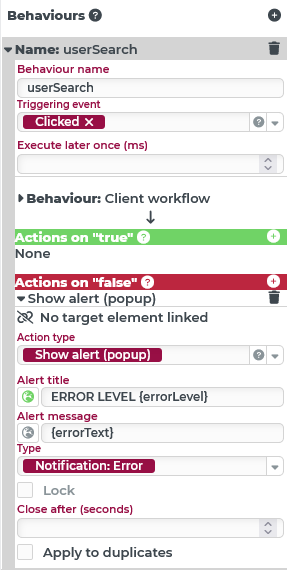
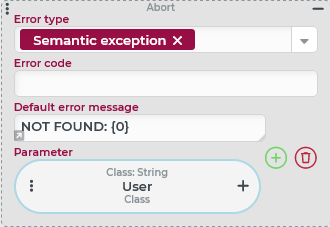
NOTE Although the Error type (or errorLevel) cannot be dynamically mapped to the selection for the Type in the Show alert action. However, if needed, depending on the errorLevel value, the 'Error information' object could be passed to one of several behaviors, in each of which a specific Type is used for the Show alert action. Only the appearance for the default Error type with the extended interaction options described above cannot be simulated this way.
Configuration:
The condition configuration for the existing behavior ('userSearch') is adjusted as shown on the right:
Runtime example: The Error type for the Abort event action in the Client Workflow has been changed to 'Notification: Warning' so that the NOTE The specific check expressions should be defined so that each |
|

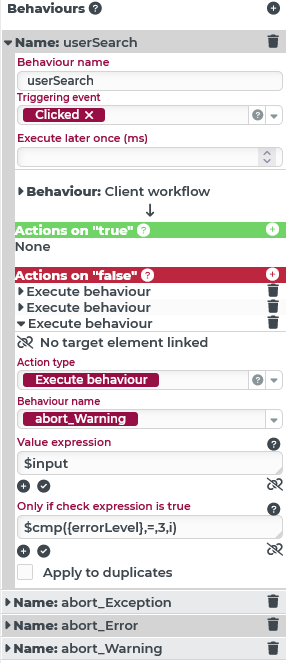
This type of 'case distinction' is only really useful if a Client Workflow contains multiple instances of the Abort event action and these refer to the Error type that needs to be differentiated.
NOTE Comparable results can also be achieved by executing a Show alert (Popup) event action in the Client Workflow immediately before the Abort event action, which is parameterized as an error message. Then the parameterization of the Abort event action and the configuration of Actions on "false" may be completely unnecessary.
More complex use case: Cancel event handling with/without message
Each time an entity of the type 'Order' (see Orders) is saved, a variety of criteria are evaluated in order to automatically assign a subsequent working state in the workflow (see Set current working state), if necessary, depending on the current working state (see Current working state rule).
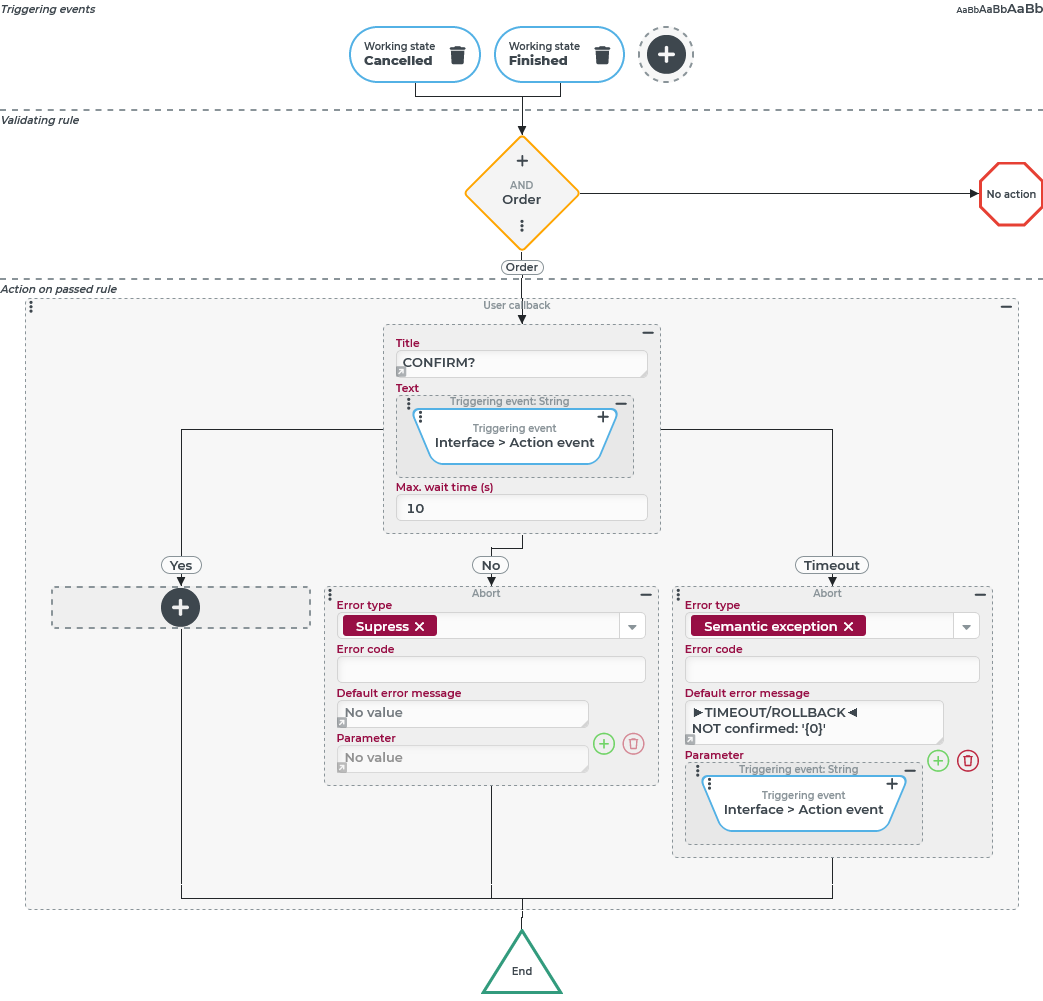
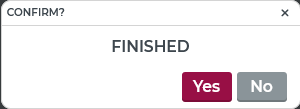
Details of the workflow should not play a role here. However, the automatic switch to certain Working state should only be executed if the user explicitly confirms this via a User callback. The following cases are to be distinguished:
Response to User callback | Desired effect | Measures in event handling |
|---|---|---|
'Yes' (confirmation granted) | Close transaction | none |
'No' (confirmation explicitly rejected) | Rollback for transaction | Abort (without message) |
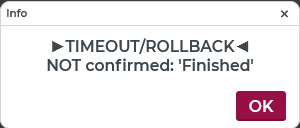
No decision within the maximum waiting time | Abort (with warning message) |
Configuration:
As Triggering events should be selected the Triggering events from the category Working state (Events), which refer to Working state, whose assignment should be reconfirmed. The Validating rule here uses a Check type of the 'Order' type. The only Action on passed rule is configured as a User callback event action as shown on the right:
|
|
Runtime example:
Semantic exception (on timeout) | |
|---|---|
|
|
The static text in the Title is in English, so it matches the internal name for the triggering event ( In contrast, the 'Yes' and 'No' buttons appear with the default locales for the Current locale. | The user can let the 10 seconds waiting time pass without selecting 'Yes' or 'No' or to end the dialog by clicking on the 'X' (='No'). Then the message above appears. The predefined title and the 'OK' button are labeled with the localization for the Current locale. The message appears, according to the configuration for the Default error message parameter (see above) in English. However, for the placeholder |
NOTE A mixture of languages within the messages can only be avoided if all configurable content is consistently localized so that the Current locale applies to all text. Instead of static text, the Value from localization value resolver should be used in each case.