The following types are available for the explicit configuration of Joins:
NOTE
Joins are typically created in the configuration of a search (or a Sub search oder Subsearch projection) at a parent level in order to use the alias name defined in the further configuration of the search.
If required, Joins can also be used to create a Chained projection (see there for examples). The alias names used are not valid outside the projection.
Joins can also be used in the context of data grid settings to include additional data in the Tuple search for an overview. A "Joins" tab is available for this in the context of the column configuration. Although the Joins configured in this way are formally related to a specific column of the data grid, they can be addressed in the context of the entire data grid definition via the assigned alias name. On the other hand, it is important to ensure that there are no different definitions in different columns for the same alias name.
Background
All Search types in Lobster Data Platform/Orchestration require the selection of an entity type (in the "Entity" property), which defines the primary data source for the "Search".
The selection of the entity determines which database table the database query generated for the search in the FROM section of the SELECT statement directly refers to.
The FROM section of a SELECT statement can also contain several JOIN sections in order to include the results of other table accesses in the search.
Within each JOIN section, the complex ON condition determines which criteria must be met for data records from the JOIN table to be considered "related" to a specific data record from the FROM table.
Example diagram
A CANDIDATES table evaluates in the LEVEL column the knowledge of candidates identified in the NAME column in relation to the language named in the LANGUAGE column:
| A further TASKS table defines the required "English language skills" (
| ||||||||||||||||||||||||||||||||||||||||||||||||||||||
The following slightly simplified SELECT statement aims to form an intersection between TASKS and suitable CANDIDATES:
SELECT TASK, NAME FROM TASKS INNER JOIN CANDIDATES ON ((LANGUAGE = "en") AND (LEVEL >= EN_LEVEL))
Result:
| The An INNER JOIN is explicitly used here because the result should be exactly the intersection of CANDIDATES and TASKS defined by the ON condition.
|
Implicitly generated joins
When executing a "search", at least one SELECT statement is generated based on the configuration of the search and – if this succeeds without error – transferred to the database.
Data storage for an entity type often extends across several database tables, the relationship between which is then also more or less strictly "regulated" on the database side, depending on the data model for the entity.
If the relationship between an entity and the data managed in a "detail table" is sufficiently binding, the relevant relations are automatically "resolved" when accessing detail properties in Projections , without the need to explicitly configure Joins.
NOTE If different Projections imply exactly the same join, this is generally not executed redundantly on the database side, but is used jointly within the generated SELECT statement.
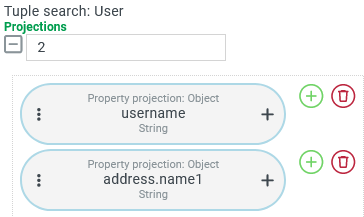
| In a Tuple search for Users a Property projection accesses the "Name" address property ( This search returns the desired result without any further precautions, although only the "username" ( Access to the "address" requires a LEFT JOIN to the database table base_address , which contains all addresses known in the system. This LEFT JOIN including the ON condition relevant to the context, is generated automatically when the database query is executed. |
The following SELECT
| |
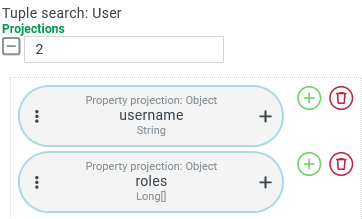
| In a Tuple search for Users a Property projection accesses the "Roles" ( This search returns the desired result without any further precautions, although only the "username" ( So that several role IDs can be assigned to the same user, a specific detail table ( base_user_roles ) is required in which different role IDs ( role_id ) can be combined with the same foreign key ( user_id ) on the Users table. Access to the "roles" of a user again requires a LEFT JOIN. |
The following SELECT NOTE Each role ID could in turn be interpreted as a foreign key for a data record in the table for Roles ( | |
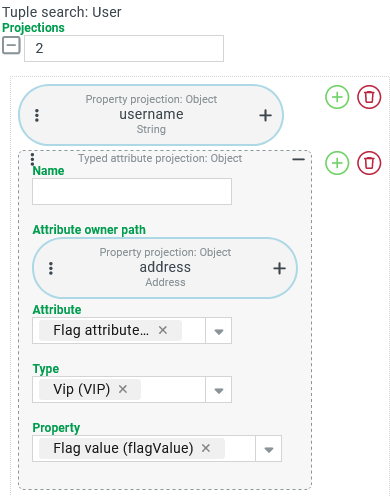
Example: Users ←1 : 1→ Addresses ~ Typed attribute projection | |
|---|---|
| In a Tuple search for Users a Typed attribute projection accesses the flag attribute for the address with the (sub)type This search returns the desired result without any further precautions, although only the "username" ( As explained in the first example above, accessing a field of the address already implies a LEFT JOIN to the As can be seen in the screenshot on the left, our Typed attribute projection explicitly refers to the Attribute owner path On the database side, the implementation of an attribute type for an owner requires a separate database table in which the attribute properties for this owner-attribute type combination are stored. Access to attribute values therefore always requires at least one implicit join. The Projections for attributes only simplify access on the surface. However, this does not eliminate the need to look up the specific detail tables in the database. NOTE In special cases, it may be necessary to dispense with the convenience of Projections for attributes and instead set up explicit Joins for accessing attribute values. |
The following SELECT LEFT JOIN LEFT JOIN base_address_flag_attribute ON | |
NOTE In the ON condition for the second LEFT JOIN, the id from the green address table (base_address) is used as the compare value for the address_id column in the red marked attribute table ( base_address_flag_attribute ) However, as can be seen in the ON condition for the first LEFT JOIN, this must match the foreign key address_id in the Users table (base_user) marked in blue. Therefore, it is possible to completely dispense with the first LEFT JOIN to the address if the foreign key address_id is compared directly with the address_id column of the attribute. This abbreviation can only be enforced in an explicit join. The implicit join will always follow the internally predefined schema (Entity → Attribute owner path → Attribute) if an Attribute owner path is specified that differs from the entity in the FROM section. | |
Explicitly defined joins
By explicitly defining Joins, additional data sources can be included in a search so that they are available for the definition of Projections.
All Search types can use Projections on Joins to define Restrictions.
NOTE AnINNER JOINcan also restrict the search if necessary, without there being any restrictions at the main level of the search.In a Tuple search or CSV search data assigned via Joins can serve as Projections for Output columns and Group by's.
In data grid settings, data from Joins can also be used in Restriction projections (for filtering) or Sorting projections (for sorting).
Explicit Joins may only be required as an intermediate step in order to enable projections for key values in the
ONcondition of further Joins.
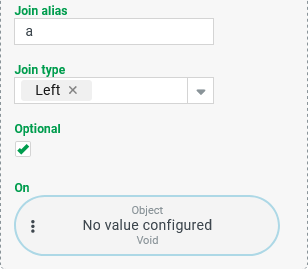
All Joins have the parameters shown on the right:
|
|
The configuration of an On condition is always optional. For all Joins except the Entity join the context already implies a condition for the join:
An explicitly configured On condition is always combined with any applicable implicit condition in an AND junction. In this case, the join only adds data records for which both the implicit and the explicit condition apply as passed. | |
CAUTION
An important restriction for the definition of an explicit On condition is that it must not refer to a projection with a path to a property that would imply another join.
What sounds quite complicated can be clearly understood using the following example:
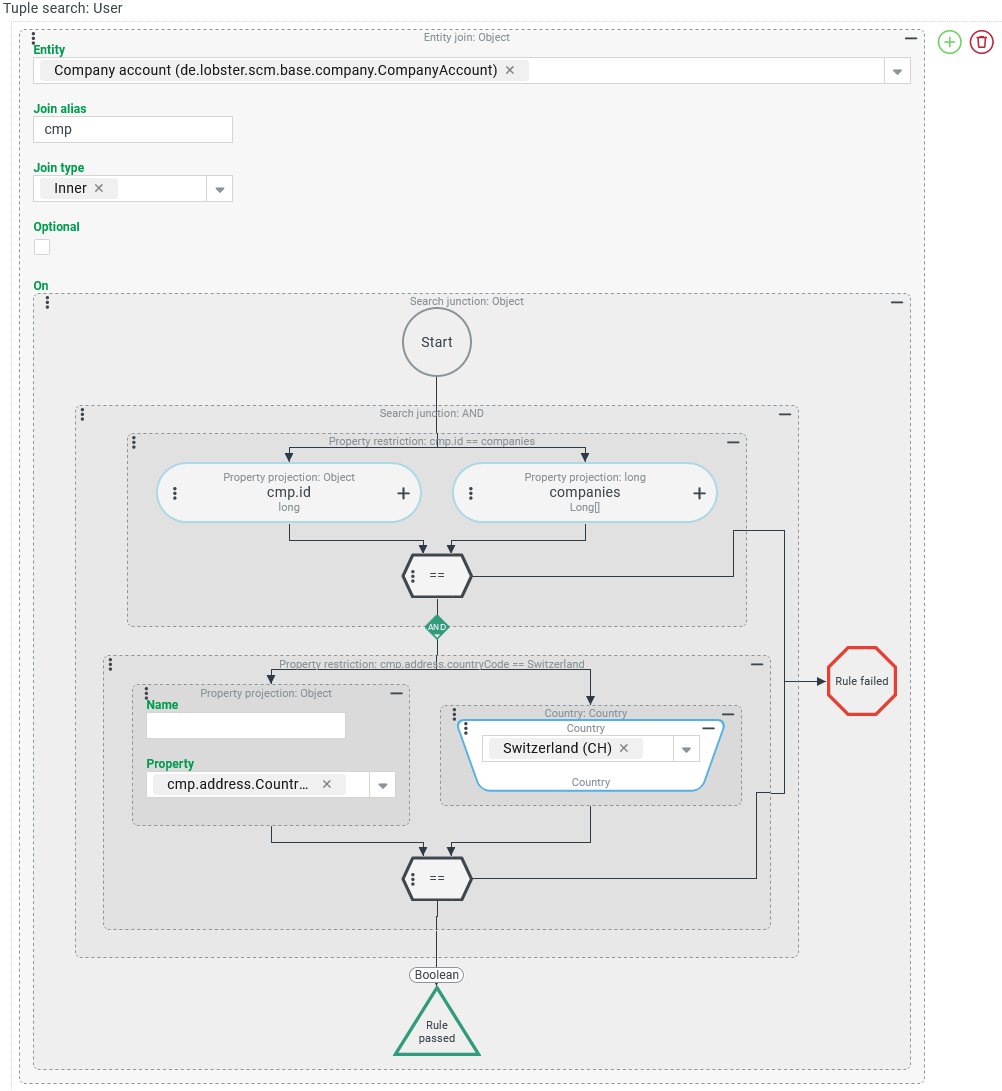
A search for Users uses a Entity join to include the data of all Companies/Clients in the search whose ID is specified in the "Companies" (
companies) list field of a user account.A secondary condition is that only company accounts whose address field "Country" (
address.countryCode) refers to the Country "Switzerland" (CH) should be taken into account.
NOTE The configuration shown on the right is not completely nonsensical, but "just off the mark". It is intended to demonstrate a common mistake when configuring an On condition that contains a secondary condition.
This configuration returns an error message when the search is executed: The "Join" to which the error message refers is not the explicitly created Entity join to the company account. However, it is problematic that the "Country" property is addressed in the address of the company account. The path selected in the Property parameter implies a join to the address so that its "Country" property can be evaluated. What is not difficult in the projection for an output column, for example, is not possible in the context of an On condition. In order for the restriction for the country of the company account to be implemented effectively, the company address must be explicitly included in the search by means of an additional join. |
|
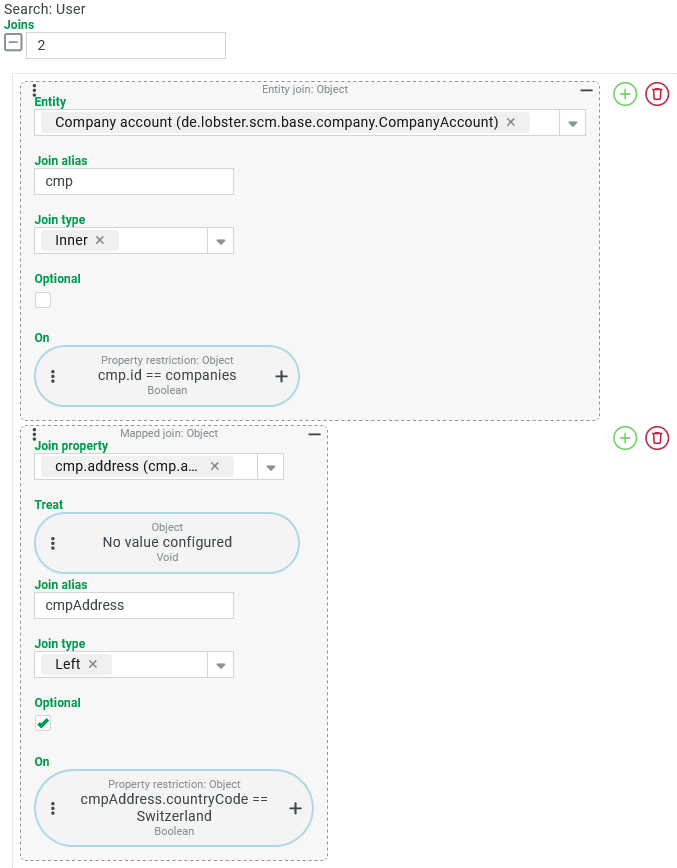
The secondary bindings for the address of a company included by a join can only be effectively implemented here by an additional join for the address: | |
The Entity join described above can be customized as follows:
In the form shown on the right, the Entity join first binds all Companies/Clients that are assigned in the A Mapped Join has been added below, which refers to the "address" property of a company provided by the first join (
|
|