Value resolver – Abstract
Purpose: Explicitly returns "no value" (
$null) e.g. as a return value for a value configuration for which the reference object is otherwise the default value.Tooltip
Usage: The value resolver ignores the input value and returns "no value" (
$null) as a value. A typical usage scenario is the explicit assignment of "no value" ($null) for a value configuration that would use the current reference object as default value without any configuration.NOTE Value resolvers arranged above within a value resolver chain are not executed!

IMPORTANT All value resolvers for Static values ignore the input value. Within a value resolver chain (see Chained resolver), this has the effect that all value resolvers arranged above are not executed.
The No value resolver returns "no value" ($null) as a static value.
An "untouched" value configuration, e.g. for a parameter of a value resolver that has just been added, shows the label "no value configured". This condition is often but not always effectively equivalent to selecting the No value resolver for the value configuration. It always depends on the context of the value configuration concerned (see examples) whether "no value" ($null) or the possibly applicable reference object is assigned as a value to a parameter at runtime when a configuration is omitted.
Examples:
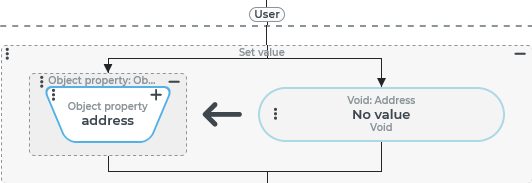
A Set value event action assigns the value "no value" (
$null) to theaddressfield of a user account (see Users), i.e. deletes the address from the user account. Here, the No value resolver (on the right side of the assignment) does not necessarily have to be used, since$nullis assigned even without a value configuration (see figure). "No value configured" and "no value" are equivalent at runtime.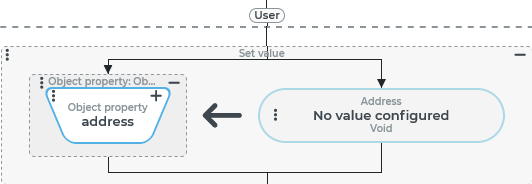
=
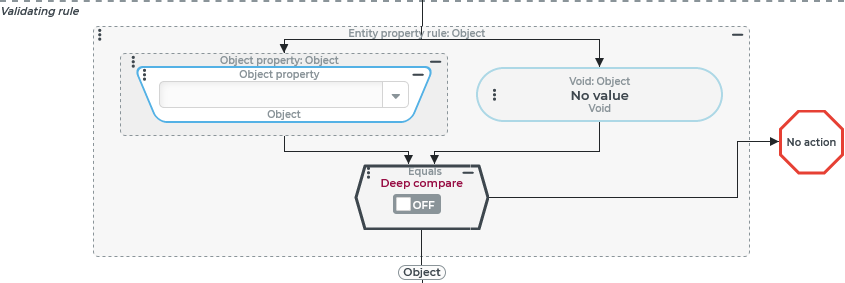
The Validating rule of an event handling is supposed to apply exactly if the triggering event was triggered without an input value. Even in this case, the No value resolver (right) does not have to be used explicitly, since
$nullis valid as a compare value even without configuration: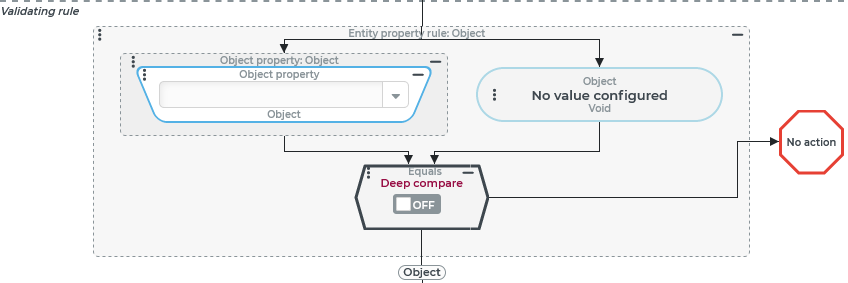
=
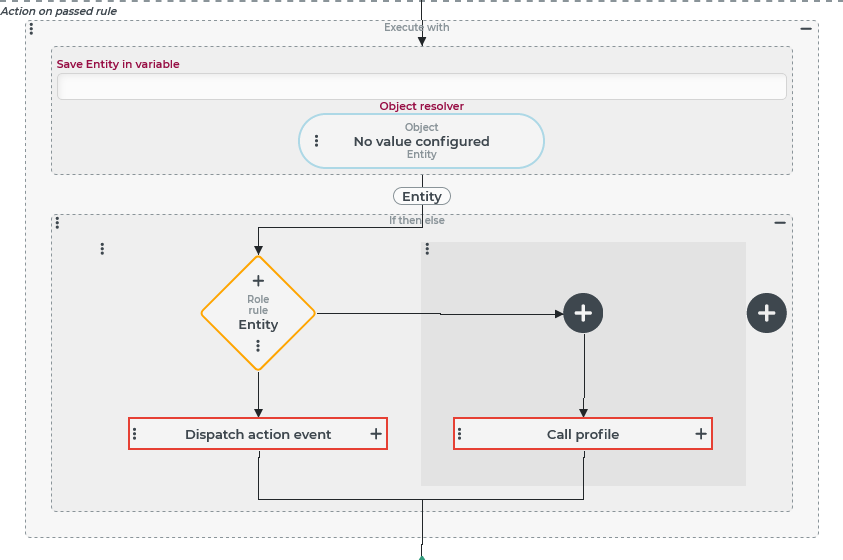
An event handling should either trigger a Custom action event or execute a Call profile event action depending on a Role rule. In both cases, no input value is expected. Since both the Dispatch action event event action and the Call profile event action pass on the reference object present in the call context as input value by default, the context for the case distinction (If then else event action) is explicitly changed to "no value" (
$null). This enables an Execute with event action, in whose Object resolver the No value resolver must be used:Without value configuration ("No value configured") for the Object resolver parameter, the "entity" given as the reference object is passed through to case discrimination. This is explicitly undesirable here.
For the Object resolver parameter, the No value resolver must be used so that "no value" (
$null) is the reference object in all branches of the case distinction. In this way, the data of the external reference object ("Entity") can be passed on to the custom action event or the profile. Consequently, the type in the configuration is no longer "Entity" but "Void".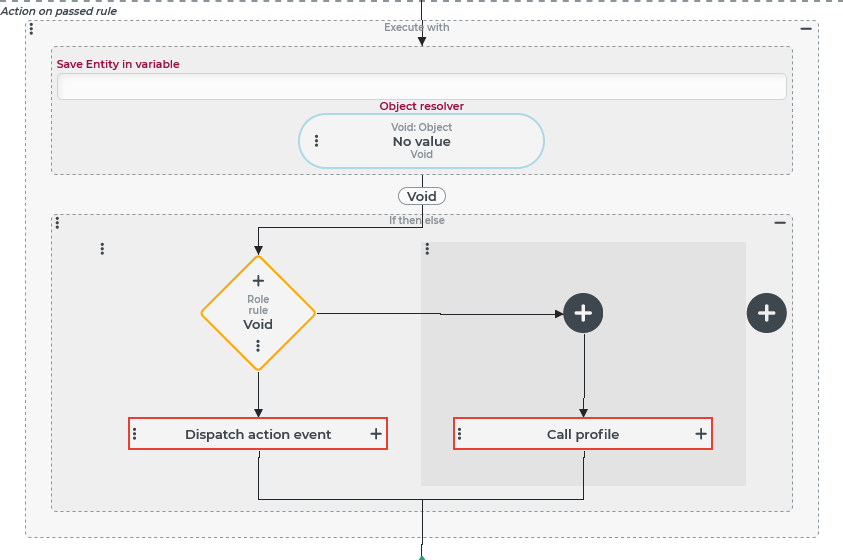
NOTE At first glance, it may not seem to make much sense to explicitly set the input value for an Event handling to "no value" ($null). However, this can be used, for example, to trigger automatic value assignments within the event handling in question via the Default value resolver.
Configuration
The No value resolver ignores the input value and does not use any parameters.
Examples
Explicit assignment of "no value" ($null) when an event is triggered.
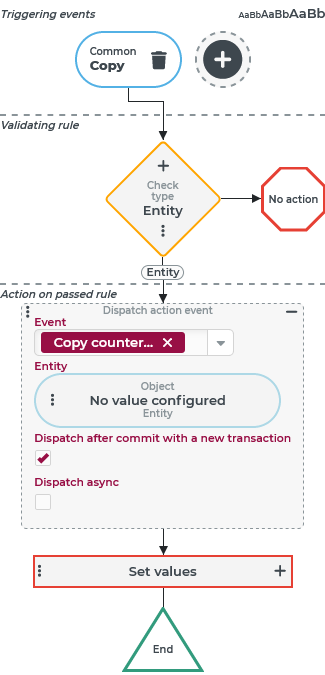
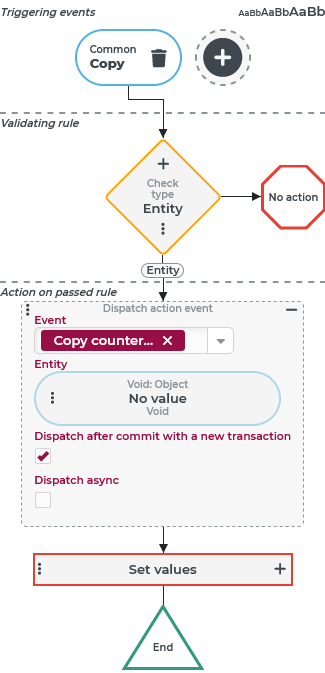
Event handling should be executed whenever the "Copy" event (see Common action event) is triggered in the context of any entity.
The essential purpose of event handling is to initialize the copy by value assignments in a copy of Set values event action.
Beforehand, however, a Custom action event "Copy counter" is triggered, which "registers" the creation of a copy with reference to the original for certain entity types.
NOTE The "Copy" event (see Common action event) refers to the original of the copy operation via the automatically provided source variable. The Dispatch action event event action "clones" all variables valid in the context for the context of the called event. This means that when the "copy counter" event is triggered, the data of the original is available in the source variable even if it is not explicitly passed as an input value to the event.
Configuration:
Alternatives ► | Option 1: "No value configured" for "Entity" | Option 2: Entity: No value |
|---|---|---|
Configuration |
|
|
Differences per option | The Entity parameter in the Dispatch action event event action does not contain a value configuration ("No value configured"). Effect: The reference object, i.e. the copied entity, is assigned as an Entity (→input value) for the custom action event. That the Entity parameter passes the reference object when "No value configured" is indicated by the reference to the "Entity" data type (at the bottom of the placeholder for the value configuration). | The Entity parameter in the Dispatch action event event action is explicitly assigned "no value" ( Effect: The custom action event is not assigned the data of the reference object as input value, but "no value" ( If the No value value resolver is used to explicitly assign "no value" ( |
IMPORTANT The type displayed in an "empty" value configuration is not always a reliable indication of whether or not the reference object will be used as the default value at runtime. Whether the No value resolver must be used so that "no value" ( | ||