Purpose: Sets a value in an object field or variable.
Tooltip
Usage: The value returned by the right value resolver is assigned to the target (object field or variable) defined by the left value resolver.
Parameter: Value resolver (left/target), value resolver (right/source).
Output: Value change for a field of the reference object or variable.
The Set value event action sets a value in an object field or variable.
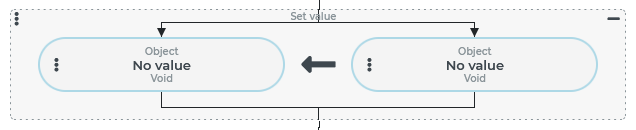
On both sides of the 'Value assignment', one resolver each can be configured for the destination and the source.
The arrow direction of the symbol between the two values illustrates the relationship between the source (right) and the destination (left).
IMPORTANT
A value assignment only takes place if the configured target can process it at all, and if the data type between source and target matches or is convertible. If, for example, a static value (see Static values) or 'no value' is defined as the target, the event action has no effect with respect to the target. In the context of Tests, an error message may be read in the 'Log' (e.g. an
UnsupportedOperationException), however, in the case of the Set value event action, such inconsistencies do not usually lead to any event handling cancellation (with rollback). If a value assignment fails, the target simply keeps its value unchanged.If a Variable value resolver in a Set value event action defines the source, the 'Type' parameter (in the Variable value resolver) can be used to read the data 'type safe' from the variable. In addition to simple conversions for simple values (e.g. between the types
StringandLong), specific mechanisms (see Input object (type safe)) for 'resolving' complex objects based on simple values (dynamic enumeration value vianameasStringvalue, entity of a concrete type viaidasLongvalue) are also effective.If a Variable value resolver in a Set value event action defines the target, the 'Type' parameter (in the Variable value resolver) can be used to write the data read from the source to the target in a 'type-safe' manner. Only simple conversions for simple values (e.g. between the types
StringandLong) are effective, but not the specific mechanisms mentioned under (2).When writing or reading variables, note that they always represent a reference to an object unless they are assigned a simple value (e.g. a string or a numeric value). Set value transfers if source and target are two different variables, i.e. only the reference, provided that the value of the source is an object and not a simple value.
The following examples are intended to illustrate the practical significance of these important aspects.
Example
As an example, the use of a series of Set value event actions is explained here, which should result in an event handling with the following objective:
Task formulation:
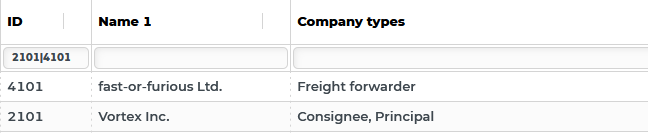
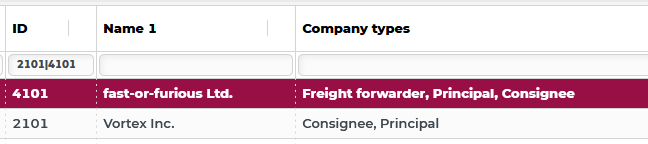
There are two companies (with the IDs
2101and4101), that have been assigned so far to the Company types shown above (see Company type).The Company types of 'Vortex Inc.' (
2101) are to be transferred to the company 'fast-or-furious Ltd.' by event handling, which was previously classified only as a 'Freight forwarder', in addition to the current company type ('Freight forwarder').
Configuration:
NOTE The following configuration is not intended to be a best practice solution for the task. Rather, it serves to illustrate important considerations when using Set value.
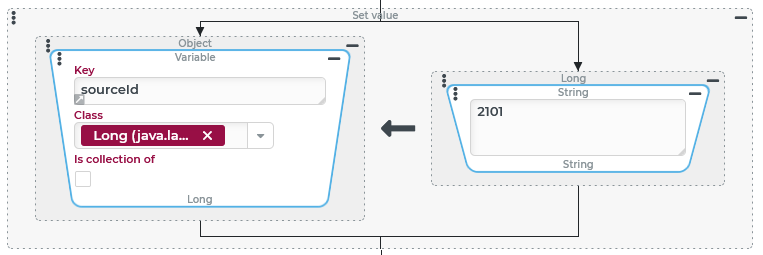
Assigning a simple value to a variable (with simple conversion) | |
|---|---|
The source of the first assignment is a value resolver that defines the unique internal ID ( The target of the assignment is a value resolver for a Variable in which the Key The value of the variable |
|
NOTE To assign the | |
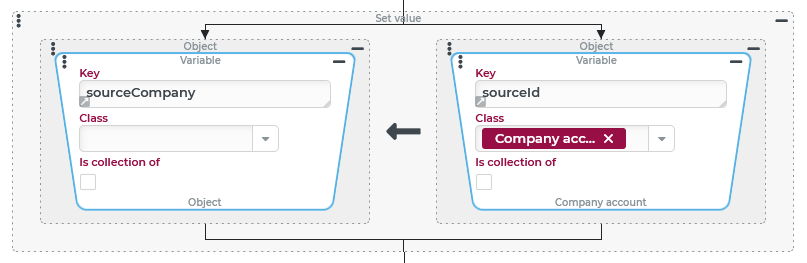
Assign a reference to an entity addressed by Long ID as the value of a variable | |
The source of this assignment is the previously set variable The target of the assignment is a new variable named NOTE In Tests, the current status of the company account with all details valid at the time of execution still appears as the value of the variable. |
|
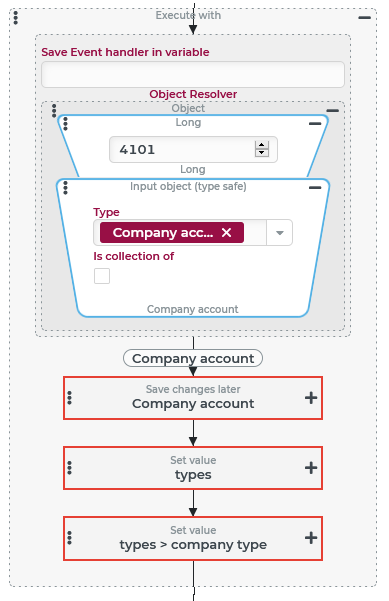
In the Execute with event action shown on the right, the company account of the company 'fast-or-furious Ltd.' is first set as the reference object, which is the target of the following assignments in the action block. Its internal ID ( The following event actions are then performed with the company account defined as the reference object:
Further details on this are described in the following sections, which show the expanded configuration of the two Set value event actions. |
|
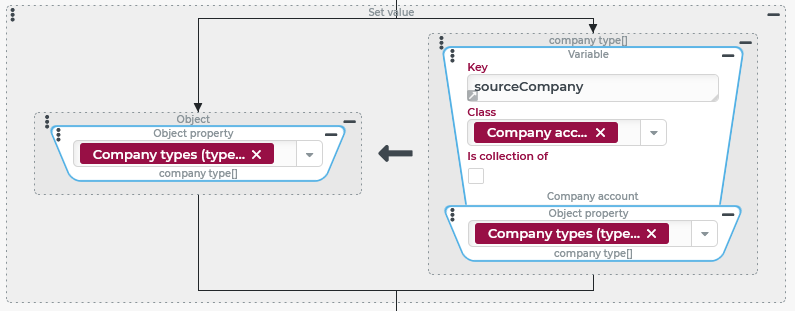
The source of the first assignment is the variable The target of the assignment defines an Object property value resolver, which provides access to the field 'Company types' of the reference object – the 'fast-or-furious Ltd.'. This field previously referenced a list with exactly one entry, namely the company type 'Freight forwarder'. This reference replaces the assignment with a reference to the list of 'Vortex Inc.' with the company types 'Consignee' and 'Principal'. |
|
IMPORTANT For the understanding of Set value, it is important to understand that at this moment the two input objects for the involved company accounts per field types actually refer to the same list and not to two different ones, which contain the same elements due to the assignment. | |
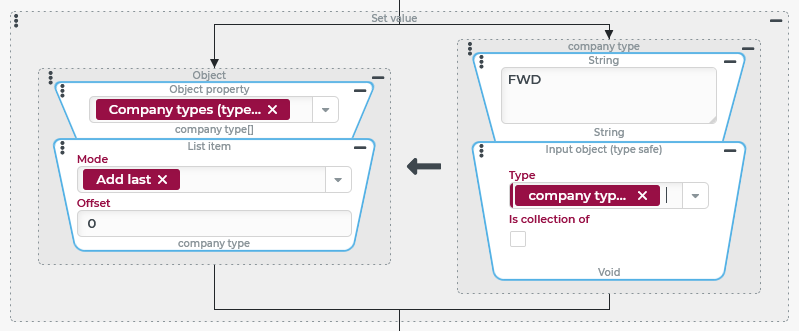
The last assignment is now to restore the entry of the company type 'Freight forwarder' for the company account of 'fast-or-furious Ltd.', so that this is not lost when the company account is saved with the list recently referenced. The source for the entry uses a concatenation of the static string The target here is a List item resolver, which with the Mode 'Add last' allows an element to be added to the list defined above by value resolver. The list referred to by the 'Company types' ( |
|
CAUTION As explained in the previous paragraph, at this point the two input objects for the involved company accounts per
| |
| |