See also: Store value as variable, Input object (type safe)
Value resolver – Abstract
Purpose: Establishes the reference to a variable in the execution context for read or write access, supporting type checks, type conversions and lookup functions similar to the Input object (type safe) value resolver.
Tooltip
Usage: The value resolver provides the fallback value defined by the Default value parameter if the input value is "no value" (
$null). In all other cases (e.g. even if the input value is an empty string or an empty list) the input value is returned directly.Parameter:
The Key parameter names a variable whose value is read or written by the direct input of static text or the definition of value resolvers that provide a variable name at runtime.
The Class parameter provides for the selection (or input) of a class to declare, check, lookup, or convert the read or written value to.
The Is collection of option is considered a declaration or a check type with and without specifying a Class but excludes the lookup and type conversion functions.
NOTE Looking up entities by their ID starting from a numeric value is not supported in the Client Workflow and is read-only in the server context..
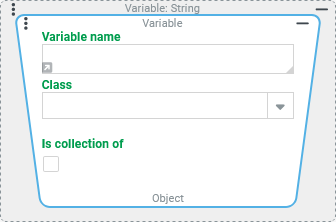
The Variable value resolver establishes the reference to a variable in the execution context for read or write access. The input value is ignored in both cases.
NOTE The Variable value resolver can be used on the left side of a Set value event action to assign a value to a variable. Often "write access" can also be achieved without any disadvantages via the Store value as variable value resolver. This is more versatile (e.g. also in Association criteria, where Event actions are not available) and allows more efficient configurations, since, for example, within a value resolver chain any intermediate result can literally be "casually" assigned to a variable.
The Key parameter defines the name of the variable that will be created during write access if it does not already exist.
The Class and Is collection of parameters define the data type expected for subsequent elements in the context of the configuration.
The two parameters are relevant for read and write accesses to variables depending on the context for the following functions in a similar way to the Input object (type safe) value resolver:
Function | For read access | For write access |
|---|---|---|
Type conversion for simple values ( |
|
|
Look up an enumeration value in the enumeration selected as Class starting from a text key passed as value, which is compared with a key field defined per enumeration (usually |
|
|
Lookup of an entity of the selected Class (specific entity type) starting from a numeric value for the ID ( |
|
|
Check type against the selected Class Checks the class affiliation of a value or all values of a list (if Is collection of is checked):→ Return value if passed: Checked value (list, if applicable)→ Return value if failed: "no value" ( |
|
|
NOTE The Check type always takes place after the other functions that may be applicable. Therefore, if the lookup or type conversion is successful, the check is always passed. If an applicable function fails, the return value is "no value" ( | ||
.svg) automatic
automatic.svg) not supported in the
not supported in the IMPORTANT
If a write access uses the Variable value resolver with the Class and/or Is collection of parameters of on the target side of the assignment (e.g. on the left in a Set value event action), the failure of a type check, type conversion, or lookup of an enumeration value will not result in the assignment of "no value" (
$null), but in a "silent" abort of the assignment. So the variable defined as the target keeps its previous value unchanged and the execution context continues without any error message. Only in the context of Tests is the abort traceable via the "Log" tab anUnsupportedOperatonException.
Configuration
The input value is basically ignored by the Variable value resolver (in contrast to the Store value as variable value resolver).
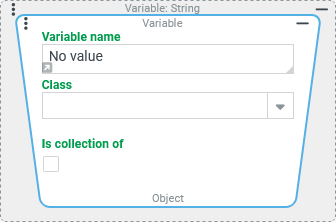
Key | By default, a Text field is displayed for the Key parameter for direct entry of a static text for the variable name. NOTE To address already existing variables, the upper/lower case letters must exactly match the variable name used for write access. | Direct input of a static text:
|
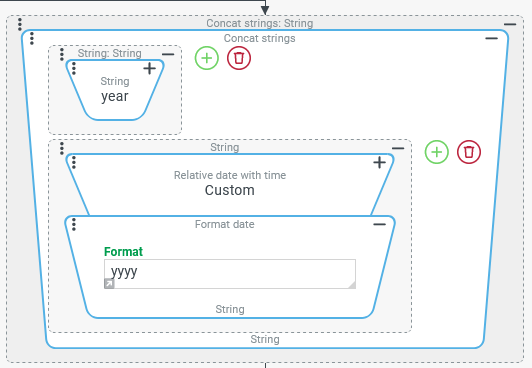
As an alternative to direct input, after clicking on the small gray arrow at the bottom left of the Text field, value resolvers can be configured for direct input, which should return a string suitable as Key. If no text has been entered yet when clicking on the arrow, a placeholder for the configuration of value resolvers will then appear:
| Value resolver configuration:
NOTE The dynamically assigned variable could be used, for example, to calculate key figures per calendar year in the context of a loop over raw data. | |
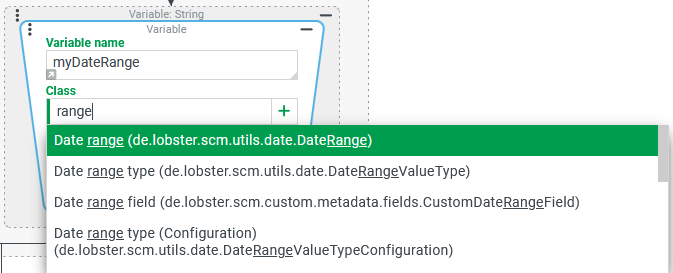
Class | The optional Class parameter supports a static single selection for a class via a Combobox. Its search function (see image on the right) considers matches for the applicable localization as well as the internal name of the class. A selection for the Class implies a Check type for the value of the variable and may – if automatic conversions are provided – also cause a type conversion or a lookup of enumeration values or entities with respect to the return value. |
NOTE Using the [+] symbol or the Enter key, the string entered here as a search term |
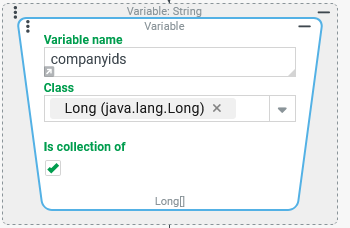
Is collection of | The option Is collection of (unchecked by default) specifies that the value of the variable should be a list. If the value is not a list, the Variable value resolver returns "no value" ( If a Class is explicitly specified (see image on the right), checking the Is collection of option implies a Check type of all list entries against this Class , so that the return value is |
Selecting the Type |

With regard to "lists" stored in a variable, it should also be noted:
If the option Is collection of is unchecked (default) and no Class is checked then no Check type takes place. So it is not possible to specify in this way that only one return value is "desired", which is not a list.
As long as the option Is collection of is unchecked, a list is returned directly like any other data object stored in a variable.
If the option Is collection of is unchecked when accessing a list, then the Class parameter can be used for a type conversion for the list as a whole.
Example: A
routevariable contains a normal "list" (java.util.List) ofStringvalues defined by IATA codes of flight destinations along a "trip schema":In JSON notation, the list in theroutevariable for a "round trip" could look like this, for example:[MUC,JFK,GIG,CDG,MUC]If theroutevariable is accessed by the Class "List" (java.util.List) or without specifying a type, the return value is exactly the same as the saved value.If, on the other hand, the
routevariable is accessed by the Class "Set" (java.util.Set), then the "List" is converted into a "Set", which can change the order and the number of entries. In the specific example, the return value could look like this:[GIG,CDG,MUC,JFK]
Examples
Simple write access (with and without type conversion)
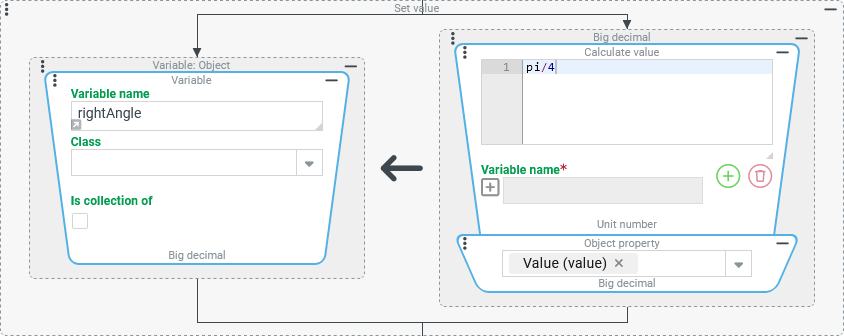
An approximate value for π/2 (radian measure value for 90°) is written as a decimal number into a rightAngle variable.
Configuration:
Within a Set value event action, the Variable value resolver is used to identify the target for the assignment:
|
|
Result: (XML image of the variables as entry in the <entry><key xsi:type="xsd:string">rightAngle</key><value xsi:type="xsd:decimal">0.785398163397448309615</value></entry> | |
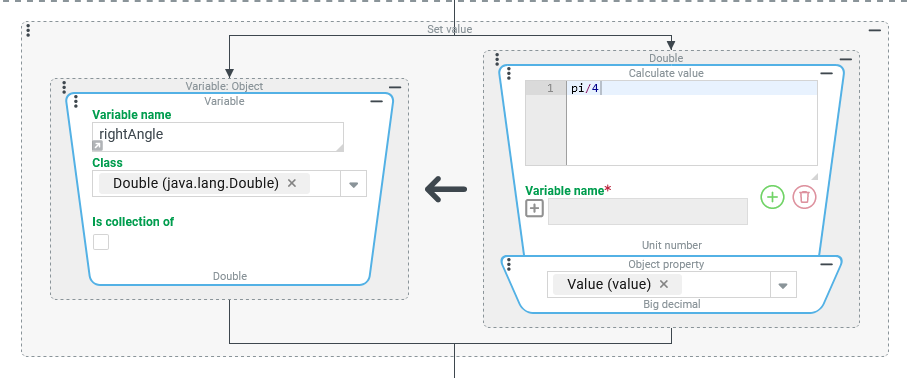
Within the previous configuration, the Class "Double" ( |
|
Result: (XML image of the variables as entry in the <entry><key xsi:type="xsd:string">rightAngle</key><value xsi:type="xsd:double">0.7853981633974483</value></entry> |
Simple read access (with and without type conversion/lookup)
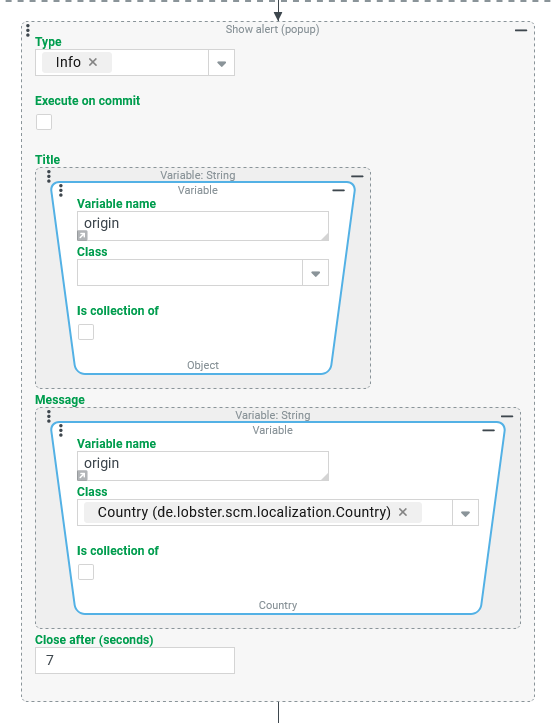
An origin variable contains static text that specifies a "home country" via the internal name of a value from the Country dynamic enumeration.
In a notification (via Show alert (Popup) event action), the static text is to be reproduced in the "Title" and its localization as "Message".
Runtime example:

Configuration:
In a Client Workflow (in the context of a form), a Show alert (Popup) event action can be configured as shown on the right to achieve the desired result:
IMPORTANT The return value for the Message is a dynamic enumeration value ( |
|
Read access to a list of entities from a search in the context of a loop
A typical use case where a variable contains a list of entities is the execution of a Search (Event action) of the "Search" type for which the "Search value" mode is selected.
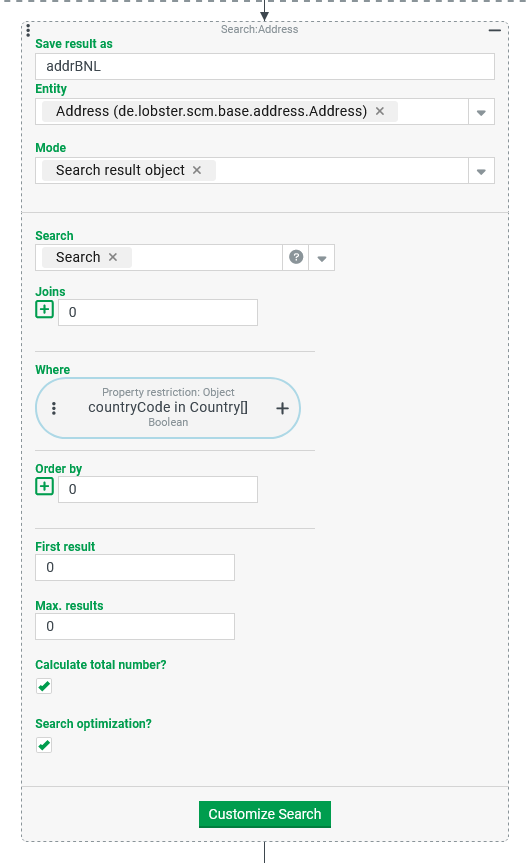
In the following example, the search should return all addresses that refer to a region defined by a list of countries (see Country) (here: "Benelux" with the country codes BE, NL, LU).
A loop then iterates over all "found" addresses to determine statistical key figures.
Since a Search (Event action) can only be executed as an event action and not as a value resolver, the name of a variable into which the result of the search is saved at runtime must be specified during configuration via the Save result as parameter.
NOTE The Search (Event action) lists only addresses for the "addresses" entity that can be accessed via Address book entries in the given execution context. |
|
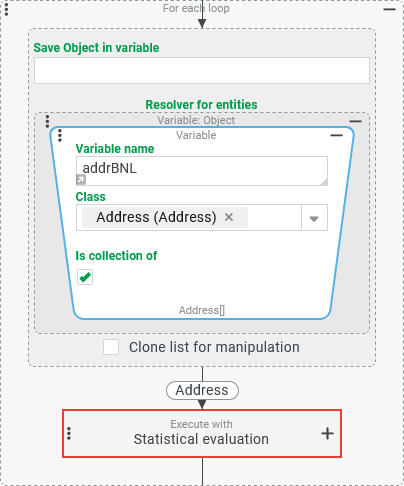
The following For each loop event action iterates over all "found" addresses. A Variable value resolver is therefore used as the Resolver for entries and configured as follows:
Accordingly, the expected data type (at the bottom of the value resolver "Address[]" is shown and the type "Address" for the action block of the loop. |
|
NOTE The selection for Class could technically also be omitted, since all entries passed into the | |
Read access to an entity via its ID in an association criteria.
An association criterion (see Association criteria) is assumed to be true if the following condition is met:
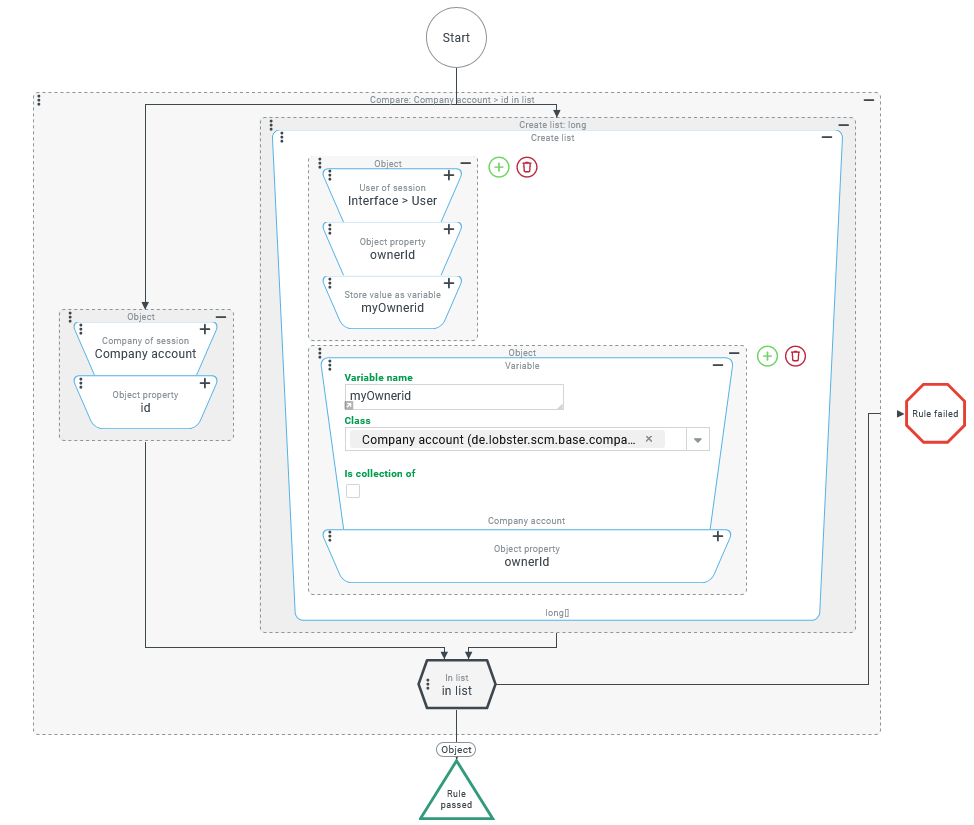
The logged in company (Company of session) either owns the user or guest user account (User of session) used for logging in or owns the company that owns this account.
It could also be formulated: The User of session should be owned either by the Company of session or by the company that owns it.
The configuration for an association criteria shown on the right checks the criteria described above in the context of an Entity property rule:
NOTE Instead of using the |
|