Value resolver – Abstract
Purpose: Assigns the input value of the variable addressed via the Variable Name parameter in the execution context.
Tooltip
Usage: The input value is assigned to the variable addressed via the Variable Name parameter in the execution context of the value resolver. This is either overwritten or newly created.
Parameter: The single Variable Name parameter defines the name of the variable for value assignment by static text. It is only formally optional. Without specifications the value resolver is effectively ineffective.
NOTE Assignments to a variable whose name is determined "dynamically" by the value resolver at runtime are only possible by write access via the Variable value resolver in event actions (e.g. Set value).
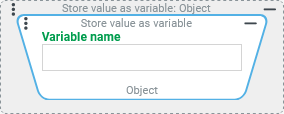
The Store value as variable value resolver assigns the input value to the variable addressed via the optional Variable Name parameter in the execution context.
If the Variable Name parameter does not contain any information, then the input value will not be saved.
If the addressed variable is already in use in the execution context, it will be overwritten.
If the addressed variable does not yet exist in the execution context, it is added.
In each case, the input value is returned unchanged.
In the context of a value resolution chain, any intermediate result can be literally stored "at random" in order to be able to access it in the further course or to examine the value in the context of Tests.
While in Event handling or in a Client Workflow the value of a variable can alternatively be assigned by an event action (e.g. by Set value with a Variable value resolver as target), the Store value as variable value resolver e.g. in Association criteria represents the only possibility to store a value directly in the execution context.
Configuration
The optional Variable Name parameter defines by a static text the name for a variable in the execution context to which the input value is assigned as a value.
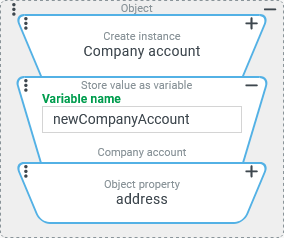
In the example on the right, the Store value as variable value resolver is used within a value resolver chain, which assigns the new company account created via a Create instance value resolver in the input value of the |
|
NOTE If the Variable Name is not determined statically in the configuration but rather at runtime, only an assignment via event action (e.g. with the Set value value resolver) can be considered. If the target of the assignment is determined by the Variable value resolver, the name of the variable can be determined via value resolver.
Example
Simple use case: Save intermediate result in a multilevel calculation
Based on numerical values for "quantity" (quantity), "unit price" (unitPrice) and an applicable "tax rate" (taxRate) specified in percent, in addition to the resulting "gross amount" (grossAmount), the "net amount" (netAmount) should also be calculated as follows:
netAmount = quantity * unitPricegrossAmount = netAmount * (1+taxRate/100)
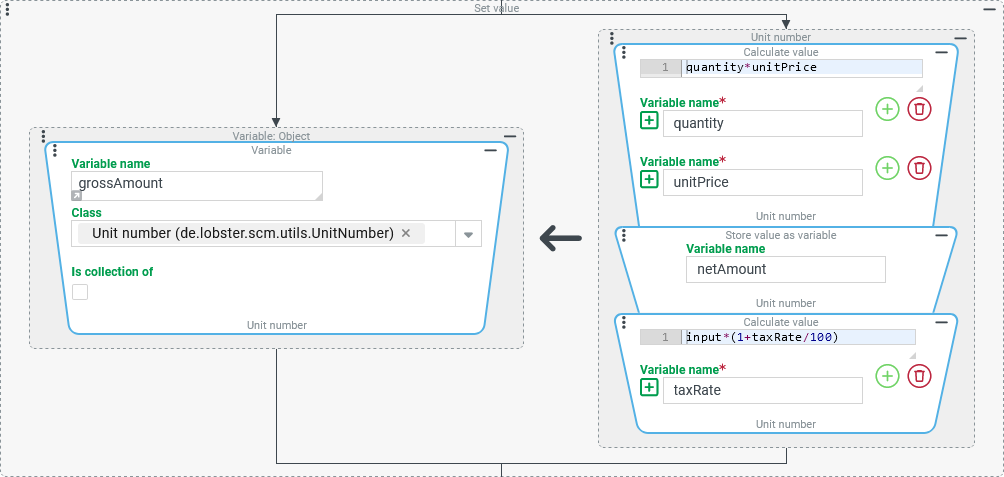
The following configuration demonstrates how the "net amount" can be stored as an intermediate result in a value assignment for the "gross amount" via the Store value as variable value resolver.
The subsequent use of the netAmount and grossAmount variables is not discussed here.
Configuration:
Within an event handling that is triggered when a business object is saved, a Set value event action is executed that calculates the "gross amount" and writes its value as a total result to the
|
|
NOTE The concept demonstrated here can also be applied in a multi-step manner in the same value resolution chain to transfer a series of intermediate results into variables.
More complex use case: "Validating rule" occupies variables for the "Actions on passed rule"
In an event handling, the Validating rule determines whether the company to which the logged-in user account (according to User of session) refers as "owner" (ownerId) owns its company account itself or not.
Actions should only be executed if this is not the case. Among other things, a notification then indicates ownership.
Runtime example:
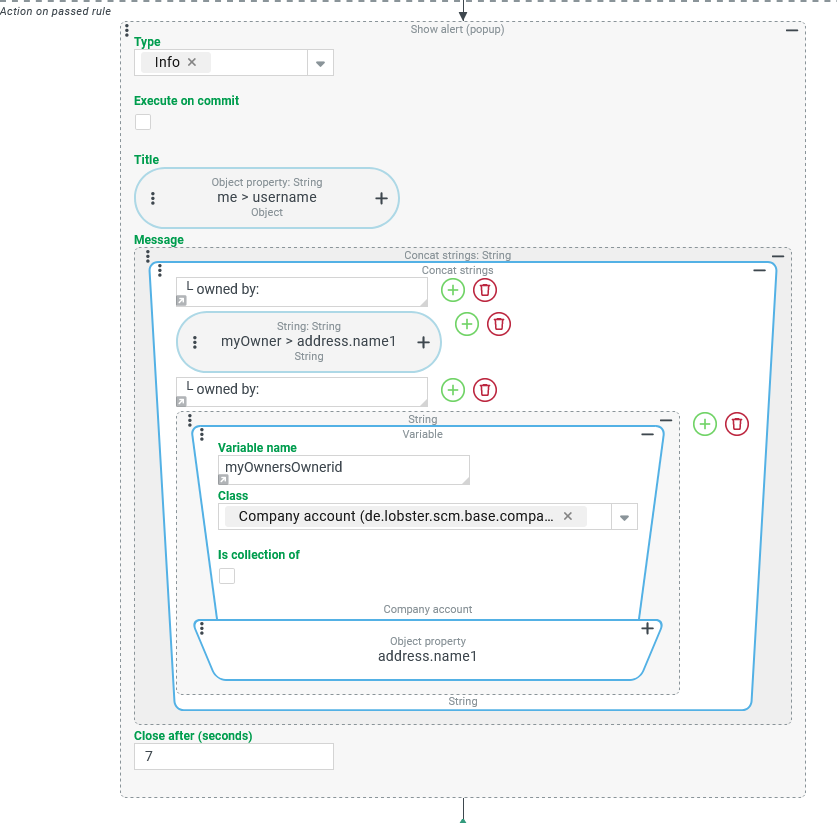
The "Username" for the User of session appears in the "Title" of the notification. The "message" below displays, in the context of a text concatenation (including literals to clarify ownership), the name of the "owner" company of this user account ("Vortex Inc.") and the name of its "owner" company ("Xflow AG"). |
|

Configuration:
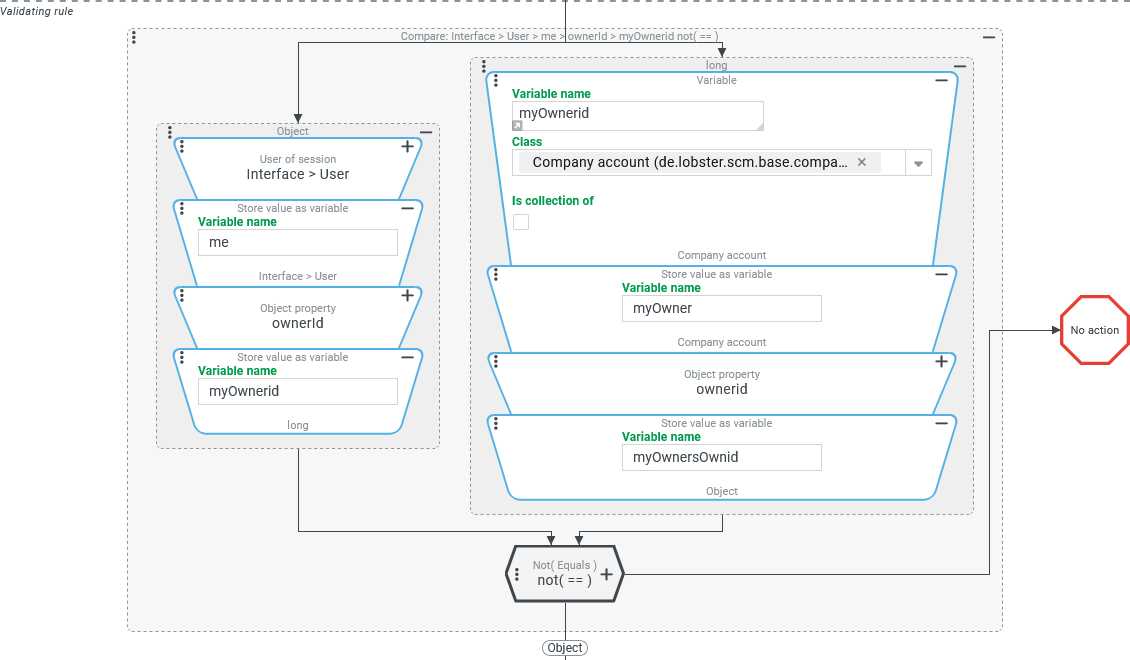
The Validating rule of an event handler shown above defines an Entity property rule that compares the "owner" (ownerId) field for the User of session with the same field in the company account referenced there as "owner":
On the left side of the comparison, the ID of the company that owns the User of session is determined:
The value resolver chain starts with the User of session value resolver, which returns the logged in user account.
The concatenated Store value as variable value resolver stores this user account in the
mevariable.NOTE The Show alert (Popup) event action in the "Title" refers to this variable.
The concatenated Object property value resolver reads the "owner" (
ownerId) field of the user account that is the User of session.The concatenated Store value as variable value resolver stores the ID of the company account specified as "owner" in the
myOwnerIdvariable.NOTE The Variable value resolver at the beginning of the value resolver chain on the right-hand side of the Entity property rule refers to this variable.
On the right side of the comparison, the ID of the company that owns the company account that owns the User of session is determined.
The value resolver chain starts with the
myOwnerIdvariable, where a lookup is performed for the Class "Company account" (CompanyAccount) (see Variable value resolver).The concatenated Store value as variable value resolver stores the company account looked up via the Variable value resolver in the
myOwnervariable.NOTE The Show alert (Popup) event action in the configuration of the "Message" refers to this variable.
The concatenated Object property value resolver reads the "owner" (
ownerId) field of the user account, the company account that owns the User of session.The concatenated Store value as variable value resolver stores the ID of the company account specified as "owner" in the
myOwnersOwnerIdvariable.NOTE The Show alert (Popup) event action in the configuration of the "Message" refers to this variable.
Since the Validating rule is always processed before any Actions on passed rule are executed, in its context the variables addressed via the Store value as variable value resolver are populated as follows:
Variable | Content | Data type | Use in a Show alert (Popup) event action |
|---|---|---|---|
| "User" | Read access to the "username" field in the "Title". | |
| ID of the company account that owns the User of session. |
| Not used (only within the Validating rule). |
| Data of the company account that owns the User of session. | "Company account" | Read access to the "name" field of the address ( |
| ID of the company account that owns the |
| Read access to the "name" field of the address ( |