Value resolver – Abstract
Purpose: Performs mathematical operations with numeric values (with and without unit), and usually returns the calculation result as a "Unit number" as the return value.
Tooltip
Usage: The value resolver includes a static definition for a calculation expression that can include variables from the inner and outer context of the value resolver, provided they provide the numeric values or textual content that can be interpreted as a numeric value.
Parameter: For editing a calculation expression (with constants, variables, operators, functions) a multi-line code input field is available, the size of which can be changed as required.
Optionally, any number of value assignments for variables can be added via value resolvers. The Variable name should not be identical to the alias of Units (e.g. b, l, m, D, H, M, etc.).
Variables from the outer context of the value resolver (
storage) are also directly available without assignment, provided there is no name conflict with the aliases of Units.The input value (
input) and the reference object (entity) can also be referenced directly in the calculation expression, provided they contain numerically interpretable values.Exclusively for the input value (
input) data field paths for accessing numerically interpretable field values are also resolved in the calculation expression (e.g.input.numericProperty).NOTE In case of syntax errors (e.g. incorrect bracket replacement) the return value is
$null. Mathematical "impossibilities" (e.g. a "division by zero") are treated as errors (with rollback if necessary).WARNING The value resolver supports conversions between Units of the same type (via
convert()function and partly automatically), but has neither clairvoyant abilities nor an engineering degree. A product of three values with length units therefore does not automatically appear as "volume" but formally as "length".
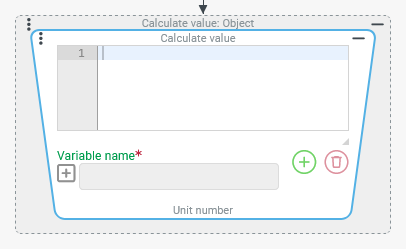
The Calculate value value resolver allows mathematical operations with numeric values (with and without unit), and usually returns the calculation result as a "Unit number" as the return value.
Exceptions:
The calculation expression is empty or contains syntax errors (e.g. regarding bracket replacement). Then the return value is "no value" (
$null), but no error occurs.The calculation expression's syntax is correct, but it is not possible to calculate. Then an error occurs at runtime (e.g.
ArithmeticException: Division by zero).
In principle, a calculation expression can serve the sole purpose of defining a "Unit number" statically (via text entry in the configuration), for example: 7.5t for the definition of a maximum weight of "7.5 tonnes".
In most cases, however, the calculation links variable input variables that are at least partially provided via variables.
The calculation expression can be constructed from different components:
Type of component | Syntax/Example | Description | Example of expressions | Result (example) |
|---|---|---|---|---|
Constant numerical values (with and without Units). |
or
| IMPORTANT Regardless of the settings for the Current locale, the entry of the point as a decimal separator is required. The unit of a constant must appear after it and be identified via the alias from the relevant dynamic enumeration. Spaces between value and unit are optional. |
| Constant "Unit number" ( |
Preset constants (Override assignments to variables with the same name). |
| Pi π (3.1415926535897932384...) |
| Circular area for a circle with the radius defined by the |
e | Euler's number e (2.7182818284590452353...) |
|
| |
Automatically preset variables (Can be overridden by explicit assignments for the same variable name in the inner context (see below) of the Calculate value value resolver). |
Input value | By default, the |
| Calculates a gross amount (with a tax rate of 19%) if the input value ( |
NOTE Data field paths for accessing numerically interpretable field values (e.g. |
| Calculates the time span for an input value of the ‘DateRange’ ( | ||
NOTE For return values of the Relative date with time resolver, the expression for the time span in milliseconds should generally be ( | ||||
| If the reference object in the context of the value resolver is a numerical value (with or without unit) or can be converted into a numerical value, this is available via the variable name |
| Converts the input value into the unit of a "Unit number", which is available as a reference object. | |
| Current iteration index ( |
| "Progress": Degree of processing with regard to the iterations when executing a loop (in percentage points). | |
NOTE Depending on the context (e.g. depending on events or the selection in an overview), further variables can be automatically preset. However, these (like the | ||||
External context variables ( | In principle, any variable names can be used within labelling expressions. However, the restrictions listed on the right must be observed. To prevent variable names such as ' | IMPORTANT
|
| If the value of a variable is not a numerical value or a "Unit number", an attempt is made to interpret its content as a number. The string image is not automatically used for more complex data objects (e.g. values of dynamic enumerations). Only if the variable already contains a string like If the conversion into a numerical value fails, then the value 0 (without unit) is used as the value of the variable instead. |
Specially defined variables for the (inner) context of the value resolver. | Within the configuration of the value resolver, any number of explicit value assignments for existing or newly introduced variables (with the specified Variable name) can be added by clicking on the Assignments for the context of the calculation do not change the value of variables already defined in the outer context. They are only temporarily overridden in the inner context, so that the "outer values" cannot be included in the calculation. | NOTE
|
IMPORTANT In order to output the calculation result in days, the conversion via convert( | |
The example on the right demonstrates how the alias D (for the Time unit "day") is temporarily overridden by an assignment for the Variable name | ||||
Brackets | ( <Expression> ) | Pairs of brackets structure aggregates or delimit contained expressions from operators and operands (constants, variables, functions) specifically from each other to explicitly regulate the precedence between operators. | 5+4*3^2 |
|
5+4*(3^2) |
| |||
|
| |||
|
| |||
|
| |||
|
| |||
| Diagonal of a 16:9 proportioned rectangle with width according to the | |||
Operators |
| Addition or positive sign |
|
|
| Subtraction or negative sign |
| Difference between actual and set point value in one variable each. | |
| Multiplication |
| Markup of 25% on a balance value in the variable | |
| Division |
| "Profit per capita". "Exchange rate" for Swiss francs (CHF) in the sense of a bulk quotation (with 1 EUR as reference in "local currency") based on the conversion factors in the enumeration Currency; see also | |
| Modulo (remainder of the integer division) |
| Number of pallets for a partial load, if the transport volume specified in the | |
| Exponentiation (for square root in the example the function |
| Square root ("to the power of 1/2") of the "sum of squared errors" aggregated in the variable | |
Functions |
| Unsigned absolute value (math.: |a|) |
| Absolute amount of the difference between target and actual values in variables. |
| Signum value: 1 for (a>0), -1 for (a<0), 0 for (a=0) |
| "Sign value" of the difference between target and actual values in variables. | |
| Round up to the next highest integer |
| Number of containers required (with 24 pallet spaces each) for the number of pallets specified in the | |
| Round up to the next highest integer |
| Number of completely loaded containers (with 24 pallet spaces each) for the number of pallets specified in the | |
| Integer rounding (from 0.5 is rounded up) |
| "Profit per capita" (from variables) rounded to 1000 currency units. | |
| Minimum of two values |
| The smaller value of two variables for "actual" and "estimate" of a quantity. | |
| Returns the larger of the two values |
| The larger value of two variables for "actual" and "estimate" of a quantity. | |
| Square root, correspondingly: |
| Square root of the "sum of squared errors" aggregated in the | |
| Cubic root, correspondingly: |
| Radius of a sphere with the volume specified in the | |
| Natural logarithm of a |
| The binary logarithm of the value in the maxNumber variable. | |
| Base 10 logarithm |
| The "order of magnitude" of the deviation between an actual and a target value (in variables) as a signed power of ten (e.g. | |
| Convert value a to the unit of value b |
| Converts the freight (quantity) in the variable load into the unit of the capacity specification ( | |
| Converts the total cost in the | |||
| Convert radian angle a to angular degrees |
|
| |
| Convert degree angle a to radians |
|
| |
| Sine value for radian angle a |
|
| |
| Cosine value for radian angle a |
|
| |
| Tangent for radian angle a |
|
| |
| Arc sine value (in radians) for a (sine value) |
|
| |
| Arc cosine value (in radians) for a (cosine value) |
|
| |
| Arc tangent value (in radians) for a (tangent value) |
|
| |
| Sine hyperbolic value for a |
|
| |
| Consinus hyperbolic value for a |
|
| |
| Tangent hyperbolic value for a |
|
| |
.svg) icon, which only applies within the calculation expression.
icon, which only applies within the calculation expression.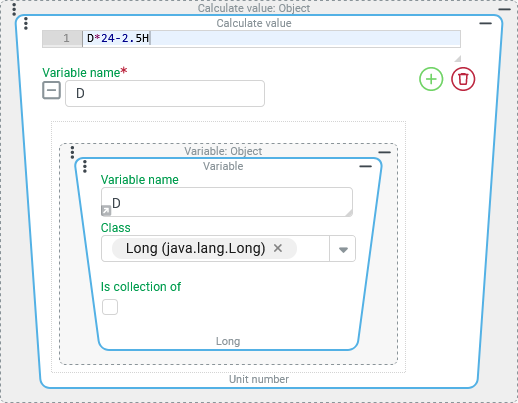
Examples
Calculate a time span in days with decimals
Through Lobster Data Platform/Orchestration server, users can report particular operational incidents (faults, accidents, delays, etc.) by creating an entity of a specially defined type ("event"), classifying the incident by specific characteristics.
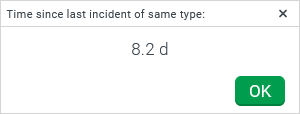
When creating the event entity, the system checks when an incident with a similar classification was last reported. If this search returns a match, a message indicates how much time (in days with one decimal) has passed since this incident.
Runtime example:
Configuration:
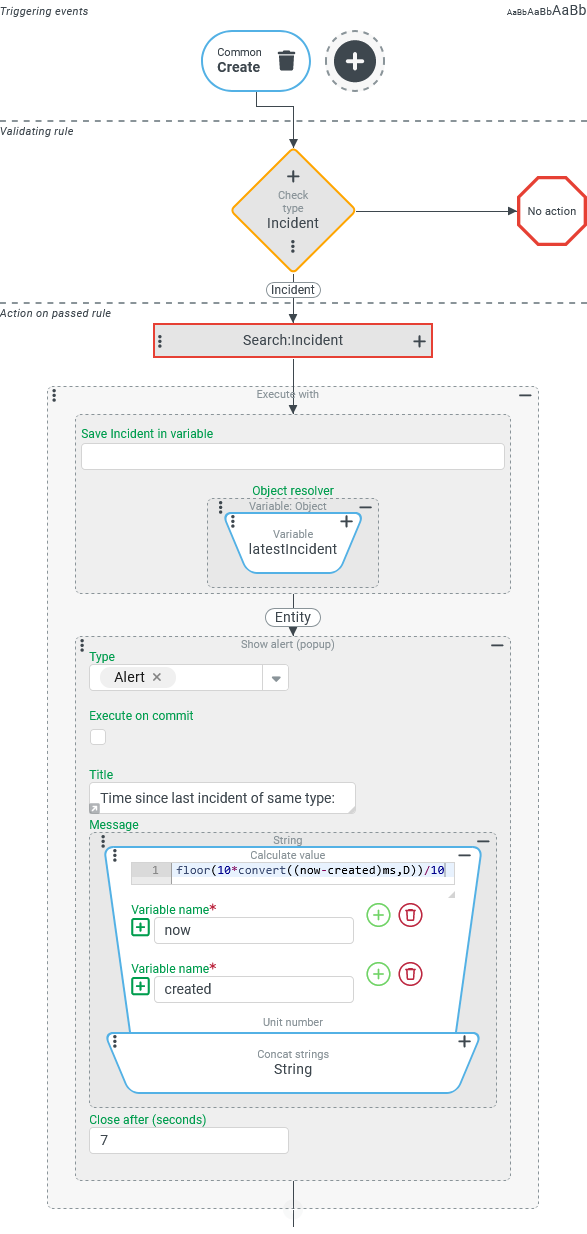
The event handling shown on the right reacts to the Triggering event (see Common action event) "Create", which is triggered, among other things, when the user saves an entity in a data input form. In the Validating rule, check type ensures that an entity of the "Event" type is created. As an Action on passed rule, the Search (Event action) is executed first, which searches for "comparable" incidents among all events created so far. Details about the criteria for the search are irrelevant for the further workflow.
|
|
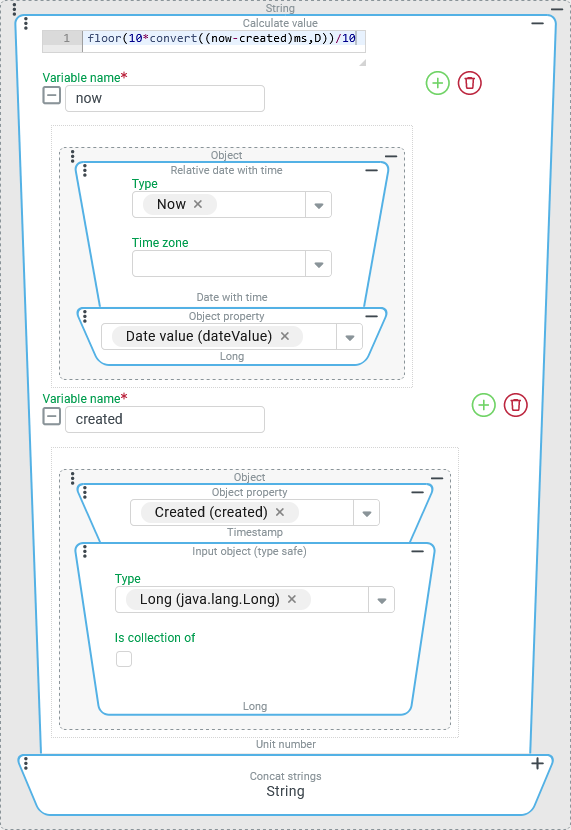
On the right are details about the configuration of the Calculate value value resolver:
NOTE The NOTE The conversion of the millisecond difference to days relies on conversion rules in the dynamic enumeration Time unit, which are not calendar-specific operations, but only "mediate" between the time units millisecond ( However, the |
|
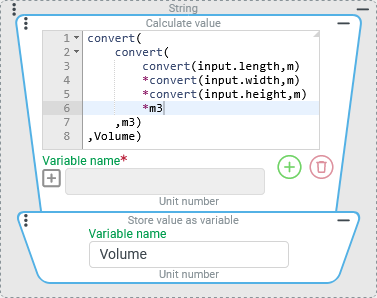
Calculating the package volume from length x width x height (with variable length unit)
For a package, the dimensions "length", "width" and "height" are available in numerical fields, whose Length unit can be selected by the user – if necessary differently for each dimension.
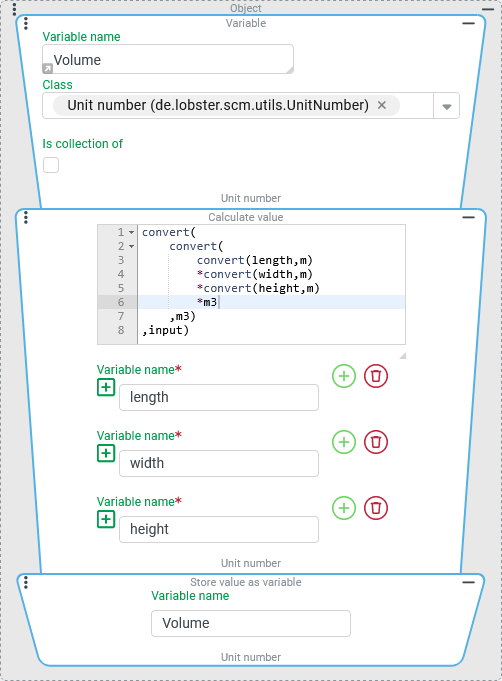
From this information, the volume of the cuboid idealized package is calculated in a selectable Volume unit within an event handling and written to the Volume variable as a value of the "Unit number" type.
To specify the desired Volume unit, it is pre-assigned to the Volume variable so that it already contains a value such as "0 liters" or "0 gallons" before the calculation.
Configuration:
The suitably initialized target variable
|
|
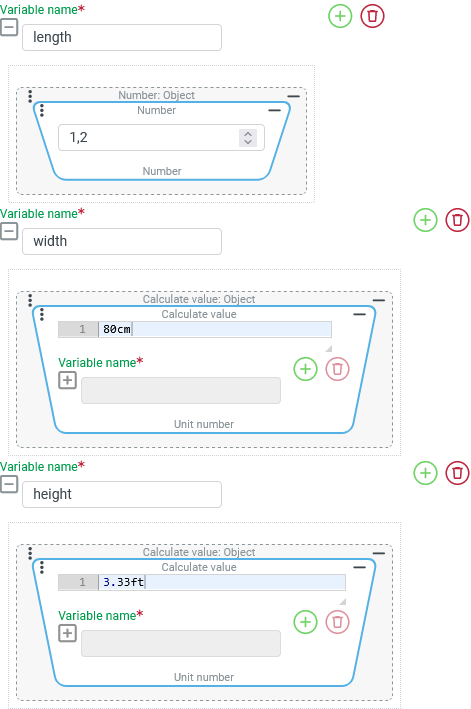
The screenshot on the right shows how the assignment of the variables for the input data
NOTE The decimal separator ‘comma’ only affects the representation in the input context.
For operational practice, assigning static values for the three variables does not make sense. Assuming that the information for the three dimensions of the package exists, for example, as fields (or attributes) of a common data object, this could be defined as a reference object in the context of the value explorer by an Execute with event action, in order to then access it in the assignments for the
|
|
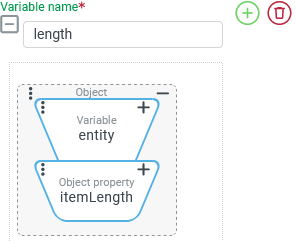
NOTE It is not described here how the length, width and height variables – apart from the test with static values – are actually supplied with values.
Typically, Object property resolvers would be used here, which assign suitable values from the external reference object to the variables.
If several values are read from the same reference object and are "calculated" directly, it would actually make sense to use the reference object as the input value and to address the individual fields in the calculation expression via the input variable.
Configuration variant:
The screenshot on the right shows a value resolver chain that is supplied directly with the data object for the package as an input value (here: as a reference object). The dimensions to be calculated should be available in the ‘length’ ( The calculation expression is basically structured as described above, but with the following adjustments:
NOTE The explicit ‘assignment’ of the numerical input values to variables is completely omitted here. However, this access only works as long as the read data is available directly as numerical values (here: with a unit) in the NOTE A Create instance with values resolver can be added as the start of the value resolver chain for tests, for example, in order to provide a ‘package’ as a client object. |
|
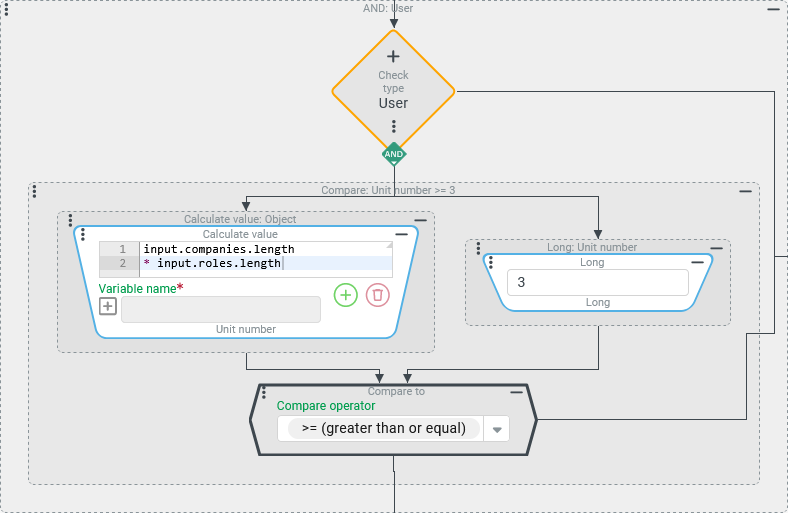
Evaluate the "range" of the logged-in user account in an association criterion
Users are classified using a "range" key figure, which is defined as the product of the number of Roles and Companies/Clients that can be selected at login.
An association criterion should apply if the "range" of a user is at least 3.
Configuration:
In the context of a With rule that defines the evaluated user as a reference object (e.g. the User of session), the criterion shown in the screenshot on the right is checked:
NOTE The fact that the value in the Object property |
|
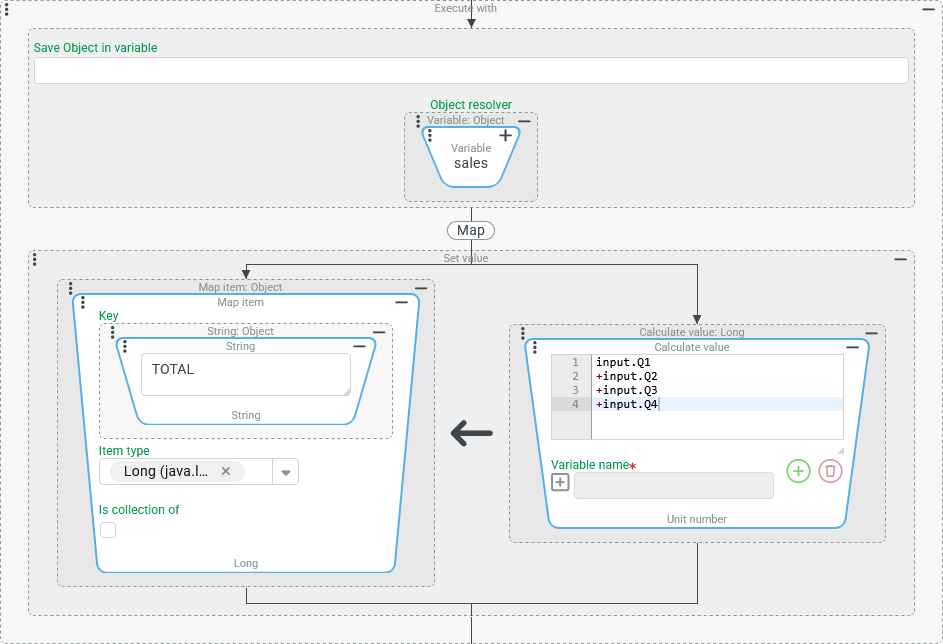
Calculations with data from a map
Access via data field paths for details from a complex input value is also possible when a map is involved.
For the following example, a map is available in a sales variable, in which sales figures (number of units) for the completed quarters of the current year have been written using systematically named key values ("Q1", "Q2", "Q3", "Q4").
The sum of all quarters for the current status is to be calculated and written to the map as an additional value under the key "TOTAL".
Configuration:
The screenshot on the right shows an Execute with event action whose action block uses the map in the Calculation and value assignment can be handled within the same Set value event action:
|
|
Calculations with data from lists
Access to list values via index
If the input value is a list or contains list values, the calculation expression can access individual list values via their absolute index position.
The index always starts at
0.
The first list value of a list of numerical values available as an input value can therefore be addressed as input.0 in the calculation expression.
If a list value is a complex object, the data field path can be continued after the index value in order to further resolve its structure.
The expression
input.2.maxCapacityreads the value of themaxCapacityfield of an object that is the third entry in the list provided as an input value (if available).IMPORTANT In contrast to the context of a form, where the get (Read value from data field) function enables access to list values via a variable index value, this is not possible here. Index values can only be defined statically and absolutely in the calculation expression.
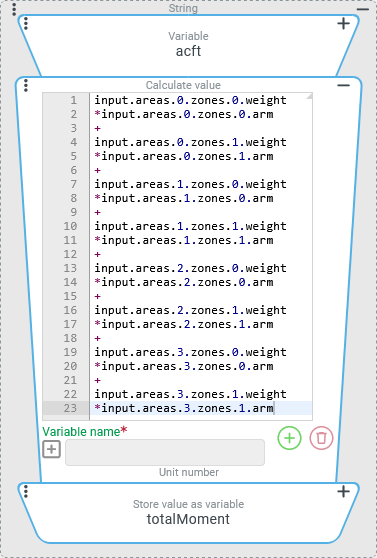
A Custom entity type "Aircraft" (Aircraft) lists areas of an aircraft in the list field, which can be further subdivided via another list field zones.
By convention, each relevant aircraft can be described by a maximum of four loading areas (areas), to each of which 1-2 zones (zones) are assigned.
A "load weight" (weight) can be assigned to each zone via the0 weight field. At the same time, a fictitious "lever arm" (arm) is specified for each zone, which is used to calculate the moment depending on the payload.
Before the aircraft takes off, it must be checked whether the total mass and the total moment are within the permissible operating range, taking into account the actual load and fueling (here: modeled via the zones).
The following configuration shows how the total torque can be calculated for an Aircraft object defined in an acft variable.
Configuration:
The screenshot on the right shows a value resolver chain (see Chained resolver), which can be used to determine the "total moment", e.g. as a message in a Show alert event action:
|
|
NOTE This example is intended to show how index access for list values can be performed for calculations with a defined (or at least finite) number of list values. Calculations for lists with variable length always enable a For each loop event action and – in special cases – the execution of a calculation (via value resolver, e.g. Calculate value or Simple calculation (+,-,*,/,%)) in a Collect values resolver.