Value resolver – Abstract
Purpose: Converts a date value or date range in the input value to a formatted string that describes a time or interval.
Tooltip
Usage: From an input value that defines a point in time (date/time with time zone) or an interval (date/time range with time zone) is formatted using the pattern defined as the Format.
Parameter:
The optional Format parameter can define the pattern by direct input (static) or via a value resolver (dynamic). Without any specification, the default patterns for the Current locale or the selected Locale take effect.The default pattern is defined via the Localization or Company specific localization:
[lobsterui,dateFormat] [lobsterui,timeFormat]The optional Locale parameter appears only in server-side deployment. The selection concerns localizable components in the Format or the selection of the default format from the localization. If not specified, the server-side Java locale takes effect.On the client side, the Current locale is the only alternative for localization.
NOTE Depending on the context in which the value resolver is used (server vs. client), different rules and restrictions may apply to the interpretation of the pattern (see manual for details).
In the server context (e.g. Event handling) | In the client context (e.g. Client Workflow) |
|---|---|
|
NOTE The selection of a Locale is not supported on the client side. The Current locale determines the localization in the client without alternative. |
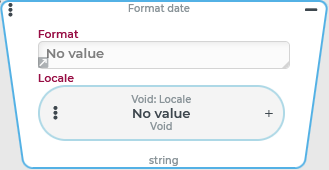
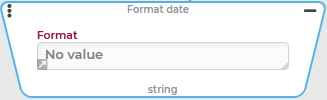
The Format date value resolver converts the date value or date range present as input value into a formatted string according to the template (pattern) defined as Format.
Interpretation of date values without a declared time zone
A
Longvalue as input value is interpreted as milliseconds since 01.01.1970 00:00:00.000 (UTC). However, as for all input value types interpreted as date without time zone (Long,Timestamp,Date), the UTC time zone is not the default. Rather, the default time zone applicable in the context is taken into account according to the following logic:
If a "Default time zone" (
defaultTimeZone) is defined for the User of session (in the actual logged-in session), this will be used.Otherwise, the account of the Company of session (in the actual logged-in session) and the "Default time zone" (
defaultTimeZone) defined there, if applicable, are used.Only if neither account defines a "Default time zone" for the actual logged in session, the selection for the time zone in the operating system of the server or client will be the deciding factor:
In the server context (e.g. for Event handling) the time zone is taken from the Lobster Data Platform/Orchestration server execution context.
In the client context (e.g. in a Client Workflow), the selection for the time zone is adopted in the client operating system.
For a date range, the same Format is applied for "From" and "To" time.
The return value of the value resolver shows a date range as an interval only if the formatted values (From/To) differ.
For example, a Relative date range with time value resolver with the "This year" type results in the following interval when formatted with the date, time, and time zone:
01/01/2022 12:00 AM (UTC) - 12/31/2022 11:59 PM (UTC)
If the formatted strings for from-time and to-time of a date range are identical, the return value does not define an interval, but only the (common) point in time.
For example, a Relative date range with time value resolver of the "This day" type for a format that uses only date and time zone returns the following value:
04/30/2022 (UTC)
Configuration
In the optional Format parameter, a so-called pattern can be specified by direct input (as static text) or via value resolvers at runtime, which defines the desired combination of date/time components in combinations with "literals" (e.g. separators).
The optional Locale parameter is only supported for server-side use. It explicitly defines the Locale for localizations in the return value and, if applicable, the applicable default pattern.
How pattern letters in the Format parameter can be resolved at runtime depends on the context of use of the value resolver:
Operational context | Interpretation of the pattern in the "Format" parameter | Example |
|---|---|---|
Server (e.g. in Event handling) | Pattern syntax for the Java SimpleDateFormat with the following exceptions:
By default, date components are not localized on the server side (unlike the client, which localizes in the same way as the fd (format date) function). However, the optional Locale parameter can be used to explicitly define the Locale to be considered for localizations statically (through Static values in the configuration) or dynamically (through value resolvers of other categories). Without assigning a Locale, the Java
|
returns e.g.
provided that the execution context of the Lobster Data Platform/Orchestration server is localized as "English". |
Client (e.g. in a Client Workflow) | Restricted pattern syntax as described for the fd (format date) function:
Localization of date components (via Localization or Company specific localization), as described for the fd (format date) function.
|
always returns
returns e.g.:
|
Without specifying a pattern for the Format string, localization entries from the Localization or Company specific localization are assigned as default patterns according to the following scheme:
Scheme for the default pattern:
[lobsterui,dateFormat] [lobsterui,timeFormat]Localization provides the following localizations for the default pattern by default:
Component | Bundle | Resource | Locale | Default pattern | Example |
|---|---|---|---|---|---|
Date |
|
| German ( |
|
|
English ( |
|
| |||
Time |
| German ( |
|
| |
English ( |
|
|
The two components (Date and Time) are output together (separated by a space) by default.
NOTE The patterns stored as localization texts should be defined to match the more restrictive syntax for the client context (see table above). Otherwise, the Format date value resolver in client-side use will always return $null if no Format is specified.
Other default localizations in the Localization that may be relevant for the output:
Component | Pattern | Bundle | Resource | Locale | Default |
|---|---|---|---|---|---|
Date | Month
|
|
| German ( |
|
English ( |
| ||||
Month (short)
|
| German ( |
| ||
English ( |
| ||||
Weekday
|
| German ( |
| ||
English ( |
| ||||
Weekday (short)
|
| German ( |
| ||
English ( |
| ||||
Quarter
|
| German ( |
| ||
English ( |
| ||||
Time | AM/PM
|
| German ( |
| |
English ( |
| ||||
| German ( |
| |||
English ( |
|
Examples
Formatting a date value
Configuration | Result (in the server context) | Result (in the client context) with the locale "German" (de) |
|---|---|---|
|
Due to the settings for the Lobster Data Platform/Orchestration server execution context, the date format (here) always appears in Java "English". |
In the client, the localizations for the locale "German" ( |
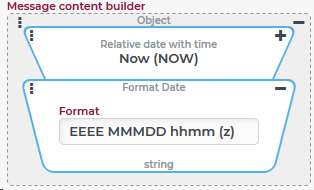
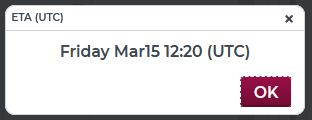
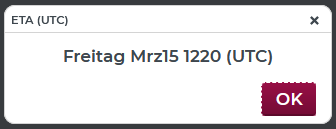
In this example, the current time is determined by a Relative date with time resolver to display it in a special format in a message.
The Format date value resolver is used by concatenation to format the output of date and time (here incl. time zone).
Formatting by default date and time settings from localization
Configuration | Result (EN) | Result (DE) |
|---|---|---|
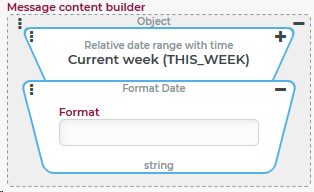
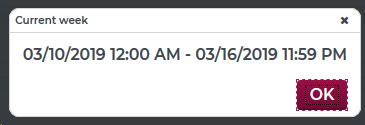
Without parameters the default formats for date and time from the localization (see above) are applied. If, on the other hand, the Format date value resolver were completely omitted in the context of the message, then the message would display the string image for the "Relative date range with time" in the following format:
|
|
|
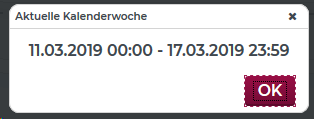
IMPORTANT If the default pattern defined via the localization entry contains localizable components (e.g. the The server-side execution context also governs other aspects of date handling in Lobster Data Platform/Orchestration. This includes, among other things, the setting for the first day of the week. Whether the "Current week" – as above left – is delimited from Monday (03/10/2019) to Sunday or – as above right – from Sunday (11/03/2019) to Monday, depends solely on the server-side setting for the first day of the week. The two screenshots were therefore generated on two different systems. NOTE The Localization contains an entry | ||
 Based on the following localization entries: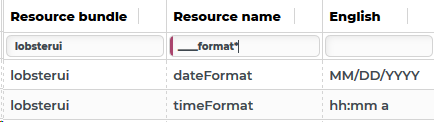
 Based on the following localization entries: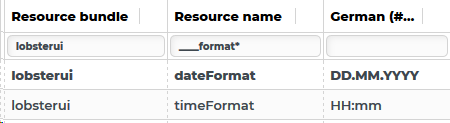
Formatting date and time for a specific locale
In the context of event handling, the "Subject" of a booking confirmation e-mail explicitly reflects the booking date using the localization specified in Lobster Data Platform/Orchestration for the en_US language.
The output should look like this without regard to the Current locale for a posting for 07/04/2022: "CONFIRMED: MON04JUL22".
Configuration:
In the Subject of the E-mail event action, the text output is generated by the concatenation of value resolvers shown on the right:
|
|
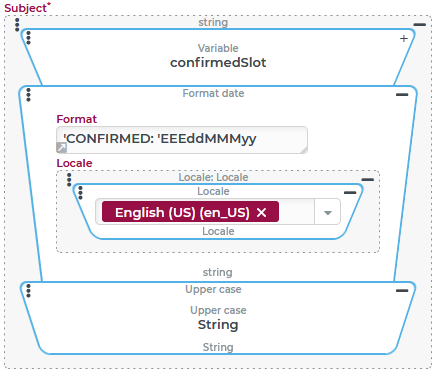
NOTE The single quotation marks ('...') are absolutely necessary here so that the text "CONFIRMED: " is processed as a literal. Otherwise already the first letter ("C") causes an error message (IllegalArgumentException: Illegal pattern character).