See also: Set value, Create instance with values
Event action – Abstract
Purpose: The Set values event action combines a flexible number of assignments in a single event action, for the configuration of which one source host and one target host can be defined as input values.
Tooltip
Usage:
Parameter: All event action parameters are value configurations:
Source host: Optional value configuration for a uniform input value for Source values that differs from the reference object.
Target host: Optional value configuration for a uniform input value for Target values that differs from the reference object.
Assignments: Undefined number of source value-target value pairs with one value configuration each:
Source values: Value configurations for assigned values (possibly based on the Source object as input value).
Target values: Value configurations for assignment targets (possibly based on the Target host as input value)
NOTE
The order of assignments that have already been created can be adjusted as required via the tree view using drag & drop.
The reference object in the execution context can be addressed in assignments as required via the
entityvariable.
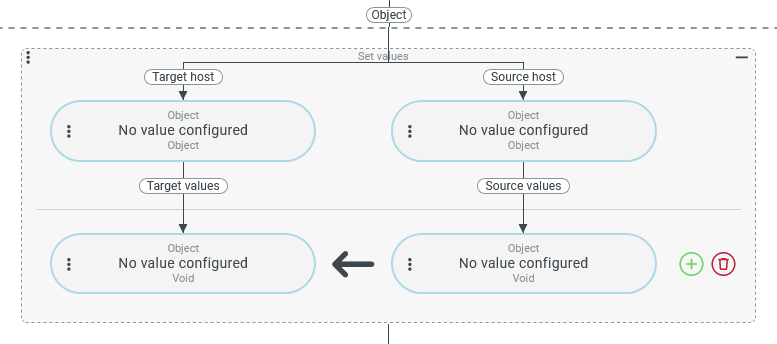
The Set values event action combines a flexible number of assignments (Source values → Target values) in a single event action.
For the context of these assignments, a Source host and a Target host can optionally be defined via a value configuration.
If there is a value configuration for the Source host, its return value is used as the input value for all value configurations for Source values in assignments.
If there is a value configuration for the Target host, its return value is used as the input value for all value configurations for Target values in assignments.
Without a value configuration for the Source host or the Target host, the reference object in the execution context (if available) represents the input value for value configurations on the relevant page in all assignments.
The individual value configurations in the assignments are not necessarily bound to the Source host or Target host. Any other data objects or static values of any kind can be addressed via value resolvers.
IMPORTANT The entity and entityClass variables do not refer to the Source host or the Target host in the context of the assignments, but to the reference object unchanged on both sides of the assignment. Value resolvers that ignore the input value and can only process the reference object (e.g. Template or XML export) do not access the Source host or the Target host, even within an assignment.
Configuration
Parameter | Description | Example |
|---|---|---|
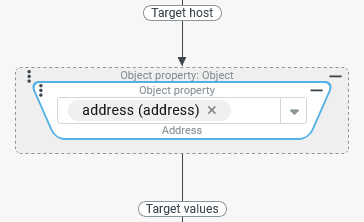
Target host Value configuration | The value configuration for the Target host is optional. The default value is the reference object in the execution context. In the example (right), an Object property resolver defines an |
|
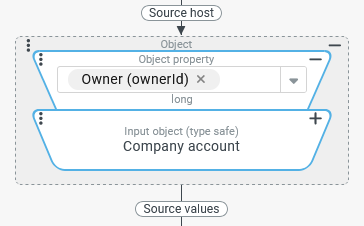
Source host Value configuration | The value configuration for the Source host is optional. The default value is the reference object in the execution context. In the example (right), the company account that is considered the 'owner' ( |
|
Assignments | Any number of assignments can be added to the configuration using the The first assignment cannot be removed. However, the All additional assignments are completely removed by clicking on the NOTE
IMPORTANT The assignments are processed at runtime from top to bottom, so it cannot be ruled out that changing the order of the assignments will produce different results with identical input data. | |
NOTE The company account was specifically selected as the Target host here and not just its | ||
.svg) icon. The first instance is initially displayed in the user interface so that value configurations can be set up directly without having to click the
icon. The first instance is initially displayed in the user interface so that value configurations can be set up directly without having to click the .svg) symbol for the instance deletes all value configurations.
symbol for the instance deletes all value configurations.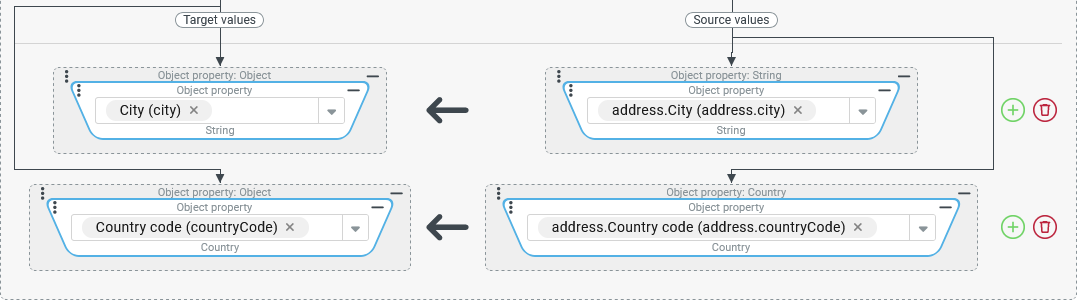
Examples
Typical use case: Mapping of selected property values
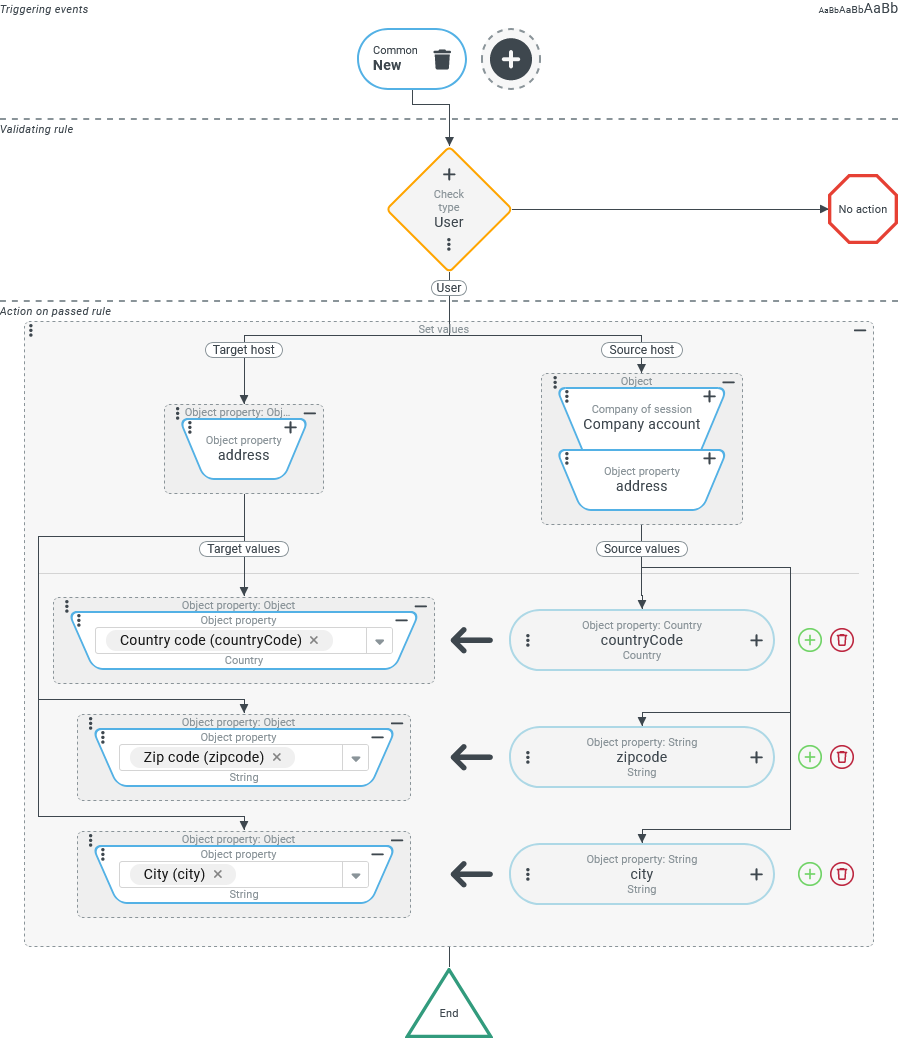
Whenever a new user (see Users) is created, selected address characteristics from the address of the Company of session are transferred to their address:
'Country' (
countryCode)'ZIP code' (
zipcode)'City' (
city)
Configuration:
The screenshot on the right illustrates the configuration for event handling that reacts to the Triggering event 'New' ( As a Validating rule, a Check type therefore ensures that event handling only takes place when a new 'User' ( If the 'New' ribbon button is pressed in the context of a data input form for Users, a Set values event action with the following configuration should be executed as the only Action on passed rule:
NOTE After clicking on 'New', the transferred data appears immediately in the input form, where it can be displayed and edited if necessary. Whether the 'enhanced' user account is saved or not is up to the user of the form. |
|
Special use case: Access to the source host, target host and another reference object
Based on the previous example, a registered company should be given the option of creating several Users from a list in csv format via Batch import.
When creating the new user account, the 'Country', 'ZIP code' and 'City' address fields should again be assigned the corresponding values from the address of the Company of session.
Furthermore, a text value is assigned to the user account in the 'Match code' address field, in which the unique 'username' is linked to the value from the 'Match code' (accMatchCode) address field of the Company of session according to the following structure:
<username>@<company_address_accMatchCode>
Configuration:
The following screenshot shows how the mapping from the previous example can be extended to be reused in the context of an event handling that is triggered when a user account is 'created' (see Common) via Batch import.
NOTE In contrast to the previous use case, where an empty user account should be enriched before displaying the unsaved data in a data entry mask, the Batch import provides some data (e.g. 'Username') for the user account to be created from the csv file. In the context of a CREATE action, the 'Create” event is automatically triggered during import. An event handling that reacts to this event can then 'revise' the data to be saved. The Validating rule of the event handling can use an AND junction with the absolutely necessary Check type (see above) to specify additional conditions that define when the synchronization of the address data takes effect at all.
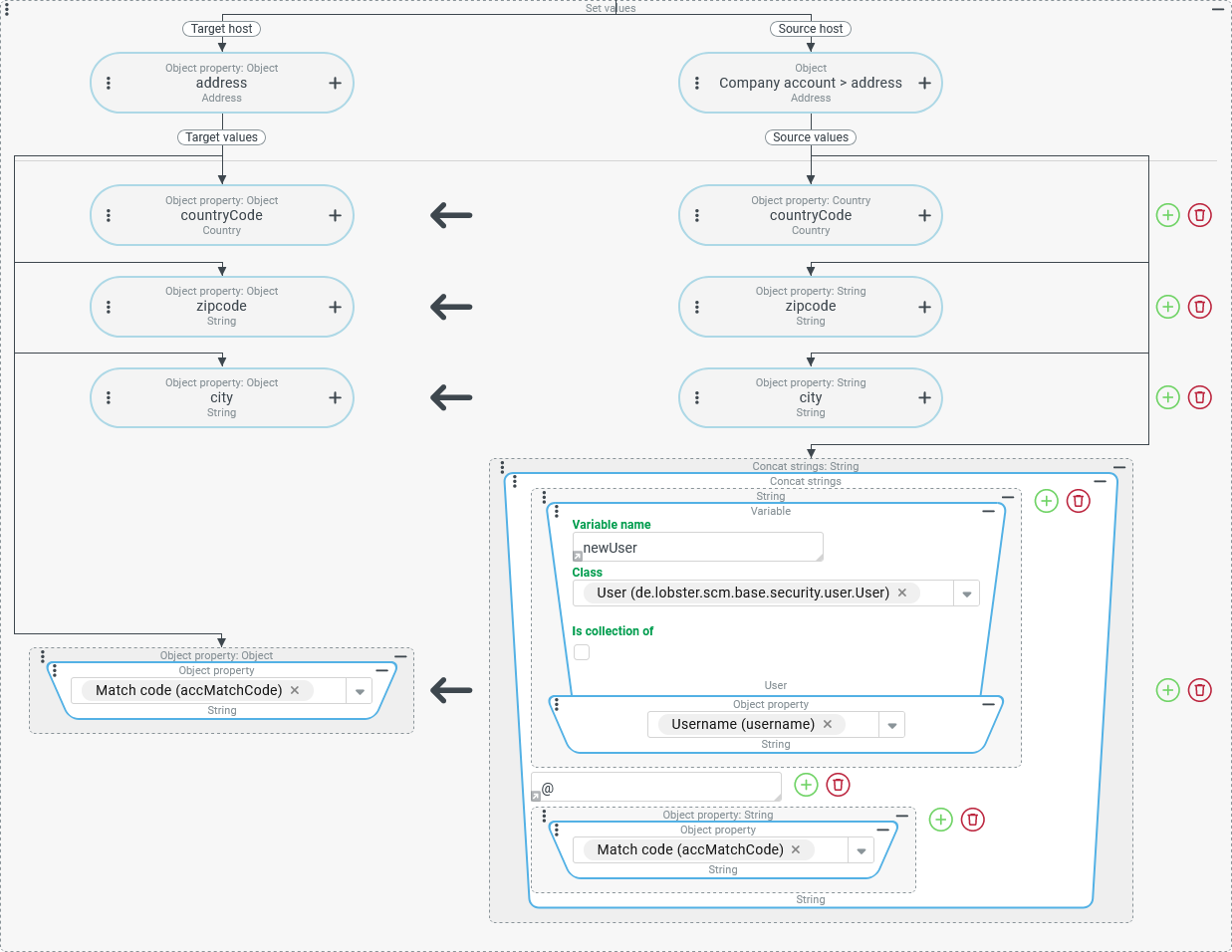
The definitions for Source host and Target host as well as the first three assignments correspond exactly to the configuration from the previous example.
The fourth assignment is structured as follows:
As the Target value (left), in the same way as the other assignments, an Object property resolver references the 'Match code' (
accMatchCode) field in the address of the user account that is defined as the Target host.The Source value (right) is defined by a Concat strings resolver with three text components:
The first text component defines a value resolver chain (see Chained resolver):
A Variable value resolver to the current reference object provided by the system via the
entityvariable.The concatenated Object property resolver can read the 'username' (
username) field in this way, even though it is not contained in the company address provided as the Source host.
The second text component is the '
@' separator defined as static text.The third text component accesses the 'Match code' (
accMatchCode) field in the address of the Company of session, which is defined as the Source host.
Special use case: Create list with values
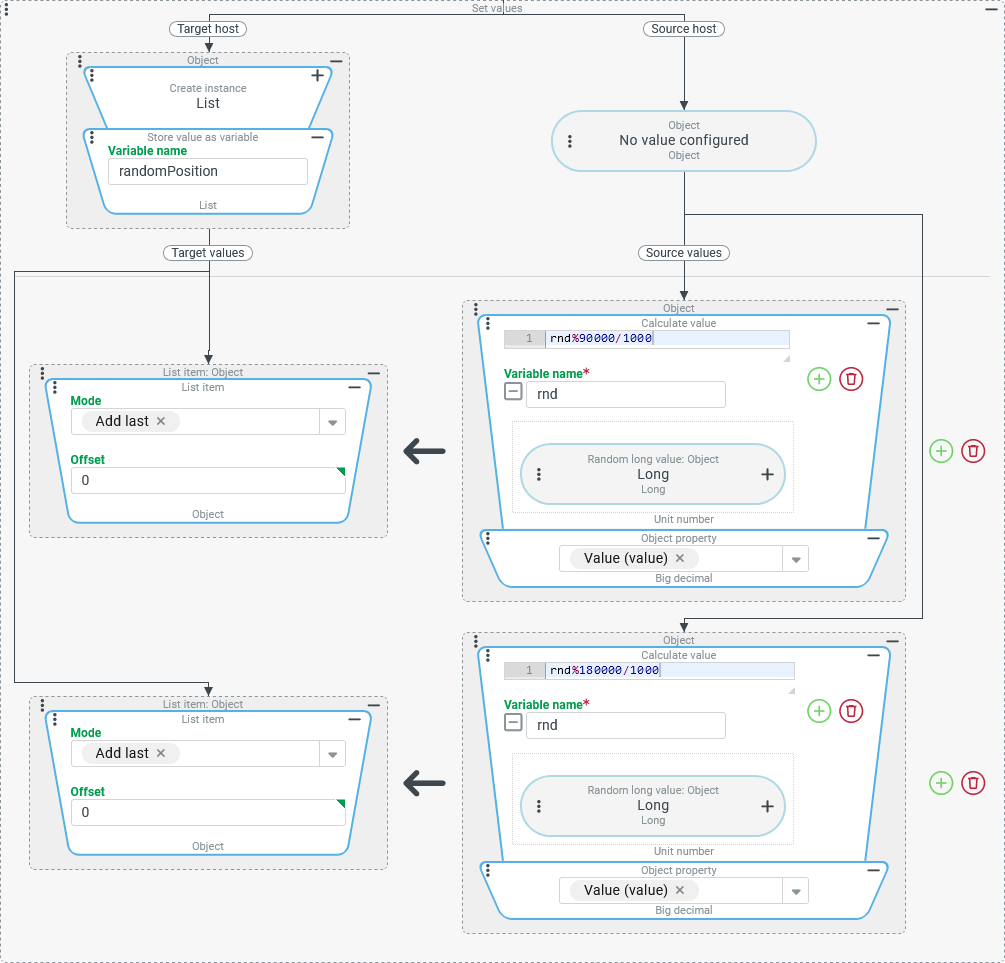
For automated tests of an interface, certain geopositions are to be generated repeatedly at random in the context of a For each loop and assigned to a randomPosition variable.
The individual geoposition should be defined as a list of exactly two decimal numbers with a maximum of three decimal places, the first of which specifies the latitude with a value range of ±90° and the second the longitude with a value range of ±180°.
Configuration:
The screenshot on the right shows the configuration for a Set values event action that provides a random geoposition as a 'tuple' (list of two coordinates) in the
NOTE In principle, it would be advisable to create a client object structure with two named fields (e.g. |
|