A Batch import processes a series of Import calls as a "batch" in a single "job". Each individual Import executed in the "batch run" functionally resembles a Single import with the corresponding structure and logic.
The Import page provides an overview of the interaction between Lobster Data Platform/Orchestration and Lobster Data Platform/Integration and describes the general structure of an import profile.
The structure used for Single import corresponds exactly to the content of an individual
batchnode during Batch import.In the following, the focus is therefore mainly on the details of batch processing, while the details of the actual import structure documented for the Single import are assumed.
In practice, the Batch import structure can also be used for importing individual objects. This enables the use additional functionalities exclusively available for the Batch import, as required.
Elements of the target structure for a batch import
When creating an import profile for a Batch import, the target structure is ideally created based on the template provided by the system for the core:BatchImport object (for details see Orchestration templates).
The following screenshot shows a target structure generated from the core:BatchImport with the column "Data type" indicated here for information purposes:
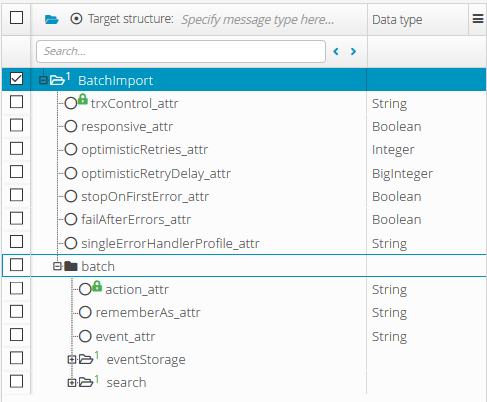
The "root node" highlighted by selection (BatchImport) contains a number of fields for parameters concerning the Batch import. These are described in the following subsections.
Below, the template provides a single
batchnode (highlighted by the blue frame in the screenshot), which can either be iterated at runtime or explicitly included multiple times in the definition of the target structure. Every individualbatchnode is parameterized and interpreted like thecore:Importnode in a Single import. The screenshot shows only the elements provided by the template. Within abatchnode, usually the object structure has to be added, which can be defined by exactly one (or several strictly alternatively handled) subnodes (see also Single import and Orchestration templates).
Transaction control (trxControl Atttribute)
The trxControl attribute can be used to select one of the following transaction control modes for a Batch import:
Transaction control mode | Description |
|---|---|
| Each If an individual import fails, subsequent imports are still executed. |
| All If an individual import fails, the entire "batch" is aborted and any imports already executed are rolled back. |
| For each object to be imported, a check is made whether a valid transaction already exists in the execution context.
NOTE This mode makes sense if several profiles or events are to be linked together in a transaction. |
Response behavior (responsive attribute)
The responsive attribute can be assigned a Boolean value in order to decide in the context of a function call (see Import (Integration function)) whether the objects processed by a Batch import should appear as return values of the function (true) or not (false).
NOTE If the Batch import is defined as a target structure of a profile, this attribute is irrelevant.
Error handling attributes
Attribute | Data type | Default value | Description |
|---|---|---|---|
| Integer |
| A value >0 defines the maximum number of retry attempts in case of a write conflict (optimistic lock exception). With the value |
| BigInteger |
| A value > 0 defines the waiting time in seconds before a retry in case of a write conflict (optimistic lock exception). |
| Boolean |
| With the value With the value |
| Boolean |
| With the value
With the value
|
| String | (empty) | The entry specifies a profile that is called for error handling with transaction control mode The specified profile receives a
|
Example
The following example demonstrates the use of a batch import to import master data for Cities that are used in Lobster Data Platform/Orchestration to automatically complete address data.
Input agent (Phase 1)
Suitable source data can be downloaded from www.geonames.org for example. The archive file provided there contains source data in text format (tab-separated, UTF-8), which fits well to the data structure of the City object, as illustrated by the mapping described in the following section. In principle, a source file could be sent to an import profile by a "manual upload". Alternatively, a direct retrieval via HTTP-CronJob can be configured, as shown in the following screenshot:
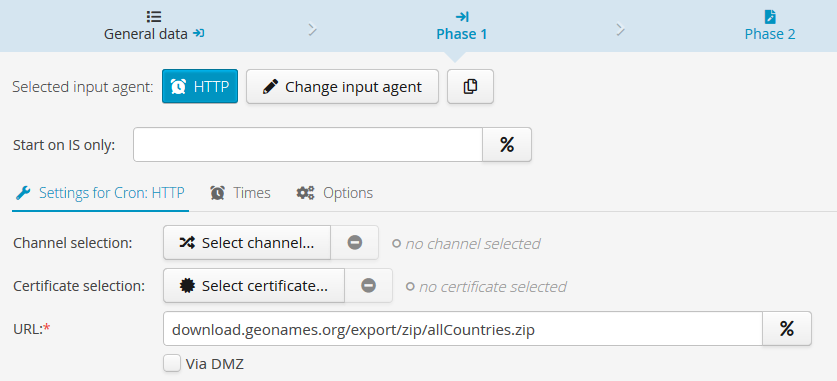
In the format of the "allCountries.zip" file specified here, specific data sources for individual countries are also available at the location specified.
When downloading the Zip file, it is essential that the option Data comes in compressed is set on the "General data" tab:

Since the
allCountries.zip file contains a large amount of data (seven-digit number of lines), it should be processed in sections (e.g. in groups of 5000 lines per record) to avoid memory space allocation issues. For this purpose, Preparsing by a special "preparser", theTokenFileSplitter, can be set up in the profile tab "General data".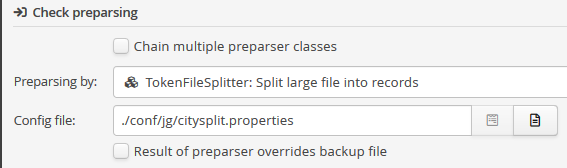
The preparser is parameterized via a configuration file. Starting from a template, only the parameters in the last two lines need to be modified here. In addition to the number of rows per data sheet, a freely selectable header string must be specified. The header is inserted between the real source data rows at all positions where a new record should start.
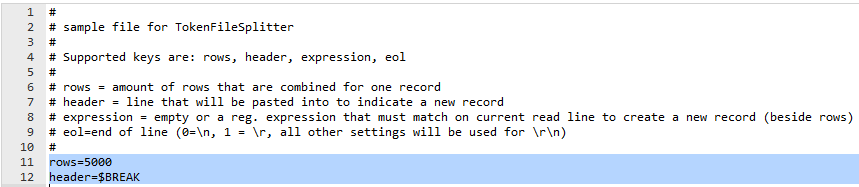
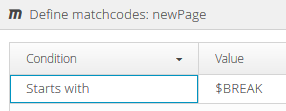
The mapping (see below) must use a "matching" node (here: newPage), which recognizes the header string as a Matchcode and starts a new record. In the example:
Parser (Phase 2)
To ensure that splitting the input data into manageable amounts of data per record also affects the effective execution of the import, the options Enter output channels for each record and Incorporate IU must be set in phase 2 of the profile:
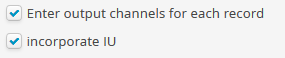
With these settings, the profile creates a separate batch import job for each record at runtime, each covering at maximum the number of batch nodes specified by parameter rows in the tokenFileSplitter preparser.
Mapping (Phase 3)
The Source structure (1) must be set up according to the imported file format. The following screenshot shows the fields to be created with data type (including test data) as child-elements of the node names city. Each row provides the data for exactly one Cities data object to be created.
The purpose of the newPage node added above the city node, is to split the source data into records (see above).
NOTE For the latitude and longitude fields, the data type BigDecimal was selected, for which a suitable template for converting the text into numerical values must also be assigned in the field definition.
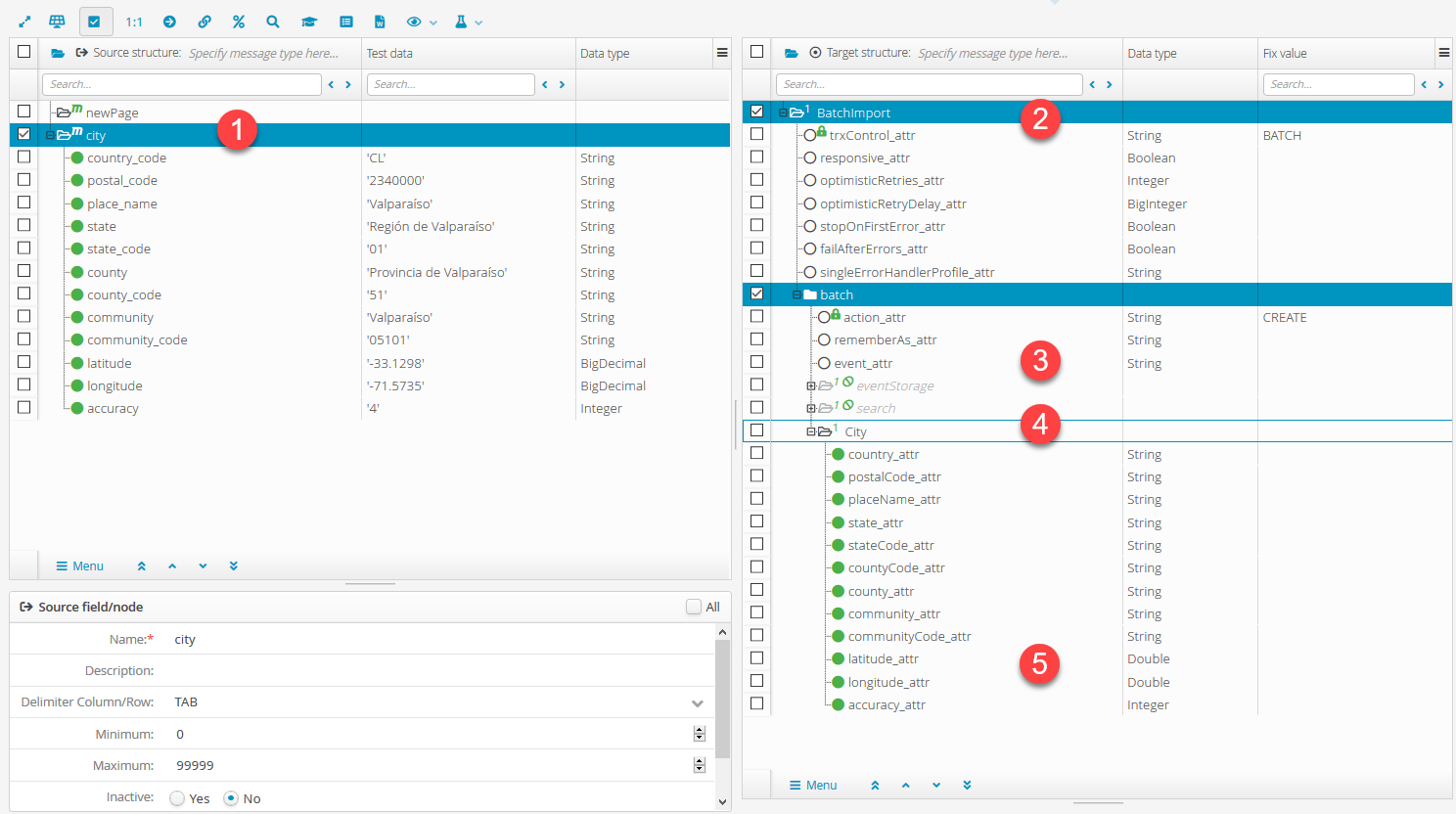
To build the Target structure, the system provides specific templates (see Orchestration templates) for the data structures of Lobster Data Platform/Orchestration.
First the
core:BatchImporttemplate (2) with the basic structure for a batch import was loaded. In the screenshot, the typeBATCHis already entered as a fixed value for transaction control, since the imported Cities are to be imported by batch transactions and not individually.Inside the
batchnode (3), the actionCREATEis assigned as a fixed value, since a new Cities data object is to be created for each imported row. Thebatchnode is connected to thecitynode of the source structure by a path, so that it is iterated for each imported "city".The
eventStorgeandsearchnodes are not needed here and therefore set to inactive. They could also be deleted instead.For the
Citynode (4), again, one of the Orchestration templates (base:City) was used, which was appended as a subnode to thebatchnode with option Skip entity attributes set: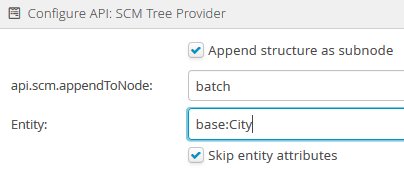
The mapping of source data fields to the target fields within the
Citynode is considered self-explanatory from the labels.The field settings for the "decimal" target fields
latitudeandlongitudeshould be set to fit to the data content to ensure that relevant decimal places are not accidentally shortened.
NOTE The configuration for phase 4 is not required. Phases 5 and 6 are set up as described under Import. No specific settings for the Batch import are required here.
Results
To illustrate the effect of the tokenFileSplitter preparser used here as a special feature, the rows value was temporarily set to 5 and a mapping test with a smaller data set (only "places" in Chile) was executed:
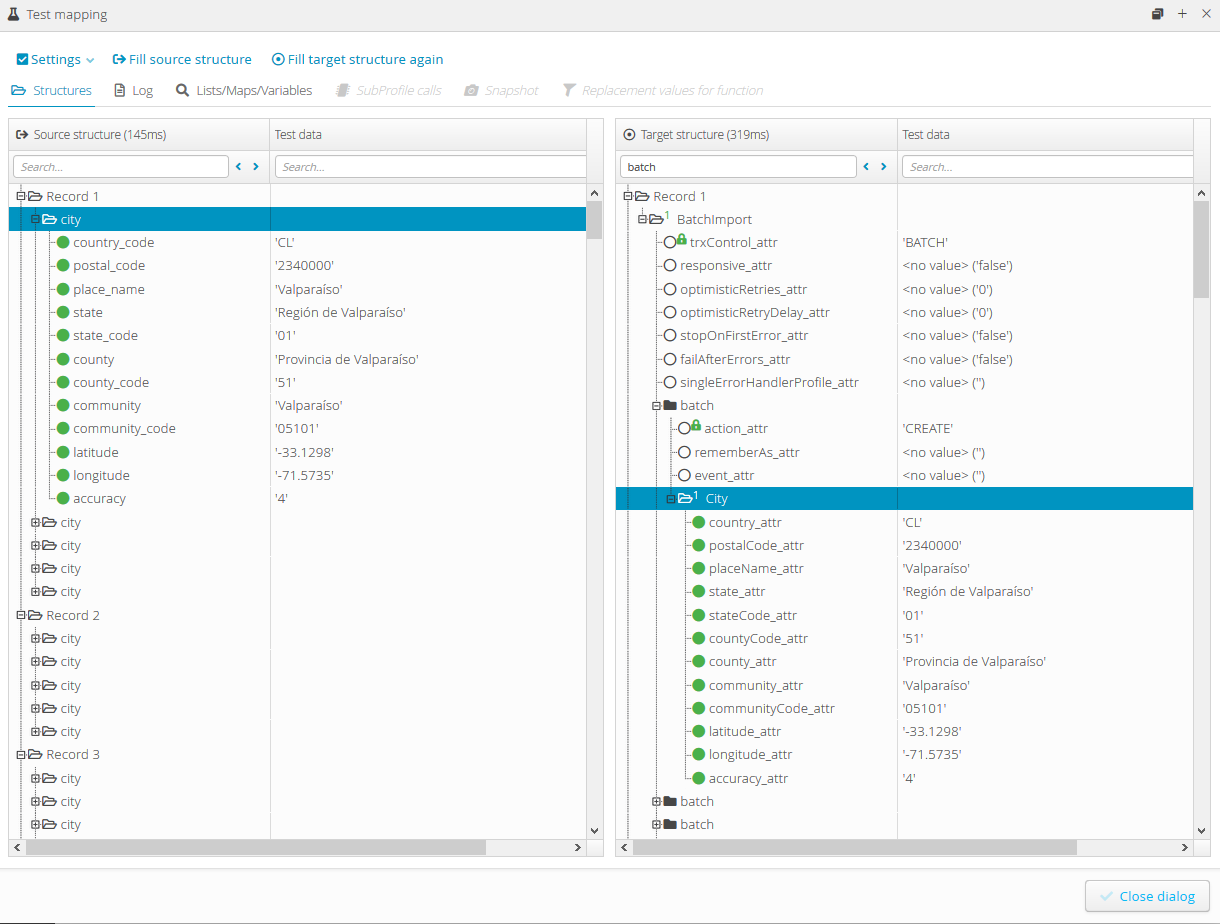
The Source structure (left) shows that records are created with a maximum of 5
Citynodes each.The first
Citynode in the source structure corresponds to the firstbatchnode in the Target structure (right) expanded and shows identical data.
The batch import job for the first record (Record 1 in the target structure during the mapping test) would be structured as follows:
<?xml version="1.0" encoding="UTF-8"?>
<core:BatchImport ... trxControl="BATCH">
  <batch action="CREATE">
    <base:City country="CL" postalCode="2340000" placeName="Valparaíso" state="Región de Valparaíso" stateCode="01" countyCode="51" county="Provincia de Valparaíso" community="Valparaíso" communityCode="05101" latitude="-33.1298" longitude="-71.5735" accuracy="4"></base:City>
  </batch>
  <batch action="CREATE">
    <base:City country="CL" postalCode="2480000" placeName="Casablanca" state="Región de Valparaíso" stateCode="01" countyCode="51" county="Provincia de Valparaíso" community="Casablanca" communityCode="05102" latitude="-33.3158" longitude="-71.4353" accuracy="4"></base:City>
  </batch>
  <batch action="CREATE">
    <base:City country="CL" postalCode="2490000" placeName="Quintero" state="Región de Valparaíso" stateCode="01" countyCode="51" county="Provincia de Valparaíso" community="Quintero" communityCode="05107" latitude="-32.843" longitude="-71.4738" accuracy="4"></base:City>
  </batch>
  <batch action="CREATE">
    <base:City country="CL" postalCode="2500000" placeName="Puchuncaví" state="Región de Valparaíso" stateCode="01" countyCode="51" county="Provincia de Valparaíso" community="Puchuncaví" communityCode="05105" latitude="-32.7176" longitude="-71.4111" accuracy="4"></base:City>
  </batch>
  <batch action="CREATE">
    <base:City country="CL" postalCode="2510000" placeName="Concón" state="Región de Valparaíso" stateCode="01" countyCode="51" county="Provincia de Valparaíso" community="Concón" communityCode="05103" latitude="-32.9534" longitude="-71.4678" accuracy="4"></base:City>
  </batch>
</core:BatchImport>