The Date time type dynamic enumeration (DateTimeValueType) specifies choices for the "type" in the Relative date with time value resolver:
All options except the "Custom" type are predefined time specifications for which a Pattern (highlighted in blue by selection in the screenshot below) can be stored for the date calculation, which is applied relative to the current system time.
For the "Custom" (
CUSTOM) option, the Pattern is ignored (it is empty by default) because a pattern in the "Time value" parameter in the Relative date with time value resolver is used instead (see Relative date with time for details).
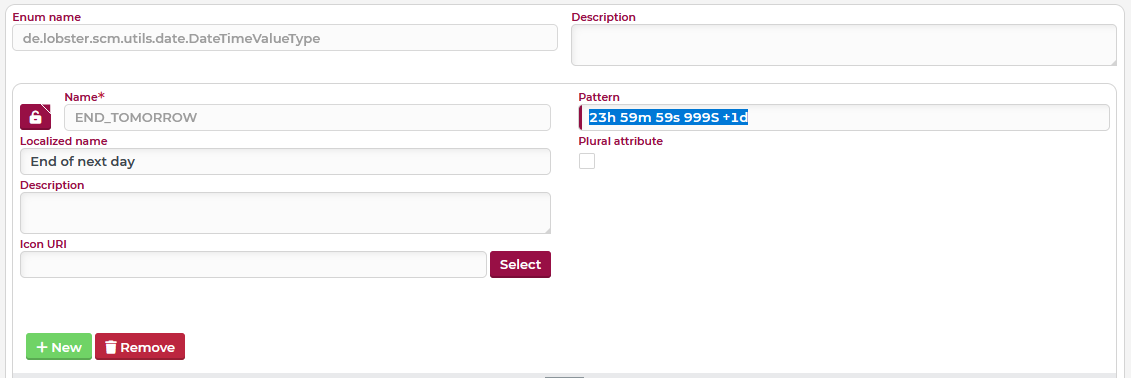
The following definitions for default values are predefined at delivery:
Name | Localization (English) | Pattern (Syntax see Relative date with time) | Comments |
|---|---|---|---|
System time | |||
| Now | <empty> | no pattern necessary ("Now" = system time without offset) |
Timeline | |||
| Last Hour |
| ... the time 3,600,000 milliseconds before "Now" (= "60 minutes ago") |
| Next Hour |
| ... the time 3,600,000 milliseconds after "Now" (= "in 60 minutes") |
Calendar day (period) | |||
| Start of today |
| ... the first millisecond of the current calendar day |
| End of today |
| ... the last millisecond of the current calendar day |
| Start of next day |
| .... the first millisecond of the next calendar day ( |
| End of next day |
| ... the last millisecond of the next calendar day ( |
| Start of previous day |
| ... the first millisecond of the previous calendar day ( |
| End of previous day |
| ... the last millisecond of the previous calendar day ( |
Calendar week (period) | |||
| Start of current week |
| ... the first millisecond of the first day of the week ( |
| End of current week |
| ... the last millisecond of the last day of the week ( |
| Start of previous week |
| ... the first millisecond of the first day ( |
| End of previous week |
| ... the last millisecond of the last day ( |
| Start of next week |
| ... the first millisecond of the first day ( |
| End of next week |
| ... the last millisecond of the last day ( |
Calendar month (period) | |||
| Start of current month |
| ... the first millisecond of the first day of the current month ( |
| End of current month |
| ... the last millisecond of the day before the first day ( NOTE Because of the variable number of days per month, it is necessary to jump to the first day ( |
| Start of previous month |
| ... the first millisecond of the first day ( |
| End of previous month |
| ... the last millisecond of the day before the first day ( |
| Start of next month |
| ... the first millisecond of the first day ( |
| End of next month |
| ... the last millisecond of the day before the first day ( NOTE Because of the number of days per month variable, it is necessary to jump to the first day ( |
Calendar year (period) | |||
| Start of current year |
| ... the first millisecond of the first day of the current year ( |
| End of current year |
| ... the last millisecond of the last day of the current year ( |
| Start of previous year |
| ... the first millisecond of the first day of the year ( |
| End of previous year |
| ... the last millisecond of the last day of the year ( |
| Start of next year |
| ... the first millisecond of the first day of the year ( |
| End of next year |
| ... the last millisecond of the last day of the year ( |
Quarter (period) | |||
| Start of current quarter |
| ... the first millisecond of the first day of the current quarter ( |
| End of current quarter |
| ... the last millisecond of the last day of the current quarter ( |
| Start of previous quarter |
| ... the first millisecond of the first day of the previous quarter ( |
| End of previous quarter |
| ... the last millisecond of the last day of the previous quarter ( |
| Start of next quarter |
| ... the first millisecond of the first day of the next quarter ( |
| End of next quarter |
| ... the last millisecond of the last day of the next quarter ( |
Special times | |||
| In the past |
| ... first millisecond of the first day of the year 0 ( "Beginning of the calendar" |
| In the future |
| ... last millisecond of the last day of the year ( "End of the calendar" |
Freely definable | |||
| Custom | <empty> | ... enables the definition of a "custom" pattern via the "Custom time" parameter in the Relative date with time value resolver |
If required, custom "time types" with a specific Pattern can be added or, if necessary, existing ones can be removed.
CAUTION The Pattern for predefined entries can basically be edited and so customized. However, any change to a predefined Pattern immediately and globally affects all existing references, e.g. even if the Relative date with time value resolver is used in criteria in the context of the Search API. This can have far-reaching consequences for the runtime behaviour of Lobster Data Platform/Orchestration as well as all Lobster_data profiles that use the Search API. If necessary, it is therefore advisable to assign alternative definitions from the default to specially added values for the calculation logic. Then, for each reference, there is a choice between the "factory default" and a "custom default". If required, Enumeration filters can be used to restrict this selection, e.g. depending on Association criteria.