Using the Behavior type Association criterion matched, a check can be made at form level to see whether at least one of the specified Association criteria applies in the data context.
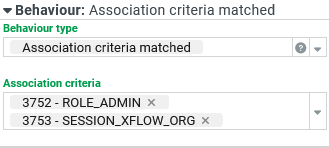
At least one association criterion must be selected under Association criteria. In cases of multiple selection, the selected association criteria are evaluated OR-linked:
If at least one of the specified Association criteria matches, the Actions on "true" are executed.
If none of the specified Association criteria matches, the Actions on "false" are executed.
In both cases, any input data is passed on to the actions as $input. Depending on the association criteria, certain Form elements, for example, can be set as mandatory fields or shown/hidden using corresponding actions. However, please note that changes made in the form only affect the return value of associations if the entire data context is evaluated again. This is the case for Input forms, for example, when saving, or when the action Invalidate context is executed in the form.
The Behavior type Association criterion matched is therefore used particularly often at form level, where the triggering event "Context changed" is available in addition to the triggering event Form data loaded. However, it is basically available for all Form elements.
NOTE Association criteria flagged as Logical components (see Association criteria of type 'Logical component'), are not available in the dropdown. They are also not evaluated in the data context of a form.