In each node of the source structure, one or more match codes can be defined via the context menu. This describes to the parser the rules which record types belong in which nodes. Each match code consists of a condition and a value.
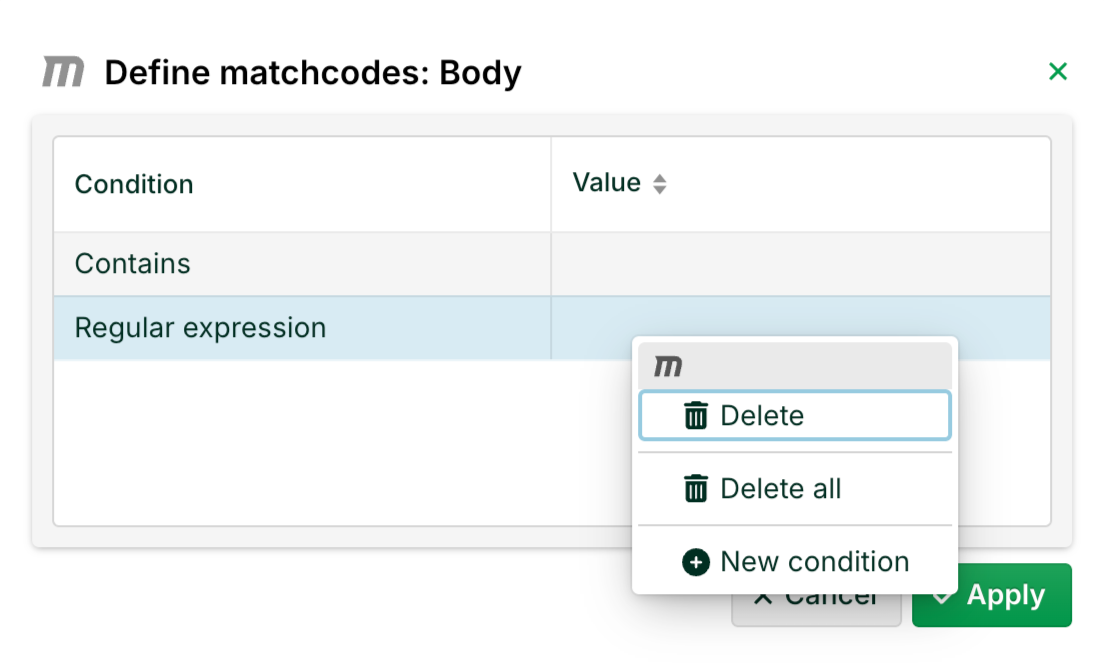
The following conditions are available:
Equals
Starts with
Ends with
Contains
Regular expression
Is not
Does not start with
If multiple match codes are defined for the same node, they are ORed (linked with logical OR).
For XML input data, it is necessary to also assign match codes to the fields. The condition that has to be used is Equals.
In the special case that a logical record goes over several lines of text, a regular expression can be used with a leading operator (?s)
For more info, see the following section, Checking and creating match codes.
Checking and creating match codes
Certain errors in the source structure prevent or interfere with the successful parsing of the input data.
Missing match codes for nodes (or for fields with XML).
Missing inheritance of match codes to parent nodes.
Node attribute "Delimiter row/column" is missing or set incorrectly.
You can test for these errors and sometimes correct them automatically. See option "Recreate match codes" in the source structure menu. The behavior of this option depends on the document type of the profile.
XML | Missing match codes are automatically set with Equals <field name>/<node name>. Inheritance to parent nodes and field delimiters are not checked because they are not relevant to document type XML. |
IDoc | The root node has to begin with "EDI_". Missing match codes for nodes are automatically set. Inheritance to the parent node is checked and set if necessary. Field delimiters are not relevant for IDoc because it is a fixed-length format. |
CSV, Database, Excel | Match codes are checked in all nodes but not automatically set. Inheritance to the parent node is checked and set if necessary. Field delimiters are checked but not changed. |
Fixed-length | Match codes are checked in all nodes but not automatically set. Inheritance to the parent node is checked and set if necessary. Field delimiters are not checked. |
EDIFACT | Match codes are checked in all EDIFACT segments but not automatically set. Composite nodes (containing fields but no subnodes and whose names begin with C or S, followed by three digits) are ignored. Inheritance to parent nodes (segment groups) is checked but not set automatically. Field delimiters are not relevant. |
EDIFACT with option Tradacoms | The check is not (yet) implemented. An error message appears. |
X12, BWA | Match codes are checked but not set. Inheritance to parent nodes is checked but not set. |
Custom class | There is no check or correction. The source tree is assumed to be error-free without checking. |
JSON | There is no check or correction. |
Automatic completion of match codes
The match codes can only be automatically set for "IDoc" and "XML" since there is a tenable rule about how they should appear in these cases. But only IDoc segments and XML elements that have no match code at all are altered. Existing match codes are not changed. It is also not checked whether existing match codes are factually correct, i.e. whether they match the input data.
NOTE : To remove all match codes, you can use the functionality in tab Phase 3 > Source Structure > ☰ Menu > Batch Processing > Miscellaneous > Delete matchcodes in the source structure menu.
Automatic inheritance of match codes
For the document types "IDoc", "CSV", "Database", "Excel" and "Fixed-length", missing match codes are automatically transferred from the subnodes to the parent nodes, unless another unrecoverable error has occurred. There is a check for document types "EDIFACT", "X12" and "BWA", but nothing will be changed. There is no check for document types "XML" and "Custom class".
Check field delimiter
Field delimiters are defined as attributes of the source structure nodes. For document type "Excel" the field delimiter character for nodes that contain fields has to be a semicolon (;). For document type "Database" it has to be a comma (,). For document type "CSV" it must be set but it does not have to be a semicolon. If document type CSV and the time-driven Input Agent "Custom class" with classes "DefaultSQLCron" or "DefaultFileSQLCron" are used, a semicolon is expected. Nodes that do not contain any fields themselves but only subnodes (top-level nodes) should not have a field delimiter.
Result of the check/automatic correction
If one of the checks encounters an error that cannot be corrected, the profile is not changed. An automatic correction therefore only takes place if all detected errors could be corrected automatically. Changelog messages can be found on page "General messages" in the logs of the Control Center. Each log entry contains the name of the profile. Changing the profile will not become permanent until the profile is saved.
Found errors are displayed in an error dialogue. There is no guarantee that all errors will be shown. Thus, the test should be conducted again after an error has been manually corrected.
Cases in which the tool should not be used
In rare exceptional cases, it is possible that the profile developer intentionally deviates from the rules for the source structure. IIn such instances, the test should obviously not be conducted.