What are records and what is their purpose?
During parsing, so-called records are created. At least one record is created. Note: For the number of generated records, see system variable VAR_RECORDS.
Structuring the data
These records can be used to structure the input data at the top level and thus indirectly also the output data. The first step in developing a mapping is always to think about how you want the records to be created during parsing. Everything you set up in the mapping window is executed per record.
Memory management
A further function is memory management. Records can be moved from the main memory to the hard disk (with the so-called swapping). This mechanism can be used to optimise performance and to handle oversized input files (avoiding an OutOfMemoryException).
Multiple execution of the Responses in phase 6
There is a setting with which the Responses can be executed once per record and not only once per profile run (option "Enter output channels for each record" in "Phase 2/Extended").
Behaviour of the different parsers
There is a separate parser for each document type with distinct behaviour.
Document type BWA
The BWA parser automatically detects a change of the message type when a line of the input file is read and generates a new record for this case. More on this in the explanations on this input format.
Document type CSV
Whenever the first top-level node is entered in the source tree, and there are multiple top-level nodes.
If there is only one node, only one record is created. If, however, you still want only the first node to read in data but several records to be created, you can insert an additional node that otherwise has no function (i.e. does not read in any data). You can also set this node to inactive. Note, however, that the set checkbox "Same matchcodes exist" overrides this behaviour. You can also use option "New record if value changes" (see below).
Note: In this context the TokenFileSplitter is also interesting.
Document type Cargo-Imp
The parser allows only one message per input file. Therefore, exactly one record is generated.
Document type Database
See section “Document type CSV”.
Document type EDIFACT
A record is generated for each repeated block "UNH-UNT" or "UNB-UNZ".
In addition, the option "Split EDIFACT files" can be used to force the generation of one job (with one record) per block. More on this in the explanations on this input format.
Document type Custom class
The data is forwarded directly to the Integration Unit. Not relevant here.
Document type Excel
Works like the CSV parser. But one node is sufficient to allow the creation of multiple records. A second node is not necessary.
Document type Fixed-length
Whenever the first top-level node is entered in the source tree. Even if there is only one top-level node (so different from CSV). Note: The set checkbox "Same matchcodes exist" eliminates this behaviour.
Document type IDoc
Each line beginning with "EDI_DC40" creates a new record.
Document type JSON
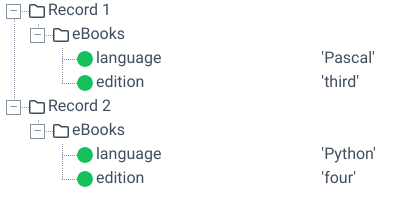
On the one hand, this parser is directly connected to the functionality of the submodule “Forms” and automatically controlled there. If the document type is used standalone and the first node of the source structure represents an array on the top level of the JSON file, then a record is created for each value of this array. In all other cases, exactly one record created. Example: Given the following source structure and input file, two records would be generated.
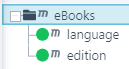
{
   "eBooks":[
      {
         "language":"Pascal",
         "edition":"third"
      },
      {
         "language":"Python",
         "edition":"four"
      }
   ]
}
More on this in the explanations on this input format.
Document type X12
A job with one record is generated for a maximum of one block of data from segment "ISA-IEA". If there is more data after the first "IEA" tag, it is ignored. Option "Split X.12 files", however, creates further records for each additional block. More on this in the explanations on this input format.
Document type XML
Phase 2, option "XML tag for record".
A new record is generated for each occurrence of the tag.
Additionally in version "V4": The generation of records can be controlled with options "Insert new root element for splitting" and "Chunk size". More on this in the explanations on this input format.
Additional relevant configurations
Please also note the following two options for every document type.
Option "Create new record"
Only relevant for document types "CSV" and "Fixed-length". See sections Attributes for fields (source structure) and Attributes for nodes (source structure).
Option "Force single record"
See respective document type (option is not available for all)..
Option "New record if value changes"
(1) New record if value changes: Source field attribute in phase 3.
(2) Default value: Source field attribute in phase 3.
If in a source structure node all field values that have the attribute (1) enabled have changed. If attribute (1) is activated in at least one source field, the normal parser algorithm is deactivated if the respective parser supports this attribute (e.g. "CSV"). Note: In the structure, a small arrow will appear in front of the field name.
If attribute (1) is activated in a source structure field and attribute (2) is filled, a new record will only be created if the source field value has changed and the new source field value is equal to the value specified in (2).
Important note: Options Enter output channels for each record and "Force single record" (see above) may have no effect when using (1).
The following figure shows the effect of attribute (1).
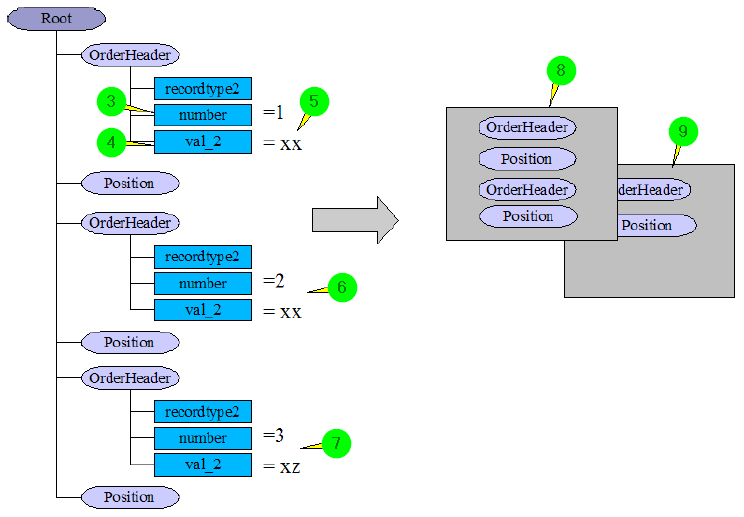
(3) Attribute (1) has been set in source structure field "number".
(4) Attribute (1) has been set in source structure field "val_2".
(5) The fields get values "1" and "xx" from the input data.
(6) The fields get values "2" and "xx" from the input data. Since only one field value differs from the previous value, no new record is started. The nodes are all inserted in the first record (8).
(7) The fields get values "3" and "xz" from the input data. Since both values differ from the previous values, a new record is created and the node is inserted into the new record (9). All further nodes will also be inserted in this record until the next record is created.