On this page you manage the configuration files of the selected client. You view the files and edit their content.
Display
The existing configuration files of the selected client are listed.
The files are in the
./conffolder or a configuration subfolder.The
./etc/admin/datawizardfolder is also shown.You edit a file's content in the editor on the right.
Settings
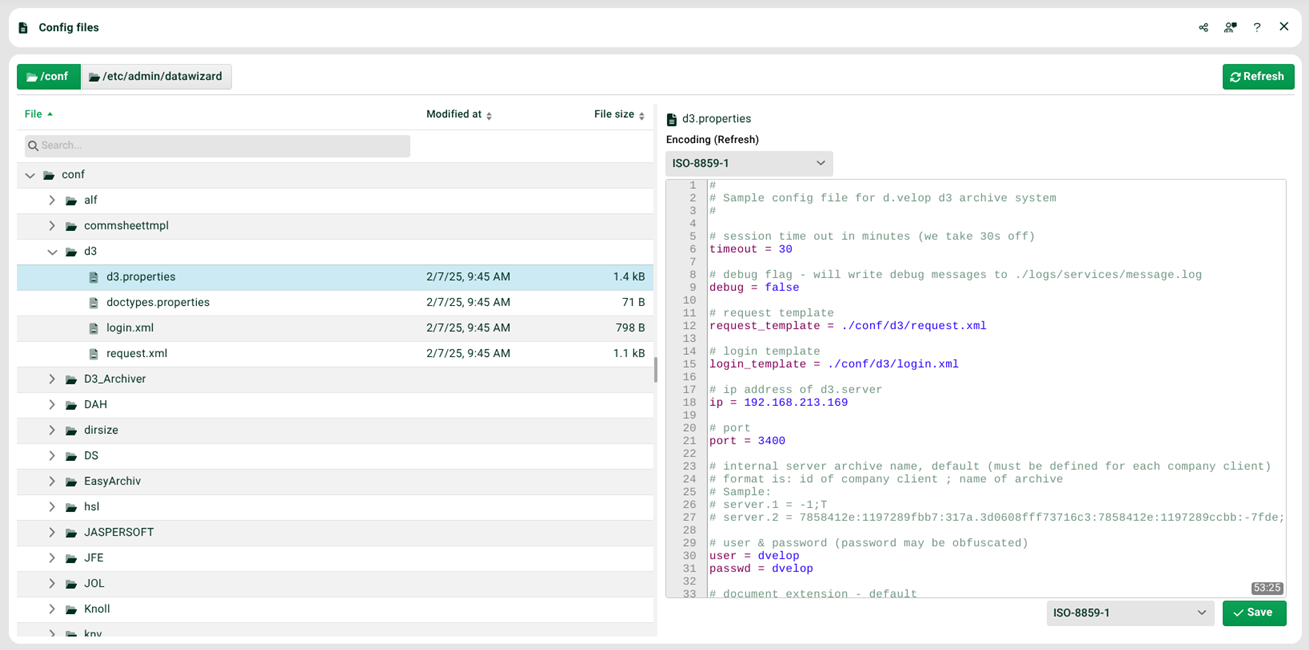
(1) Buttons top left: folder selection (./conf or ./etc/admin/datawizard).
(2) Selection top right: the selected client. Depending on the configuration, there are specific subfolders here.
(3) Window left: use the context menu for file actions.
File actions
The context menu of a file provides the following actions.
Action | Description |
|---|---|
Download file | Downloads the selected file. |
Rename file | Renames the selected file. |
Delete file… | Deletes the selected file after confirmation. |
New folder | Generates a new folder in the selected folder. |
Rename folder | Renames the selected folder. |
Delete folder… | Deletes the selected folder after confirmation. |
New file | Creates a new file inside a folder. |
Upload file | Uploads a file to the current folder. |
Update files | Refreshes the file list. |
Encoding
The editor offers two encoding selectors.
The top drop-down Encoding (Refresh) sets the encoding used to read the file. When you change it, the editor reloads the file from disk.
The drop-down next to Save sets the encoding used to save the file.
The Refresh button loads the last saved encoding.
To convert a file's encoding, read the file as ISO-8859-1 and save it as UTF-8, for example.
Note
After a conversion, the top encoding selector may still show the previous encoding. Check the value after reopening the file. Reset the read encoding manually if needed.
Access
To edit configuration files, you need the Edit config files permission. You assign this permission through a role.
Note
When strict client handling (
strictClientHandling) is active, you access configuration files only through the selection dialog. The input field is locked. TheallowConfigOnStrictHandlingoption re-enables manual input. You set both options in the./etc/startup.xmlfile.
Blacklists and whitelists for file extensions
Blacklists and whitelists control which file extensions are allowed.
See section Blacklists and whitelists for file extensions.