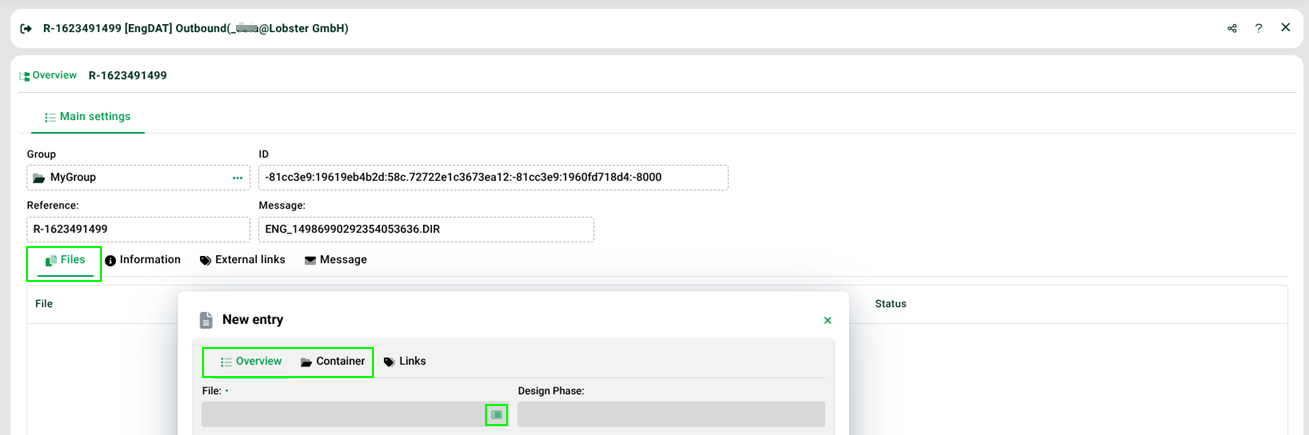
Even if the ENGDAT module offers you more options, you should use Conformance Class 3 messages in only one of the following two ways in tab Files. (Create a new entry first.)
Upload a file in tab "Overview", but then only specify a file name in tab Container (without uploading).
Only specify a file name in tab Overview and then upload files in tab Container.
In the second variant, a regular zip with containing files like for example ENG + <MID> + <file counter> + <current file counter> + <number of 'contained files'> + <current file counter 'contained file'> is created. The fields Compression, File size(compressed) in KB and File size in KB are set automatically after validation.
ENGPART
If you do not want to automatically synchronise your partner contacts, but instead want to preview and/or modify the changes beforehand, get the ENGPART message via email. ENGPART V4.1 is an XML file that you can import with the Integration Unit EngpartIU, which synchronises your address database. For this purpose, the input encoding UTF8 and the data format API must be specified in the profile!