This function stores the XPath expression from the XML/DOM object a in a list c from the root directory on up to the specified XPath expression b.
You can optionally create a concatenated XPath expression out of values b and d. It is also possible to set specific namespaces using a map, which can be defined with parameter e. Existing namespaces with the same name will be replaced.
The function returns the number of nodes in the result set.
Parameters
Parameter | Description |
|---|---|
a | Name of XML/DOM object. |
b | XPath expression (selection of a specific set of nodes). |
c | Name of the list. |
d | Optional XPath expression. |
e | Name of the map for the namespace management. |
Example
The following XML file is used.
<Invoice>
	<user>
		<customer_number>12345</customer_number>
		<first_name>Gustav</first_name>
		<last_name>Thalmeier</last_name>
		<place>Treuchtlingen</place>
		<birthday>15.07.1981</birthday>
		<order>
			<article_id id="123689">DE459363258</article_id>
			<quantity>1</quantity>
			<price>17.98</price>
		</order>
		<order>
			<article_id id="5896324">459363298</article_id>
			<quantity>1</quantity>
			<price>4.99</price>
		</order>
	</user>
	<user>
		<customer_number>85639</customer_number>
		<first_name>Henriette</first_name>
		<last_name>Michlmeier</last_name>
		<place>Breckerfeld</place>
		<birthday>04.12.1975</birthday>
		<order>
			<article_id id="9832475">DE459362358</article_id>
			<quantity>1</quantity>
			<price>199.59</price>
		</order>
		<order>
			<article_id id="123659">459363258</article_id>
			<quantity>3</quantity>
			<price>7.99</price>
		</order>
		<order>
			<article_id id="123689">DE459363258</article_id>
			<quantity>1</quantity>
			<price>14.99</price>
		</order>
	</user>
</Invoice>
For each user, we want the customer number and the item number that does not begin with "DE".
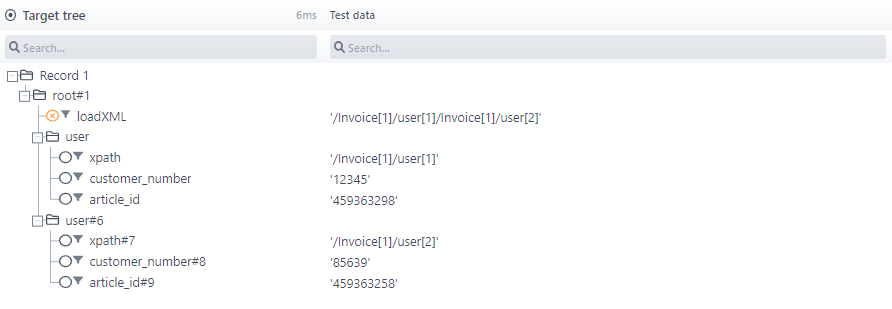
In the calculation field "loadXML" the list is issued (separated by "|") with all XPath expressions to value "user". In the first row of the table below, the parameters for these functions are listed. The node "user" drags on the list "list_user_data". In the field "xpath" of the respective XPath expression is listed for each node. In the fields "customer_number" and "article_id" the evaluated data is issued. In addition, the value of the field "article_id", are stored in a list "list_article_id" with the function described here. The XPath expression is obtained from the parameter d (in this case "/Invoice/user") and the second parameter specified below c ("/order[article_id>0]/article_id") composed. The set parameters can be found in row two in the table.
Parameter a | Parameter b | Parameter c | Parameter d | Result |
|---|---|---|---|---|
xml_Invoice | //user | list_user_data | 2 | |
xml_Invoice | /order[article_id>0]/article_id | list_article_id | xpath | 2 |