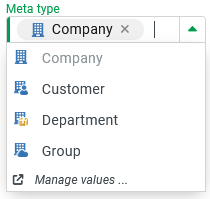
The predefined enumeration Company meta type (CompanyMetaType) classifies Companies/Clients via the "Meta type" (metaType) field.
The list can be customized.
A specific type "Company meta type (configuration)" (
CompanyMetaTypeConfiguration) with the "Icon URI" (iconUri) field is available for the configuration of enumeration values.
The following values and localizations are predefined by default:
Ordinal | Name | Description | Icon URI | German | English | French |
|---|---|---|---|---|---|---|
|
| empty |
| Gruppe | Group | Groupe |
|
| empty |
| Firma | Company | Entreprise |
|
| empty |
| Abteilung | Department | Service |
|
| empty |
| Kunde | Customer | Client |
Runtime example:
In an input form for Companies/Clients, the image specified as "Icon URI" appears in the dropdown for the Combobox element for the "Metatype" ( NOTE The Company meta type can be used to classify company accounts at a "high-level" in order to facilitate systematic orientation (e.g. through filters in overviews or Row formatting in datagrids) and automation (e.g. via Association criteria or as a filter in a Search) within a company hierarchy that may be quite complex. However, classification only has a direct functional impact if appropriate precautions are taken in a targeted manner. If required, a more detailed characterization and control is made possible by the Company type, for which Companies/Clients offer a multiple selection that can be conveniently evaluated using a Company rule, for example. In contrast, the Company meta type ensures a clear assignment to exactly one of the selection options offered. |
|