Projection – Abstract
Purpose: Returns the values of all instances of a specific attribute type for a given or explicitly defined attribute owner (without an explicit Join).
Tooltip
Usage: An Attribute projection searches the attributes of an attribute owner specified by the context or by Attribute owner path for instances of an attribute type specified by Attribute and returns a list of attribute values (or from a Property of the attribute value) as the return value.
Parameter:
The Name optionally defines the title of an output column (if relevant). By default, the Name is derived from the selection for the Property.
An Attribute owner path only needs to be defined as a Projection if the entity in the context of the search is not the attribute owner of the attribute to be evaluated.
The Attribute parameter must be used to define the attribute type (a singular/plural attribute or a typed attribute type) by selecting from the options relevant to the entity type of the attribute owner.
Optionally, a specific Property can be selected as the return value. If no selection is made, the attribute value (from the
value-propertyof the attribute entity) is returned in full.NOTE
In general, the projection returns a "multi-valued" return value with the usual implications for the design of a query.
Multiple accesses to the same attribute via several instances of the Attribute projection do not imply redundant and independent joins at the database level (see manual for details).
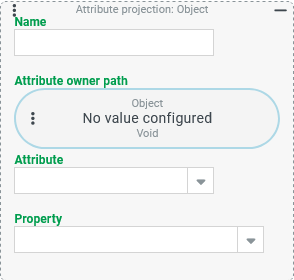
An Attribute projection searches the attributes of the attribute owner defined by the context or an explicitly defined Attribute owner path for attributes of an attribute type selected via the Attribute parameter.
Depending on the optional selection for the Property to be evaluated, either the complete attribute value or the value in the selected Property appears in the return value of the Attribute projection.
The Attribute projection returns the attribute values of all instances of the selected attribute type, so that – in contrast to the Typed attribute projection – a multi-value return value can always be assumed.
The possible uses of the Attribute projection in the context of different attribute types are illustrated by the following case differentiation:
Carnality of the attribute/subtype ↓ | Attribute type is non-typed | Attribute type is typed | |
|---|---|---|---|
more specific subtype | all subtypes | ||
"singulär" (≤1) | Default access: (Attribute projection applicable but no added value) | Default access (Attribute projection not applicable due to lack of selection for the (sub)type) | Attribute projection evaluates instances for all singular and plural subtypes and returns a "flat" list (depending on the selection for Property). |
"plural" (≥1:) | Attribute projection is the default access | ||
A non-typed singular attribute can be selected as an Attribute. Technically, this is offered by the Attribute projection. However, the Singular attribute projection provides the same result.
For a non-typed plural Attribute, e.g. the "communication information" (
AddressCommunicationInfo) for the entity type "Address" (Address), an Attribute projection represents the default access.If the Attribute selection refers to an attribute type from the typed attributes group (e.g. "Text attribute" or "Company and address attribute"), the Attribute projection provides the attribute values of all singular and plural subtypes as a "flat list".
The values of typed attributes with a plural subtype therefore do not appear "grouped" or "bundled" per attribute owner and subtype in the return value, but as individual values (with the same subtype but different
indexvalue).
NOTE At database level, the Attribute projection implies an optional LEFT OUTER JOIN to the database table for the implementation of the attribute type selected in the Attribute parameter. If a search uses multiple instances of the Attribute projection for this attribute type, the same JOIN is used multiple times and is not executed redundantly. However, if an Attribute projection and a similarly equivalent Singular attribute projection access the same singular attribute, this results in two redundant JOINs.
Configuration
Parameter | Type | Description |
|---|---|---|
Name |
| The optional Name parameter can be used to assign an (alias) name to the projection.
|
Attribute owner path | Entity (Projection) | An Attribute owner path only needs to be explicitly defined by configuring a projection if the entity in the context of the search is not the owner of the attributes that are to be evaluated. This is relevant in the following cases, for example:
|
Attribute | Class (attribute type) | In the Combobox element for the Attribute parameter, a selection must be made from the options for the attribute type offered via dropdown. Only the attribute types that the entity type of the applicable attribute owner supports per implementation are available for selection here. NOTE If no options are available for the Attribute or if options are missing, then the Attribute owner path may not have been set appropriately (e.g. the "address" of an account for which no attributes are implemented) |
Property | Property (of the attribute value) | The Combobox element for the Property allows an optional single selection for one of the fields of the attribute type selected by Attribute.
For instances of plural attributes, access to the index property (
|
Examples
Typical use case: Evaluate plural attribute
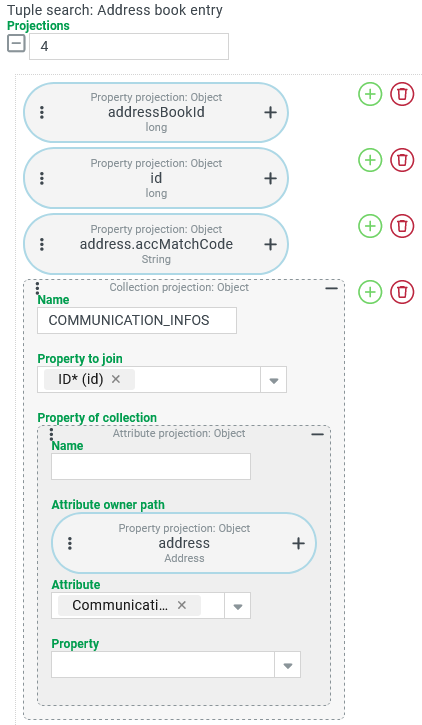
A tuple search should evaluate all tangible instances of the entity type "Address book entry" (AdressBookEntry, see Address book entries) that reference exactly one address (see Addresses) via the "Address" (address) property and provide an overview of the data stored there via the "Communication information" (CommunicationInfo) attribute type.
Specifically, exactly one tuple is output for each address book entry, which contains, among other things, a list (or collection) of all communication information.
Configuration:
The screenshot on the right shows the Projections configured for the tuple search:
|
|
Runtime example:
   <core:TupleSearchResult maxResults="100" count="33">
      <columns>
         <name>addressBookId</name>
         <name>id</name>
         <name>address.accMatchCode</name>
         <name>COMMUNICATION_INFOS</name>
      </columns>
      <result>
         ...
         <row>
            <item xsi:type="xsd:long">1051</item>
            <item xsi:type="xsd:long">953</item>
            <item xsi:type="xsd:string">EDDH</item>
            <item xsi:type="list">
               <entry id="12956" ... orderIndex="0" communicationType="EMAIL" communicationContext="noreply" xsi:type="base:AddressCommunicationInfo">
                  <communicationValue>noreply@ema.il</communicationValue>
               </entry>
               <entry id="12955" ... orderIndex="1" communicationType="EMAIL" communicationContext="alternate" xsi:type="base:AddressCommunicationInfo">
                  <communicationValue>noreply2@doma.in</communicationValue>
               </entry>
               <entry id="12957" ... orderIndex="2" communicationType="PHONE" communicationContext="info" xsi:type="base:AddressCommunicationInfo">
                  <communicationValue>+49 (40) 50750</communicationValue>
               </entry>
            </item>
         </row>
         <row>
            <item xsi:type="xsd:long">1051</item>
            <item xsi:type="xsd:long">952</item>
            <item xsi:type="xsd:string">EDDF</item>
            <item xsi:type="list">
               <entry id="12960" ... orderIndex="0" communicationType="PHONE" communicationContext="info" xsi:type="base:AddressCommunicationInfo">
                  <communicationValue>+49 (180) 6 3724636</communicationValue>
               </entry>
            </item>
         </row>
         <row>
            <item xsi:type="xsd:long">1051</item>
            <item xsi:type="xsd:long">951</item>
            <item xsi:type="xsd:string">EDDL</item>
            <item xsi:type="list">
               <entry id="12961" ... orderIndex="0" communicationType="PHONE" communicationContext="info" xsi:type="base:AddressCommunicationInfo">
                  <communicationValue>+49 (211) 4210</communicationValue>
               </entry>
            </item>
         </row>
      ...
      </result>
   </core:TupleSearchResult>
Each
rowelement ("tuple") contains a list of "Communication information" assigned to the address book entry as the fourth item.The sample data shows attribute values with different Communication type (
EMAIL,PHONE) and "context" (info,alternate,noreply) for classifying the specific information specified as "value" (communicationValue).
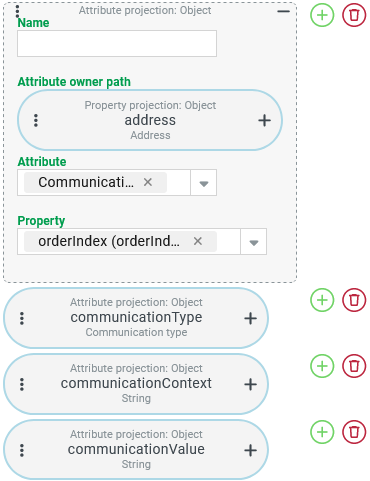
Variant: In order to "serve" the "Communication information" in a CSV search as direct readable text, a slightly different formatting of the return values from the Attribute projection is recommended:
Instead of a "list column" (collection) in a tuple, the "Communication information" is output on several lines with repetition of the header data of the address book entry.
The payload properties from the attribute should be distributed to individual columns.
Configuration:
Instead of the Collection projection in the previous example, the four instances of the Attribute projection shown in the screenshot (right) are used with a uniform parameterization except for the Property:
NOTE These projections can be put together quite quickly by "copying, pasting and adapting". As described above in abstract terms, this does not result in four individual JOINS being generated internally and processed at runtime. Rather, all instances of the Attribute projection effectively refer automatically to the same join. NOTE As no Name is specified, the internal property names appear as labels for each output column. |
|
Runtime example:
For the same section of the sample data, the CSV search returns the text shown below, in which address book entries (see second column, id) with multiple lines of "Communication information".
addressBookId,id,address.accMatchCode,orderIndex,communicationType,communicationContext,communicationValue
...
1051,953,EDDH,0,EMAIL,noreply,noreply@ema.il
1051,953,EDDH,2,PHONE,info,+49 (40) 50750
1051,953,EDDH,1,EMAIL,alternate,noreply2@doma.in
1051,952,EDDF,0,PHONE,info,+49 (180) 6 3724636
1051,951,EDDL,0,PHONE,info,+49 (211) 4210
...
Special use case: Evaluating typed attributes of a type
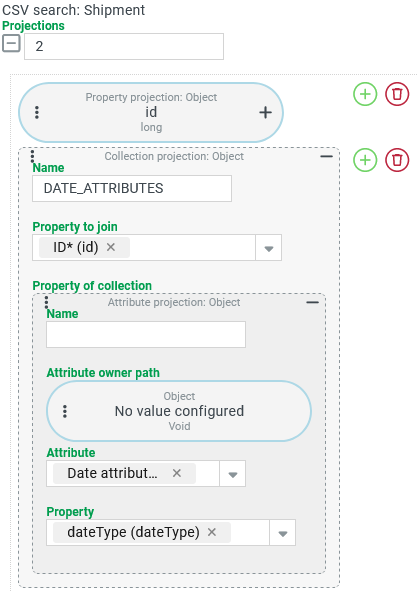
A CSV search should visualize the "progress" in the life cycle of Shipments through a list column that names the Date type for each date attribute used.
Configuration:
The screenshot on the right shows the configuration for CSV search Projections:
|
|
Runtime example:
id,DATE_ATTRIBUTES
...
4802,[DISPATCH_DATE_PLANNED]
4701,[ARRIVAL_PLANNED]
4651,[ARRIVAL_PLANNED]
4402,[]
4401,[]
4301,[ARRIVAL_PLANNED]
4253,[ARRIVAL_PLANNED]
4203,[]
4202,[ARRIVAL_PLANNED]
4201,[]
4151,[]
4101,"[VESSEL_DEPART, WAYPOINT_ARRIVAL_DATE, WAYPOINT_ARRIVAL_DATE, VESSEL_ARRIVAL, LOADING_DATE]"
4051,"[TEST_DATETYPE, ARRIVAL_PLANNED]"
4006,[]
...
NOTE
The example shows items with date attributes with subtypes that can be singular or plural.
Only the Date type
WAYPOINT_ARRIVAL_DATEcan be clearly recognized as plural, as it appears several times in the same Collection for one shipment.Whether a Date type that only appears once is singular by definition would also not be clear from the complete attribute value. An
indexproperty with the value 0 also appears for singular attribute values.
IMPORTANT The procedure demonstrated here for evaluating attribute subtypes is only really practical if the following restrictions are not a problem:
The individual values in a Collection projection cannot be sorted. The Date type values also do not appear in a logical or chronological order (see
LOADING_DATE).The Attribute projection takes into account all attributes of the selected type, including those that are not currently "filled".
Side note:
If an attribute value is deleted, not only the associated attribute entity is usually retained in the data of the attribute owner entity, but also the attribute value itself, as this continues to refer to the subtype:
      <shp:ShipmentDate id="1852" ... >
         <value dateType="TEST_DATETYPE"/>
      </shp:ShipmentDate>
The search shown above therefore returns the Date type in this case, although the attribute value does not contain any further "payload". The Attribute projection also provides no option for a corresponding restriction. Only an Attribute join could do this.