See also: Object to client xml
Value resolver – Abstract
Purpose: Attempts to parse a string passed as input value as XML to return an object.
Tooltip
Usage: The value resolver returns the generated object, if successful.
Parameter: The Class field name (default value
class) determines which property in the XML defines the class of objects or the data type of values.NOTE If no value (
$null) is present as input value, the no value ($null) is returned.
The Object to client xml value resolver parses a string passed as a input value as XML (see XML data encoder) to return an object.
The Class field name parameter defines the name of the XML attribute that specifies the "class" of elements in the client XML. Elements that have this XML attribute should be converted to the relevant data type or class.
The following cases are differentiated:
Input value (abstract) | Input value (specific examples) | Return value (suitable with "Class field name": | ... with unsuitable "Class field name" (here: not | Error |
|---|---|---|---|---|
No value ( | No value ( | No value ( | n/a | |
A string that does not define a well-formed XML | Empty character string ("")
| n/a |
| |
A well-formed XML that contains only text as content in an arbitrarily named |
|
| n/a | |
A well-formed XML with a |
|
NOTE The original string | (Client object in JSON notation) NOTE If the input value | n/a |
A well-formed XML with a |
| No value ( NOTE The original string | n/a | |
A well-formed XML with a |
| (Client object in JSON notation) | n/a | |
A well-formed XML whose | IMPORTANT The | (New NOTE Contents that are not provided for in the data model of the class (in the example: | (Client object in JSON notation) NOTE The client object reflects all the information from the XML, but maps it without any consideration of classes referenced in different layers. | n/a |
Configuration
The input value is expected to be a string for a well-formed XML document.
The Class field name parameter defines a field name that can be used as an attribute within the XML string to identify the class of an object.
By default, the
classproperty is used.
If the Class field name specified in the configuration does not match the contents of the XML present as input value because it uses a different name for references to classes of objects, then the corresponding contents are not parsed against the object model of the specified class. Instead, a "client object" is created, in which the possibly existing reference to the ignored class can be read as a data field value under the unsuitable name. For the relevant examples, the table above with yellow shading in column 4 (using the JSON notation) shows how such client objects can look.
NOTE "Ignoring" existing class references is typically undesirable when using the Object to client xml value resolver, especially since it affects all "classified" content.
Example
Event handling is used to access selected contents of a file containing weather data, which is periodically written to the file system of the Lobster Data Platform server.
The file provides a list of aviation weather reports in text form in XML format with the following structure:
Extract from an XML file with aviation weather data:
<avmet>
    <metar>
        <icaoAdId>EDMO</icaoAdId>
        <metarType>COR</metarType>
        <metarText>
            EDMO 201320Z 27013G23KT 250V310 CAVOK 29/14 Q1013=
        </metarText>
    </metar>
    <metar>
        <icaoAdId>EDMA</icaoAdId>
        <metarType/>
        <metarText>
            EDMA 201350Z 26013KT 230V290 CAVOK 29/14 Q1012=
        </metarText>
    </metar>
...
</avmet>
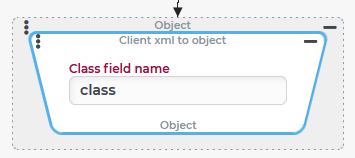
In the context of event handling, an object is created that reflects the weather reports metar elements contained in the file as a list of client objects. For this purpose, a "list object" is created from the file content, which can be "examined" or evaluated in more detail in the context of event handling with value resolvers (Rule list resolver, List item, etc.).
Configuration:
Within an Execute with event action, the list of all weather reports (
NOTE In the Execute with event action block, this list could, for example, be searched by a Rule list resolver for a weather report for a specific airport identified by an Entity property rule for the |
|