Value resolver – Abstract
Purpose: Creates a changelog that determines the differences between an object passed as an input value and a parameterized compare object and outputs them in structured form – as a "change log".
Tooltip
Usage: The object in the input value is compared with the compare object determined depending on the Compare value parameter.
If differences are detected, they appear in a changelog in the return value, whose type depends on the type of input value.
If no differences relevant to the parameterization are found, the return value is "no value" (
$null).
Parameter:
The Ignore entity class properties option is checked by default. If there is an entity as input value, its entity attributes (
created,creatorId,lastModified,lastModifierId,ownerId, etc.) will be ignored during the comparison if the option is checked.The Compute deep creation and deletion changes option is unchecked by default. For deleted and created values (objects), only the minimum amount of information appears in the return value.
A configuration for the Compare value is optional.
For an entity as input value, the "original object" is used as default compare object without configuration.
For all other object types a Compare value should be explicitly configured, otherwise "no value" (
$null) will be returned.
WARNING In connection with hierarchical objects, the generation of a changelog can require a considerable "computing effort" and can create extensive amounts of data.
IMPORTANT This value resolver is not available in a Client Workflow!
The Change log value resolver generates a changelog that determines the differences between an object passed as input value and a compare object defined by the Compare value parameter and outputs them in a structured form – as a "changelog".
The type of the return value depends on the type of the input value.
Input value type | Examples | Return value type | Specific fields |
|---|---|---|---|
Simple value | Text values, numeric values, enumeration values, etc. | "Changelog > Simple value" ( |
|
Collection | List, Unique list, etc. | "Changelog > Collection" ( |
|
Entity | Business object, Custom type definitions, Line item, Configuration, Attribute implementation (see also table below), etc. | "Changelog> Entity" ( |
|
Other objects | Client object, date value, date range, attribute (see also table below), etc. | "Changelog > Object" ( |
|
IMPORTANT Technically, each changelog type offers the fields fromIndex and toIndex, which refer to the sequence position within a collection. These fields contain the value -1 if the index is not applicable (due to lack of reference to a collection).
NOTE Changes to attributes of an entity can be determined in different ways. The return value type varies:
Input value for the changelog | Input value type | Return value type | Specific fields |
|---|---|---|---|
Attribute owner Parent entity of the attribute e.g. a business object or also a line item | Entity | "Changelog > Entity" (
|
|
Attribute implementation e.g. "Order > Text attribute" type | Entity | "Changelog > Entity" ( | no attribute |
Attribute e.g. "Text attribute" type | Object | "Changelog > Object" ( | no attribute |
Compare logic:
If no differences are found between the input value and the compare object, the return value is "no value" (
$null).If no Compare value is configured (default) and an entity is available as input value at runtime, its Original entity (i.e. the server-side state for the entity) is used as the compare object. This is the typical use case for the value resolver.
The Ignore entity class properties option only works in this use case. It controls whether changes to the entity attributes ("Owner", Created by", "Creation date", etc.) are ignored (default) or taken into account during a comparison.
If the entity in the input value contains other entities (e.g. line items or attributes), a changelog is generated for them – recursively if necessary – which appears together with other "changes" as part of the parent changelog.
If the input value is not an entity, but e.g. a simple value, a list or a "client object", then the Compare value should be configured explicitly, otherwise the input value is also a compare object and the value resolver returns "no value" (
$null).If the input value is a list of entities, these will not be automatically compared with the respective Original entity if no Compare value is configured. However, if necessary, this can be achieved by explicit configuration for the Compare value (see Special use case in the "Examples" section).
The Compute deep creation and deletion changes option controls how much information the changelog provides about objects that are classified as created or deleted in the context of the comparison:
For created or deleted values, only a minimal amount of information appears by default (option unchecked).
If the option is checked, the changelog will output more data of the object in question:
An object classified as "deleted" is reproduced in its entirety with all its details.
For an object classified as "created", its data is reflected by a "changelog" with "no value" (
$null) as the compare object.
IMPORTANT What kind of "changes" does the changelog describe?
The changelog is not a chronological list of manipulations actually performed on a specific object. In fact, two objects (the input value and the compare object) are compared, which may or may not be different versions of the same object. Generally formulated, the "changelog" describes one or more "changes" that could transform the compare object into the input value. The changelog therefore describes a possible transformation from the compare object to the input value, without claiming that the described "changes" have taken place at all and, if exactly so.
Examples illustrating the evaluation logic in the change log:
The input value contains a volatile dataset for any entity that has a "Name" (
name) field. The server-side dataset (see Original entity) shows the text "foo" for thenamefield. In the volatile dataset, the text "bar" was assigned as "Name" during the current transaction.
As long as no other changes have been made to the entity in the transaction, the entity is effectively considered changed and the Changelog value resolver shows the value change from "foo" to "bar" for the "Name" field.
As an extension to the previous scenario, the "Name" of the entity is changed back to the original value, i.e. "foo", after the change from "foo" to "bar".
As long as no other changes have been made to the entity in the transaction, the entity is thereby considered effectively unchanged and the Changelog value resolver returns "no value" (
$null).In the input value there is a list with three text characters (JSON image: [
"O","X","O"]), which as a Compare value is a list with the JSON image ["O","O","O"] contrasted.
Intuitively, one would perhaps expect the second value of the list to be evaluated as "changed from O to X". In contrast, the Changelog value resolver shows the following "changes" accordingly:
The "O" at the third list position in the compare value has been changed to an "X" and moved to the second position.
The "O" at the second list item has been moved to the third position.
The final result of these operations corresponds to the input value as well as the change of the second position described above as "intuitive". Why is this so complicated? The value resolver determines the changes to a list according to a system that first searches the list in the input value for entries already "known" from the compare object and only then evaluates unassigned target values as "added" or "changed". The "secondary condition", intuitive for people, to get from the compare value to the input value by a minimum number of "changes", does not play any role for this algorithm.
Example of a changelog:
<?xml version="1.0" encoding="UTF-8"?>
<core:EntityChangeLog [...] fromIndex="-1" toIndex="-1" changeType="MODIFIED" fromClass="shp:Shipment" toClass="shp:Shipment" fromId="51" toId="51">
   <changeLogs>
      <core:TypedAttributeChangeLog name="attributes" fromIndex="-1" toIndex="-1" changeType="MODIFIED" fromClass="shp:ShipmentText" toClass="shp:ShipmentText" fromId="1" toId="1" attributeType="base:TextAttribute" type="base:TextType#DESCRIPTION">
         <changeLogs>
            <core:ObjectChangeLog name="value" fromIndex="-1" toIndex="-1" changeType="MODIFIED" fromClass="base:TextAttribute" toClass="base:TextAttribute">
               <changeLogs>
                  <core:SimpleValueChangeLog name="textValue" fromIndex="-1" toIndex="-1">
                     <fromValue xsi:type="xsd:string">Description (original)</fromValue>
                     <toValue xsi:type="xsd:string">Description (updated)</toValue>
                  </core:SimpleValueChangeLog>
               </changeLogs>
            </core:ObjectChangeLog>
         </changeLogs>
      </core:TypedAttributeChangeLog>
   </changeLogs>
</core:EntityChangeLog>
The return value of the type "Changelog > Entity" (
EntityChangeLog) defines via thetoClassfield that a shipment (see Shipments) was passed as input value and refers to its ID (toId) with the value51.Since the
fromClassand fromIdfields do not specify any data that differs from the input value, the comparison apparently involves two data statuses for the shipment with ID 51. Typically, the Original entity serves as the compare object here because no Compare value has been configured.
In the example, the
changeLogslist field contains exactly one element of the "Changelog > Typed attribute" (TypedAttributeChangeLog) type, whosechangeTypefield names the "change type" asMODIFIED.It can be seen from the
fromClassandtoClassfields that theTypedAttributeChangeLogconcerns a typed text attribute – more precisely: its implementation – for a shipment (ShipmentText).The
attributeTypefield refers to the attribute type (TextAttribute) used as the value, and thetypefield identifies the "Description" subtype (DESCRIPTION) defined as the value from the dynamic enumeration Text type (TextType).
The
changeLogslist field within theTypedAttributeChangeLogelement contains a "Changelog > Object" (ObjectChangeLog) that classifies the attribute (TextAttribute) as changed (MODIFIED).The
namefield here refers to the name of thevaluefield in the data model of the parentShipmentTextobject.
The
changeLogslist field within theObjectChangeLogscontains a "Changelog > Simple value" (SimpleValueChangeLog) for thetextValuefield (seename) in theTextAttributeobject.The
SimpleValueChangeLogdocuments the change of the text value from "Description (original)" (fromValue) to "Description (updated)" (toValue).
CAUTION As the example shows, even a simple text value change within an existing typed attribute of a shipment generates a significant amount of information in the return value of the Changelog value resolver.When using the value resolver, it should be borne in mind that multiple changes within complex objects (such as a business object with a position hierarchy and attributes at all levels) require considerable "computing effort" and can generate corresponding amounts of data. Often, a comprehensive Changelog is subsequently evaluated specifically in order to obtain relevant information or to prepare it in a more easily "readable" form.
Configuration
"Ignore entity attributes" option
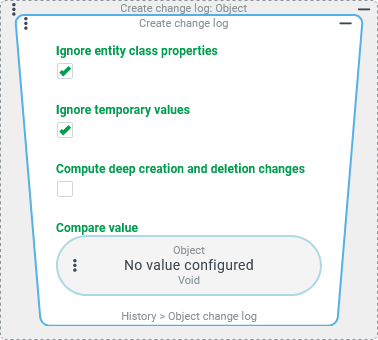
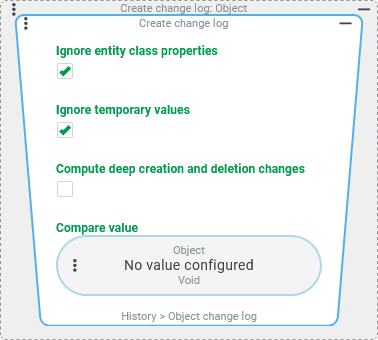
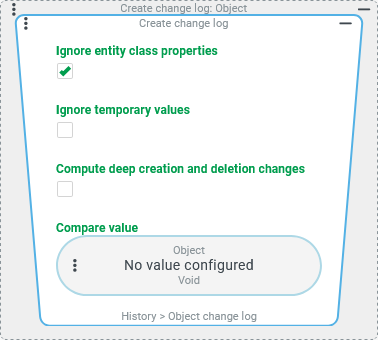
The Ignore entity class properties option is checked by default. When comparing "entity data", the so-called entity attributes are then not evaluated. Example: The input value is the volatile data of a random entity, which (without configuration for the Compare value) is matched with the server-side data state. In the default configuration for the Changelog value resolver shown on the top right, the Ignore entity class properties option is checked. If the only change in the entity’s volatile data is a "change of owner" – i.e. a value for the entity attribute "owner" ( |
|
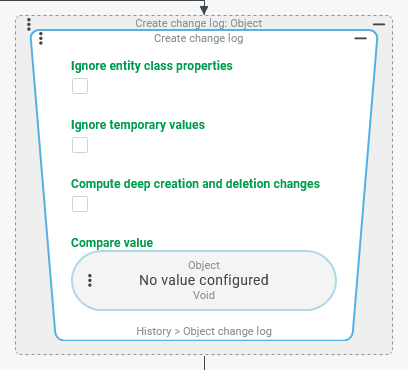
If the Ignore entity class properties option is unchecked, then the comparison between the input value and compare object for the changelog will also include all entity attributes. For the above example, this means that a "change of owner" is also considered a change, so that in the return value of the Changelog value resolver you will find, among other things, a |
"Compute deep creation and deletion changes" option
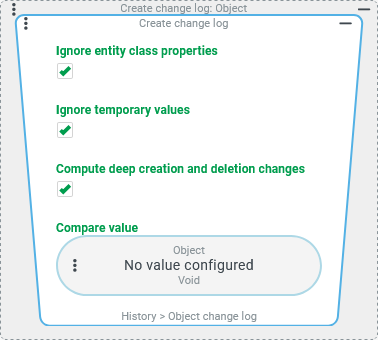
The Compute deep creation and deletion changes option is unchecked by default. If the compare value is classified as "created" or "deleted", only the minimum functionality appears in the return value of the Changelog value resolver. The respective "change type" ( Example: The input value is volatile data for a company account in which the address (still) stored on the server side has been deleted. When the comparison is made with the Compute deep creation and deletion changes option unchecked (see screenshot above right), an |
|
If the Compute deep creation and deletion changes option is checked (see screenshot below right), then in the scenario described above the comparison will provide detailed information for the deleted address, which for this purpose is marked with "no value" ( |
Compare value configuration
The optional Compare value parameter can be used to contrast the input value with a compare object. If a configuration for the compare value is completely omitted (default, see screenshot on the right), then the "original object" for the input value is used as the compare object.
|
|
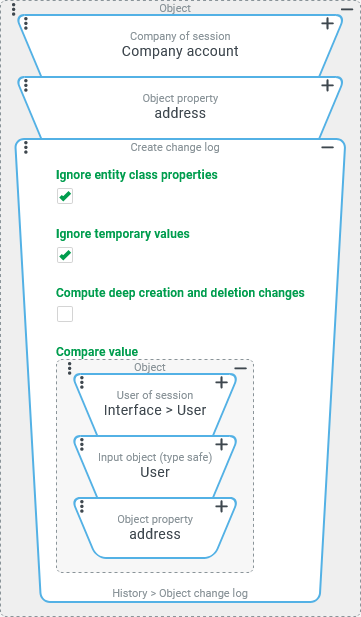
In the configuration on the right, the address of the Company of session (in the input value) is compared with the address specified for the User of session as a compare object.
NOTE If a guest user (see Guest users) is logged in, the User of session value resolver does not return a user account (see Users). Then the concatenated Input object (type safe) value resolver passes "no value" ( |
Examples
Changelog > Simple value
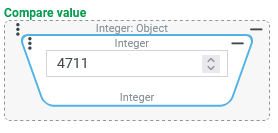
The following examples use the JSON format to describe data structures.
Input value | Compare value | Changelog |
|---|---|---|
"ABC" | "XYZ" | |
| ||
4711 | 3210 | |
| ||
e.g. from a Long value resolver |
e.g. from an Integer value resolver | |
| ||
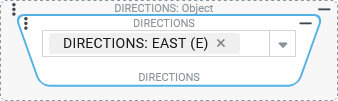
Enumeration value "East" (E) from the user-defined dynamic enumeration DIRECTIONS:
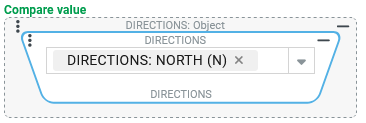
see also Any enumeration | Enumeration value "North" (N) from the user-defined dynamic enumeration DIRECTIONS:
see also Any enumeration | |
| ||
Changelog > Collection
The following examples use the JSON format to describe data structures.
Input value | Compare value | Changelog |
|---|---|---|
["Tom","Dick","Harry","Sally"] | ["Tom","Dick","Harry"] | |
| ||
["Tom","Dick","Harry"] | ["Tom","Dick","Harry","Sally"] | |
| ||
{ "class": "set", "data": [ "Tom", "Harry" ] } | { "class": "set", "data": [ "Tom", "Harry", "Dick"] } | |
NOTE The "Set" does not manage index numbers for the entries. Therefore, the | ||
[1,2,3] | [3,2,1,0] | |
NOTE The value 2 does not appear in the | ||
Special use case: Compare all entities in a list | ||
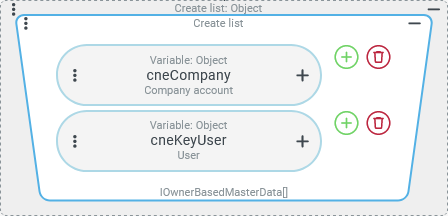
A collection created with the Create list contains volatile data from different entities that may have changed from the server-side state:
Both accounts have already been created and may have been changed in the current context. The Changelog value resolver should detect any "volatile" changes to the accounts listed as entities. |
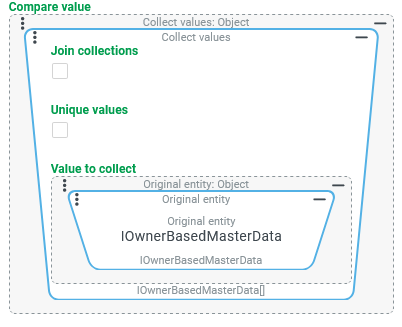
As a Compare value, the list of entities in the input value is contrasted with a list of the associated "original objects". This can be achieved with the Collect values value resolver, which here uses the Original entity value resolver as the Value to collect in order to retrieve the server-side state for each element of the list of entities present as input value. | |
| ||
Changelog > Object
The following examples use the JSON format to describe data structures.
Input value | Compare value | Changelog |
|---|---|---|
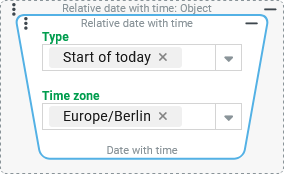
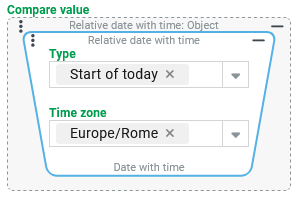
A "Date with time" object determined as Relative date with time:
|
| |
| ||
| | |
| ||
| | |
| ||
Changelog > Entity
The following examples optionally use the XML format and the JSON format to describe data structures.
Input value | Compare value | Return value |
|---|---|---|
An event handling is triggered by the "Change" event (see Common action event) so that it reacts to the saving of already created entities. A Check type ensures that the event action becomes active only in the context of Association criteria. The input value is always the changed volatile data of the association criterion that is saved. Before saving changes, a Changelog should be created so that – depending on the type of changes – an administrator can be notified if necessary. Example:
| not configured, that is the Original entity to the entity in question | |
Based on the changed state of the association criteria in the previous example, the notified administrator has reviewed the association criteria and now wants to save it again with changes. The event handling reacts again and determines the changes to the association criteria via the Changelog value resolver. Example:
| not configured, that is the Original entity to the entity in question | |