Value resolver – Abstract
Purpose: Returns the "Session information" object for the current session.
Tooltip
Usage: The value resolver returns a "Session information" object with data about login context, browser, client and the session itself. The input value is ignored.
NOTE The session data is partially provided in the
additionalDatafield via a map. This map can be enriched with specific data in advance of a login via the "Initialize additional session data" event, to which read access then exists within the session.
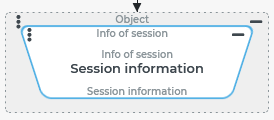
The Session information value resolver returns an entity of the "Session information" type containing information about the current session or a login context temporarily changed by the Run as event action.
NOTE The map can be enriched with specific additional content for the session in the additionalData field via the event "Initialize additional session data" (see Login (Events)).The "Session information" object can only be accessed in read-only mode within a session.
The following table shows the content of the "Session information" object structured by subjects. This also includes information that can be accessed directly via other value resolvers of the Session based (Resolvers) category.
In combination with the immediate field contents, the table also lists (with light blue shading) content that can be found under predefined keys in a map for "Additional session data" (in the additionalData field).
Subject | Field name/Map[ Key ] | Data type | Content |
|---|---|---|---|
Entity | |||
Session information |
| Long | Internal ID of the "Session information" object |
Formally available but only assigned with default value: | |||
Login context | |||
Temporarily variable by Run as event action: | |||
User |
| "Interface > User" | User of session; depending on the type of session, a user or guest user account (see Users, Guest users). |
Company |
| "Interface > Owner" | Company of session; a company account (see Companies/Clients). |
| Long[] | List of IDs of all Companies/Clients directly or indirectly superordinated to the Company of session. | |
Role |
| "Interface > Roles" | Role of session (see Roles). |
| "Permission tree" | Permissions of the Role of session as a tree structure. | |
| Long[] | List of IDs of all directly or indirectly parent Roles of the Role of session. | |
Not influenced by the Run as event action (update only when a session is logged in): | |||
Locale | locale | String | |
Time zone (not applicable for Guest users) |
| String | Name of the
|
Text modules (not applicable for Guest users) These text modules were introduced for the original |
| String | Concatenation of the following fields from the address of the logged in user account (
|
| String | Concatenation of fields from the actual login context (user, role, company) according to the following structure: | |
Client/Browser information | |||
Client & browser |
| String | "Client type" (see Sessions); mostly: |
| String | IP addresse of the DMZ | |
| String | IP address of the client | |
| String | Browser identifier. | |
| String | Browser version identifier. | |
| String | Client endpoint ID. | |
| Boolean | Indicator for "mobile" session (see Is mobile). | |
Session information | |||
Session |
| String | Session token (unique for the session). |
| Date | Start time of the current session. | |
| Date | "Last contact" to the server (see Sessions). | |
| Date | "Last activity" of the session on the server (see Sessions). | |
| Boolean | Safe mode (safeMode) indicator. | |
| String | Name of the specific class for the login type(user login, guest user login or portal login). | |
| String | Base URL for calling the session (domain). | |
Additional session data | |||
(see details above with blue shading) |
| Map | Map with "Additional session data" provided automatically by the system or before the start of the actual session via the "Initialize additional session data" event. |
Configuration
The Session information value resolver does not use any parameters and ignores the input value.
Example
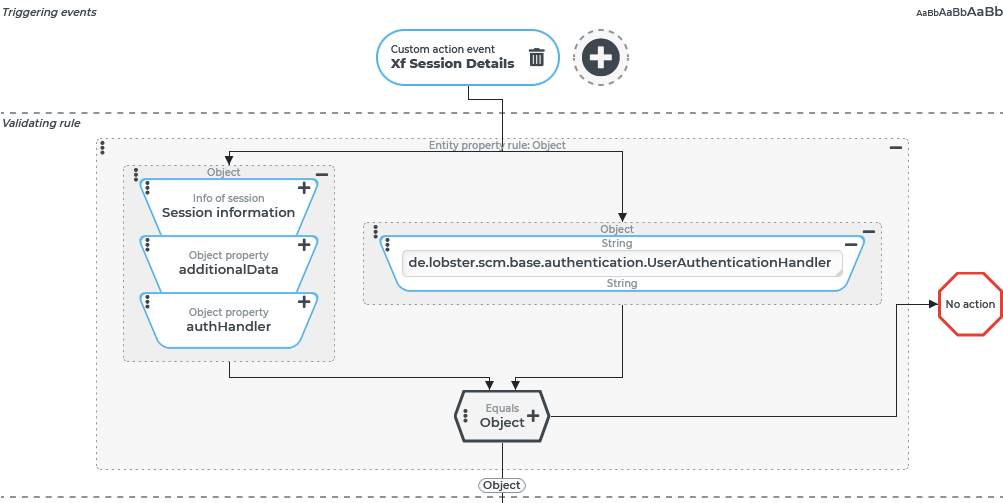
In response to a specific Custom action event (XF_SESSION_DETAILS), a message with important information about the current session is displayed when a regular user (see Users) and not a guest user (see Guest users) is logged in.
Runtime example:
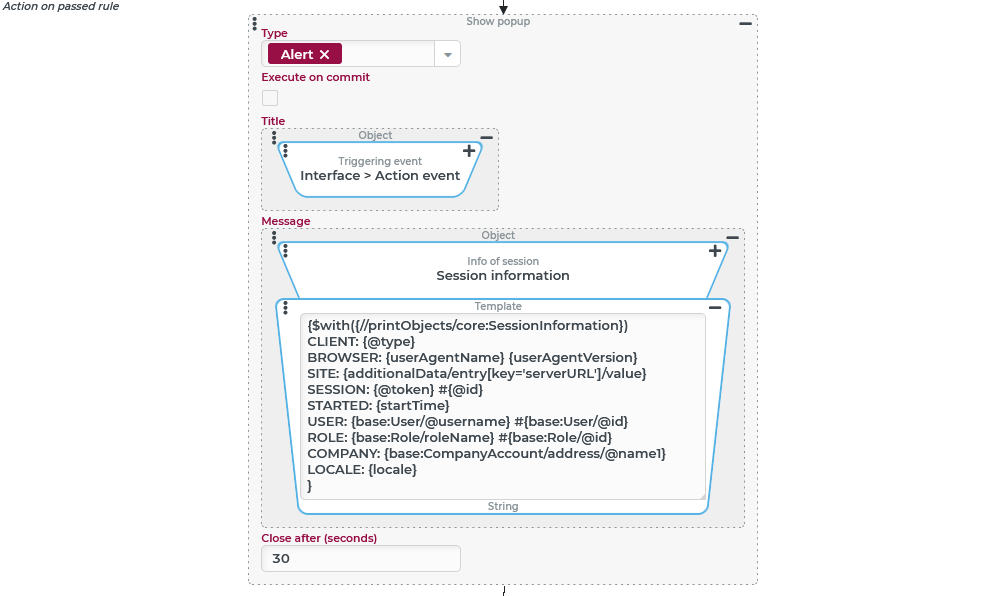
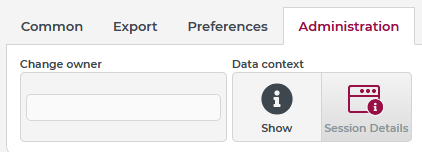
In the ribbon menu Administration/Data context a "Session information" button is added in the context of selected views. This button is used to trigger the custom action event However, it can also be triggered automatically by other events (e.g. "Client logged in", see Login (Events)) or within a workflow via the Dispatch action event. An example of formatted output of specific data from the "Session information" object is shown below on the right. Displayed here are:
NOTE USER, ROLE and COMPANY may differ from the actual session within a workflow if a temporarily different login context is defined via the Run as event action. |
|
|
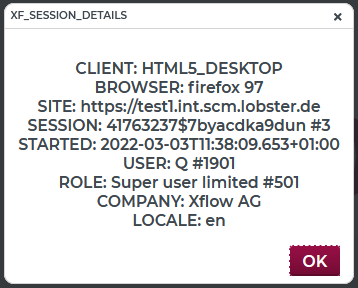
Configuration:
A Custom action event The Validating rule is intended to ensure that the "Session Details" display is only executed when a "full" user (and not, for example, a guest user) is logged in. The message should also not appear if, within a guest user session, the Here, within an Entity property rule rule, an Object property value resolver reads the value to the |
|
A Show alert (Popup) event action is configured here as the Action on passed rule:
NOTE In the example, the XPath expression for the value of the "SITE" illustrates how accessing a value of the In place of the Template value resolver, a Concat strings could also be used here, which composes field values from the "Session information" object in steps with static texts via Object property value resolvers. It should be noted that the field names (see also table above) in most cases, but not always completely, match the corresponding element or attribute names in the XML structure of the object. In the example, the XPath expression |
|