Use case dependent program logics can be configured via so-called "Behaviors and actions". Thereby actions are defined to behavior. Behaviors return a Boolean value (true/false) when evaluated and actions can react to either "true" or "false" in the corresponding order after evaluating the behavior.
In the following example, the goal is to jump to a field in the next tab by clicking the NEXT button in the first tab.
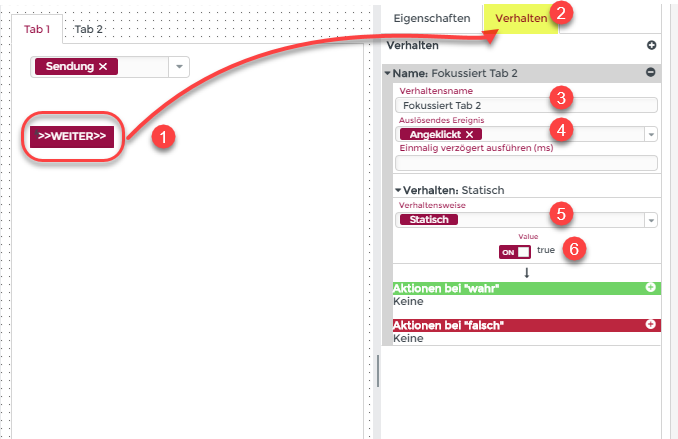
After selecting the desired element (1), the behavior and actions can be configured via the Behavior tab (2).
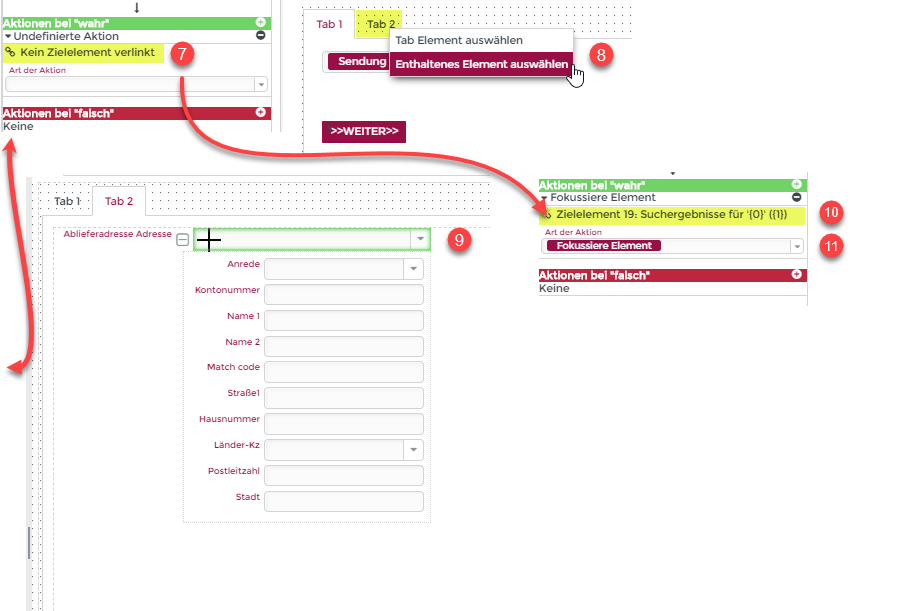
The Behavior name (3) is initially used to distinguish and name the behaviors (links also take place via this name). The Triggering event (4) field defines after which user action (e.g. clicking) the configured actions (e.g. jump to a field in the next tab) are triggered. The Behavior type (5) returns a Boolean value (true/false) and can obtain additional data (in the example, "true" (6) is always returned here). By clicking on the link symbol  (7), the action is linked to the desired element after selecting the target element. In the case of a tab, a selection menu additionally offers the possibility to choose between the tab and an element contained in the tab (8). Elements that can be linked are highlighted in green (9) when the mouse pointer is over the element. After linking the elements, the target element appears under the selected action (10). Finally, the action performed with the target element is specified (11) (in this case, the focus is on the delivery address field).