See also: Calculate aggregate number of packages, Calculate aggregate number of packages (Shipment)
Event action – Abstract
Purpose: Populates the fields for 'Aggregate number of packages' across line item levels of all or selected line item types in an order and optionally (additionally) summarizes the 'Number of packages' of the direct line items as on the header level.
Tooltip
Usage: The event action must be executed with an order as the reference object. The calculation optionally takes into account selected or all Line item types. Depending on the Calculate summary option, the 'Number of packages' in the header level is also updated.
Parameter:
The optional multiple selection for Line item types defines line item types for which the 'Aggregate number of packages' should be calculated. By default (without a selection), the 'Aggregate number of packages' is updated in line items of all types.
The Calculate summary option defines whether the sum over the 'Number of packages' of the direct line items of all relevant Line item types should be assigned to the 'Number of packages' field in the header of the order.
Output:
Updates the 'Aggregate number of packages' field of all relevant Line item types.
Optional: Updates the 'Number of packages' in the header level as a summary over the 'Number of packages' in direct line items of the relevant Line item types.
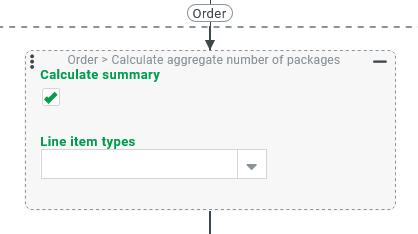
The event action Calculate aggregate number of packages (Order) executes the following steps for all or selected Line item types (see Line item type) in a reference object of the 'Order' type (see Orders):
Within the line item hierarchy for each relevant Line item type, the field 'Number of packages' (
numberOfPackages) is assigned the value 1 for each line item if it is empty or filled with 0.Within the line item hierarchy for each relevant Line item type, the field 'AggregateNumberOfPackages' (
aggregateNumberOfPackages) is filled for each line item according to the procedure described in the section 'Calculation logic'.If the option Calculate summary is selected (default), then the total is additionally calculated via the field 'Number of packages' (
numberOfPackages) in all direct line items for all relevant Line item types.This total number is assigned to the field 'Number of packages' (
numberOfPackages) of the reference object.
NOTE Details on the calculation logic and an informative runtime example can be found on the page for the Common business object entity type:
Configuration
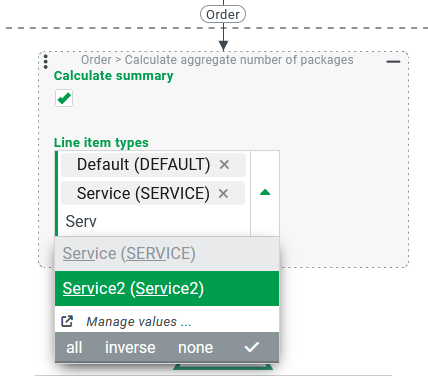
The event action Calculate aggregate number of packages (Order) expects an order (see Orders) as the reference object. In the context of another object type, the event action has no effect without an error occurring at runtime.
The Calculate summary option (set by default) controls whether the 'Number of packages' field in the reference object header data should be updated based on the information for Direct line items of the relevant Line item types.
Multiple selection for Line item types can be used to define a positive list for relevant Line item types (see Line item type).
If no Line item types are selected, all line items in the reference object are evaluated regardless of the Line item type.