The predefined enumeration Print type (PrintType) defines output formats for Print documents, which affect the ribbon buttons in the export menu (sub category "Print"), among other things:

The list can be customized.
For the configuration of enumeration values, there is a separate configuration type "Print type settings" (
PrintTypeConfiguration) which contains some specific fields in addition to the "Icon URI" (iconUri) field:
The Extension ( |
|
The ZPL DPI ( | |
The Mime type ( |
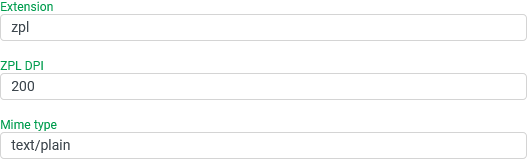
Uses for the "Print type"
Uses for the "Print type"
With interactive access via ribbon buttons in the "Print" sub-category (see also Available commands), the selection of the command determines the Print type, i.e. the output format that is to be generated.
The localization of the enumeration value for the relevant Print type determines the labeling of the ribbon button.
NOTE An image/icon assigned in the "Icon Uri" field does not appear in the ribbon button for the Print type, but does appear in Combobox elements for the Print type selection.
To create Print documents via a profile call, the internal name (
name) for the Print type must be specified in the "Print type" parameter for the PrintPostExecutor.IMPORTANT Not every Print type is supported by every Print document type. However, this compatibility with the output format is not a criterion for the selection of a print document by the Print document value resolver.
To generate Print documents via a profile call, the internal name (
name) for the Print type must be specified in the "Print type" parameter for the PrintPostExecutor.To be able to assign Print documents to a client-side printer via the Print service, a Print type with the prefix
REMOTE_(e.g.REMOTE_PDF) may need to be added.
The following values and localizations are predefined by default:
Ordinal | Name | Description | Icon URI | Extension | ZPL DPI | Mime type | German | English | French |
|---|---|---|---|---|---|---|---|---|---|
|
| empty | empty |
|
|
| leer | leer | |
|
| empty | empty |
|
|
| leer | RTF | leer |
|
| empty | empty |
|
|
| leer | Word | leer |
|
| empty | empty |
|
|
| leer | Excel | leer |
|
| empty | empty |
|
|
| leer | Text | leer |
|
| empty | empty |
|
|
| leer | Web | leer |
|
| empty | empty |
|
|
| leer | Zebra | leer |